Have you ever uploaded an image that looked great on screen but printed incorrectly? This usually happens because of a mismatch between RGB and CMYK.
Most images today come from websites, apps, and user uploads. They’re created in RGB and meant for screens. But printing works differently. When RGB files move into web-to-print or online printing workflows, colors often shift, fade, or fail altogether.
Understanding the difference between RGB and CMYK helps you avoid these issues early. In this guide, you’ll learn when to use each color model and how to prevent costly mistakes before files ever reach the printer.
Key insights
- RGB and CMYK are built for different outputs, RGB for screens, CMYK for print.
- RGB files often cause color shifts in print if they aren’t converted properly.
- CMYK has a smaller color range, so some bright screen colors won’t print exactly.
- Manual color fixes don’t scale in web-to-print and online printing workflows.
- Early color standardization helps prevent reprints, errors, and production delays.
What is RGB?
RGB stands for Red, Green, and Blue. It’s a color model based on light. By combining these three colors at different intensities, screens can produce millions of colors.
RGB is used everywhere digital content lives. Websites, web apps, mobile apps, digital ads, and product images all rely on RGB because screens emit light. The more light you add, the brighter the colors appear.
This is why RGB images look vibrant on screens. They’re perfect for web previews in online printing or web-to-print platforms. But RGB isn’t designed for ink. When an RGB file is sent directly to a printer, the colors often shift because printers can’t reproduce light-based colors accurately.

What is CMYK?
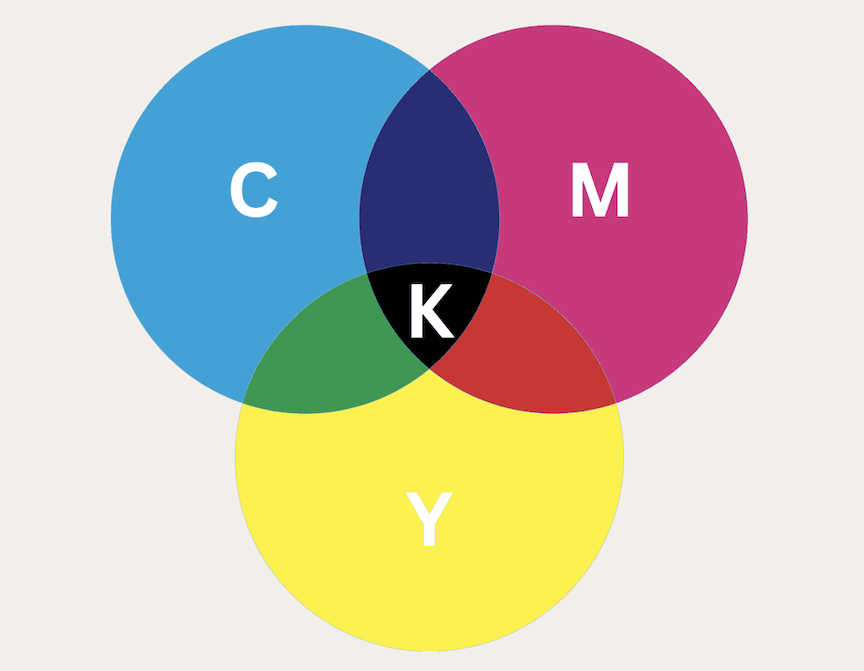
CMYK stands for Cyan, Magenta, Yellow, and Key (Black). Unlike RGB, CMYK is based on ink, not light. Colors are created by layering ink on paper and absorbing light.
Printers require CMYK because it reflects how physical printing works. Ink mixes on the page, not on a screen. That’s why most professional image printing workflows expect CMYK files.
CMYK also comes with limitations. It has a smaller color range than RGB, which means some bright screen colors simply can’t be printed. CMYK profiles help manage these limits by defining how colors should be converted and reproduced on specific printers and paper types.
What are the key differences between RGB and CMYK?
The biggest difference between RGB and CMYK color models is how colors are created. RGB uses light. Colors are formed by mixing red, green, and blue light on a screen. CMYK uses ink. Colors appear as cyan, magenta, yellow, and black inks absorb light on paper.
This also affects color range and vibrancy. RGB can display brighter and more saturated colors because screens emit light directly. CMYK has a smaller color range, which means some vivid screen colors can’t be reproduced in print and will look duller on paper.
There are differences in file formats and output expectations as well. RGB is standard for digital images like JPEGs and PNGs used on websites and apps. CMYK is expected in print-ready PDFs and image files sent to printers. Sending the wrong color model often leads to unexpected results.
Visually, RGB images tend to look brighter and more dynamic on screens. CMYK images appear more muted but accurate in print. Understanding this contrast helps teams choose the right color model before files move from web to print.
RGB vs CMYK: Key Differences at a Glance
Here’s a quick look at the key differences between RGB and CMYK color models.
| Feature | RGB Color Model | CMYK Color Model |
| Primary use | Digital and screen-based content | Physical printing and print production |
| Color type | Light-based | Ink-based |
| Primary colors | Red, Green, Blue | Cyan, Magenta, Yellow, Black |
| Color mixing | Additive mixing | Subtractive mixing |
| Color range | Wider color range | Smaller color range |
| Vibrancy | Brighter and more vivid | Less vibrant, print-accurate |
| Common file formats | JPEG, PNG, GIF | PDF, EPS, TIFF |
| Typical use cases | Websites, apps, digital ads, online images | Business cards, brochures, posters, packaging |
RGB or CMYK for printing?
The short answer is simple: it depends on where the file is in the workflow.
When RGB is acceptable
RGB is fine when images are still in the digital stage. If a file is being used for web previews, online product mockups, or on-screen proofing in a web-to-print platform, RGB works well. Screens are designed for RGB, so colors appear bright and accurate at this stage.
Many online printing platforms also accept RGB uploads to keep the user experience simple. The problem starts only when those files move closer to the final print.
When CMYK is mandatory
CMYK becomes essential once a file is prepared for physical printing. Printers use ink, not light, so CMYK is the only color model they can reproduce reliably. Print-ready PDFs, packaging files, and marketing materials should always be converted to CMYK before they reach production.
Without this conversion, printers are forced to interpret RGB colors on their own, which often leads to unexpected results.
Common mistakes in online printing platforms
One of the most common mistakes is allowing RGB files to flow straight into print without proper conversion. This causes color shifts, dull prints, and customer complaints. Another issue is relying on manual fixes, which don’t scale when handling large volumes of user uploads.
The safest approach is to treat RGB as an input format and CMYK as the final output. This ensures consistent color results and prevents costly reprints in online printing workflows.
CMYK vs RGB for web-to-print workflows
Web-to-print workflows bring together two very different worlds. Users upload files created for screens, while printers expect files prepared for ink. This gap is where most color issues begin.
When users upload RGB files for print, the system has to decide what happens next. If those files are sent directly to production, colors are often converted automatically by the printer. The result is unpredictable, bright blues turn dull, dark areas lose detail, and brand colors shift without warning.
Manual fixes don’t scale in these workflows. Adjusting files one by one takes time, requires design expertise, and slows down production. As upload volumes grow, relying on human intervention increases costs and introduces more room for error.
This is where automated workflows matter. By converting RGB files to CMYK early and consistently, platforms can standardize color before files reach print. Automation removes guesswork, reduces reprints, and helps web-to-print systems deliver reliable, repeatable results at scale.
Why color profile handling matters in print pipelines
Print pipelines deal with files from many different sources, including free image CDNs, user uploads, web applications, etc. When those files use the wrong color model or lack proper profiles, inconsistencies appear fast. The same design can print differently across machines, paper types, or print runs, even when nothing else changes.
Incorrect color models are a major cause of these issues. RGB files contain colors that printers can’t reproduce accurately. Without clear instructions on how to convert those colors, printers make their own adjustments. This leads to washed-out images, darker tones, and unexpected color shifts.
CMYK profiles help control this process. They define how colors should be translated for specific printers and materials. With the right CMYK profile in place, colors become more predictable and consistent from one print job to the next.
As print volumes grow, handling these conversions manually becomes risky and inefficient. Automated color profile handling helps standardize files before they reach production. It reduces errors, saves time, and keeps print pipelines running smoothly—without adding extra complexity to the workflow.
How Filestack helps standardize color for print
Modern printing platforms handle a large volume of user-uploaded images. These files come in different formats, sizes, and color models. Filestack helps simplify this process by handling image ingestion at scale, no matter where the files come from.
Once images are uploaded, Filestack can automatically normalize color profiles as part of the workflow. RGB files can be converted to the correct CMYK profile before they reach production. This removes guesswork and ensures colors are prepared consistently for print.
Read this article on standardizing color profiles before files hit your print pipeline to learn how to build a print-ready workflow with Filestack step by step.
You can also get the sample print-ready app from this GitHub repo, which prepares your images for printing.
For web-to-print and online printing platforms, this approach keeps workflows smooth and reliable. Teams don’t need to manually inspect or fix files, and users don’t need to understand color models. By standardizing color early, Filestack helps reduce print errors and deliver more predictable results, without adding friction to the user experience.
Explore more in Filestack documentation.
Conclusion
Understanding the difference between RGB and CMYK comes down to knowing where your images live and how they’re used. RGB is built for screens and digital experiences. CMYK is designed for ink and physical print. Problems start when files move from one world to the other without the right preparation.
In modern web-to-print and online printing workflows, this shift happens all the time. User uploads, app-generated images, and web assets are often created in RGB, but printers need CMYK to deliver consistent results. Treating RGB as the input and CMYK as the final output helps avoid color shifts, failed prints, and costly rework.
The key is catching these issues early. With the right workflows in place, color conversion and profile handling don’t have to be manual or complex. Standardizing color before files reach production keeps print pipelines reliable, scalable, and predictable.
By understanding RGB and CMYK and building workflows that respect both, teams can deliver better print results, without slowing down users or adding friction to the process.
Sign up for free today and see how you can simplify image uploads, delivery and printing with Filestack.
FAQs
1. What is the main difference between RGB and CMYK?
The main difference is how colors are created. RGB uses light and is designed for screens, while CMYK uses ink and is designed for printing. This is why colors can look different when moving from digital to print.
2. Should I use RGB or CMYK for printing?
RGB is fine for on-screen previews and digital content, but CMYK should be used for final print files. Printers rely on CMYK to reproduce colors accurately using ink.
3. Why do RGB images look different when printed?
RGB images contain colors that printers can’t reproduce exactly. When RGB files are converted to CMYK without proper color profile handling, colors can shift, appear dull, or lose detail.
4. How to print images from a free image CDN?
You can upload your images through the Filestack file upload to the Filestack free image CDN. Use the color profile standardization workflow discussed in our latest article, “Standardizing Color Profiles Before Files Hit Your Print Pipeline,” to save it as a print-ready image in the CDN. Then you can print the image by downloading it to a local drive or directly from the Filestack free image CDN when needed.


Shamal is a seasoned Software Consultant, Digital Marketing & SEO Strategist, and educator with extensive hands-on experience in the latest web technologies and development. He is also an accomplished blog orchestrator, author, and editor. Shamal holds an MBA from London Metropolitan University, a Graduate Diploma in IT from the British Computer Society, and a professional certification from the Australian Computer Society.
Read More →