

File uploads are a deceptive time sink. What starts as a simple feature request quickly becomes a project-within-a-project involving infrastructure, security, and endless maintenance. Building a file uploader from scratch is a distraction from your core product.
This guide shows you how to integrate a complete file infrastructure into your Angular app so you can get back to work on features that matter.
Key Takeaways
- Ship faster
- Cut maintenance costs
- Improve user experience
- Scale without effort
- Focus on your actual product
The Build vs. Buy Trade-off
The decision to build a file uploader internally often overlooks the long-term costs. While the initial development might seem manageable, the ongoing maintenance, security patching, and scaling efforts create a significant and continuous drain on resources.
Development Timeline
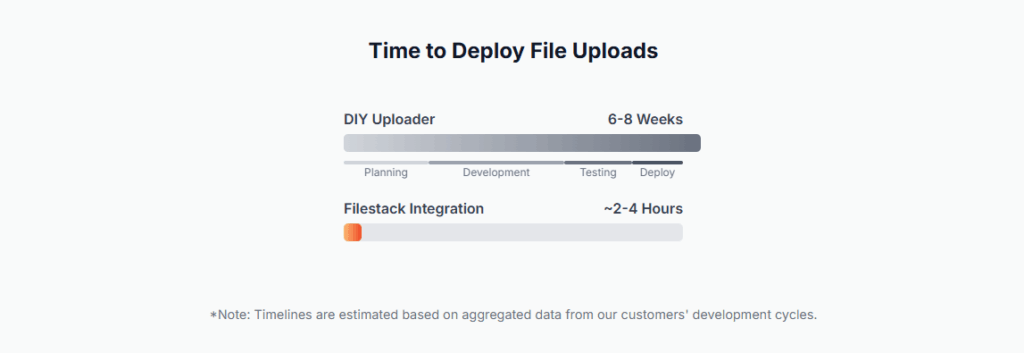
Integrating a pre-built solution is orders of magnitude faster than building one from the ground up. What takes a developer hours with an API would take a team weeks or months to build, test, and deploy themselves.
Total Cost of Ownership
A subscription fee is predictable. The cost of maintaining a homegrown system is not. Factoring in developer salaries for bug fixes, security audits, and infrastructure management, the DIY approach quickly becomes the more expensive option over the life of the product.

Get It Running
Here are the three steps to get a working file uploader in your Angular project.
1. Add the Package
Install the package using your preferred manager. The ng add schematic is the fastest route.
npm
npm install filestack-angular
yarn
yarn add filestack-angular
Angular CLI
ng add filestack-angular
2. Import the Module
In your app.module.ts or standalone component, import FilestackModule and provide your API key.
// In your app.module.ts or equivalent

import { NgModule } from '@angular/core';

import { BrowserModule } from '@angular/platform-browser';

import { FilestackModule } from 'filestack-angular';

import { AppComponent } from './app.component';


@NgModule({

  declarations: [AppComponent],

  imports: [

    BrowserModule,

    // Add the module and configure it with your key

    FilestackModule.forRoot({ apikey: 'YOUR_API_KEY' }),

  ],

  providers: [],

  bootstrap: [AppComponent]

})

export class AppModule { }
3. Use the Directive
Add the filestack directive to a button in your component template. Bind to the uploadSuccess event to handle the result.
// In your component.ts

import { Component } from '@angular/core';


@Component({

  selector: 'app-root',

  template: `

    <button

      filestack

      apikey="YOUR_API_KEY"

      [options]="pickerOptions"

      (uploadSuccess)="onUploadSuccess($event)">

      Upload File

    </button>

  `

})

export class AppComponent {

  // Set picker options

  pickerOptions = {

    accept: 'image/*',

    maxFiles: 5,

  };


  // Handle the successful upload

  onUploadSuccess(result: any) {

    console.log(result);

  }

}
The Headaches of a DIY Uploader
Building it yourself means you’re signing up for more than just an upload button. You are now responsible for:
- Constant Maintenance: Your code will break. Dependencies will become outdated. You will have to fix it, forever.
- Security Patching: File uploads are a primary attack vector. You are now in charge of sanitizing inputs, preventing XSS attacks, and staying ahead of new vulnerabilities.
- Infrastructure Scaling: When your app grows, your file handling infrastructure must grow with it. This means dealing with CDNs, load balancing, and distributed storage.
- Poor User Experience: Building a good upload experience is hard. Users expect drag-and-drop, progress bars, and cloud source integrations. Each of these is a significant feature to build and maintain.
Using a dedicated service lets you avoid these problems entirely.
What You Get with the API
A file API does more than just accept uploads. It handles the entire file lifecycle. You can also check out the complete Filestack Angular documentation in our docs.
- Image Transformations: Stop writing custom logic for resizing or cropping. Handle it with a simple URL parameter. Need a 100×100 thumbnail? Just add /resize=width:100/ to the file’s URL. Done.
- Video Processing: Transcode video for web playback, generate thumbnails, and add watermarks without spinning up your own media servers.
- Intelligent Ingestion: The API can automatically run files through virus scanners and other workflows on upload, ensuring the content you store is safe and compliant.
In short, integrating a service like Filestack lets you treat file infrastructure as a solved problem. You can deliver a better, more secure product faster because your team can focus on its own business logic, not on reinventing the file uploader.

Carl is a Product Marketing Manager at Filestack with four years of hands-on experience in React, JavaScript, Django, and Python. He bridges the gap between product and developer, translating how Filestack’s APIs and SDKs actually work into content that’s useful for the engineers building with them. His writing covers file handling workflows, upload integrations, and real-world implementation patterns, written from the perspective of someone who has built with these tools firsthand.
Read More →