



File uploads look simple at first, but they’re actually much more complex than people expect.
In a modern SaaS app, you might deal with images, documents, videos, or user uploads. Each type needs different handling, like processing, security, and delivery. Behind the scenes, managing all this is tricky, and if you don’t set it up properly, problems (and costs) slowly build up over time.
In this guide, you’ll learn how to build file uploads the right way and decide whether building it in-house is actually the best choice.
Inside, you’ll find:
- The real cost of building file upload systems in-house
- What features are expected in 2026
- A cost model you can explain to your CFO
- How to compare different vendors
- Key security and compliance risks
- How to make a long-term decision without limiting your future options
If you want to make this decision based on clear facts instead of guesswork, this is a good place to start.
Key Takeaways
- File uploads may look simple, but they actually involve complex systems and hidden long-term costs.
- Building everything yourself usually becomes 3–5x more expensive over time.
- If you’re handling large-scale (100k+ files/month), buying is often 3–4x cheaper.
- Security, compliance, and reliability are the hardest parts to manage on your own.
- The right choice depends on your scale, compliance needs, and how your team’s time is best used.
The Strategic Cost of “Simple” Uploads
Every engineering team has seen this happen. A task comes in: “Add file uploads.” It sounds quick, maybe a couple of days. But months later, multiple engineers are still dealing with storage settings, chunked uploads, security checks, and CDN configs that only one person understands.
The truth is, file uploads are not a simple feature. They’re a full system involving storage, processing, security, compliance, and delivery, all working together. And unlike your main product, this effort doesn’t give you a competitive advantage. It’s just infrastructure work.
The real problem is how the costs grow over time:
- Ongoing maintenance keeps eating engineering time. Bugs, edge cases, API changes, and updates never really stop. Even a simple setup can take a noticeable portion of a senior engineer’s time long-term.
- Security fixes are critical and can’t be delayed. One small gap, like an unsafe file type or missing validation, can lead to serious risks. Fixing and monitoring this constantly takes effort.
- Scaling for peak traffic is where things often break. During launches or high-traffic moments, uploads can fail if the system isn’t built for it. And failures at that time hurt the most.
- Compliance work increases as you grow. Things like SOC 2, GDPR, and data policies require clear answers. If your system is custom-built, your team has to handle this every time manually.
The highest cost most teams ignore is opportunity cost.
If your engineers spend years building and maintaining upload systems, that’s time they’re not spending on your actual product. For most companies, that trade-off just isn’t worth it.
💡 Key Insight: The hidden costs: maintenance, scaling, security, compliance, and lost product time, often end up being 3–5x higher than the original estimate.
What looks like a 2-day task can quietly turn into a multi-year cost.
Now that we understand the problem and cost, let’s see what features actually matter.
The 2026 Feature Landscape
Before choosing any vendor, you need to understand one thing clearly: not all features are equally important. Some are just basic requirements, while others truly set platforms apart.
Table Stakes: The Basics You Must Have
By 2026, any enterprise-grade file upload API must offer these capabilities as standard. If a vendor cannot check all of these boxes, they are not a serious enterprise option:
- Multi-cloud storage routing: You should be able to use S3, Google Cloud, Azure, or others without changing your app code.
- Resumable and chunked uploads: If a large file upload fails midway, it should continue from where it stopped, not restart.
- Basic image transformations: Resize, crop, format conversion, quality optimisation. All in a flexible way without needing to write custom code for each step.
- HTTPS-enforced transfers: Encryption in transit is the floor, not a feature.
- Upload progress and status visibility: Real-time feedback is a user expectation, not a nice-to-have.
- Global CDN delivery: Files should load fast from anywhere, not from a single server.
Differentiators: What Actually Makes a Platform Better
This is where comparing vendors really starts to matter. It’s also important to understand common upload reliability challenges at this stage.
The features below are what top platforms offer, and building or maintaining them on your own would be very expensive and time-consuming.
- AI-powered content moderation is now a must for platforms with user-generated content. It automatically detects harmful content (like NSFW or illegal material) during upload, before it even gets stored.
This isn’t just about safety; it’s also about legal and brand protection. And since these systems need constant updates and fine-tuning, building and maintaining them internally becomes very expensive. - Intelligent document processing (like OCR and data extraction) helps you not just store documents, but actually understand them. It can read things like invoices, contracts, IDs, or medical records and pull out useful structured data. Building a reliable system like this on your own usually takes months and a skilled, specialised team.
- Advanced video transcoding (like adaptive bitrate streaming, thumbnail generation, subtitle extraction) is much harder than it looks. It needs heavy infrastructure, a lot of computing power, and careful handling of different formats and speeds. Most teams underestimate this, and building it yourself often turns into an ongoing drain on time and resources.
- Workflow automation is often overlooked, but it’s a huge advantage. It lets you connect steps like transformations, moderation checks, storage routing, and webhook notifications into a single flow, without writing custom code for each step.
This saves a lot of time and effort, and advanced image transformation capabilities available off the shelf can save weeks of engineering time for each use case. - Predictive CDN optimisation makes a big difference in how files are delivered. It automatically chooses the best format (like WebP or AVIF), adjusts delivery based on the user’s device and internet speed, and even preloads content when needed. This is what turns simple speed into truly optimised performance.
- Virus and malware scanning can vary a lot between vendors, and it’s often misunderstood. Basic scanning only catches known threats, while deeper scanning can detect hidden risks inside things like zip files, Office documents with macros, or complex file types. For enterprise use, this difference is very important.
Once you know the features, the next question is: should you build this or buy it?
Build vs. Buy: A Total Cost of Ownership (TCO) Model
The build vs. buy decision often gets stuck because teams compare the wrong things, a vendor’s monthly cost vs a rough estimate of development time.
The right way to evaluate this is by looking at the total cost over 3 years, including every real expense that affects your business.
Build Costs: The Real Accounting
A simple breakdown of what it actually costs to build and maintain this yourself.
- Initial development: Building a reliable system with features like resumable uploads, basic processing, multi-cloud support, and security takes about 1.5 to 2.5 years of a senior engineer’s time. That means roughly $300k–$750k in cost, even before you launch any feature for your actual product. Most teams underestimate this by 40–60%.
- Infrastructure costs: Storage costs are usually predictable, but other costs, like data transfer (egress), can be surprising. Processing tasks like video conversion, OCR, and virus scanning get expensive as usage grows. CDN setup is also often underestimated early on and becomes costly to fix later.
For a system handling around 500k files/month, expect roughly $8k–$25k per month, depending on how well your setup is optimised. - Security and compliance costs: This is often the biggest reason internal projects become too expensive over time. Getting certifications like SOC 2 can take 4–8 months of effort plus $30k–$80k every year for audits. If you need ISO 27001 (common for European customers), it adds even more work.
A comprehensive approach to file upload security, like signed URLs, CORS setup, file type checks, and access logs, needs constant attention. If you use a vendor, much of this is already handled. If you build it yourself, every security gap becomes your responsibility. - Ongoing maintenance: This never really stops. Things like updates, API changes, new file edge cases, security fixes, and on-call issues can take 25–50% of an engineer’s time every year, directly taking time away from building your product.
Estimated 3-Year Cost:
Let’s first look at what it costs to build this yourself.
| Cost Category | Year 1 | Year 2 | Year 3 | 3-Year Total |
| Initial development (2 FTE-years) | $500k | — | — | $500k |
| Infrastructure | $150k | $180k | $220k | $550k |
| Security & compliance | $80k | $60k | $60k | $200k |
| Ongoing maintenance (0.5 FTE) | $100k | $100k | $100k | $300k |
| Total | $830k | $340k | $380k | ~$1.55M |
Assumptions: Based on a system handling ~500k files/month, a mid-sized SaaS company, and an average engineer cost of ~$200k/year.
Now let’s compare that with using a vendor.
Buy Costs: What Vendor Pricing Actually Looks Like
In 2026, most enterprise file upload platforms follow three main pricing models:
- Volume-based pricing: You pay based on usage, like per GB of storage, per file upload, or per transformation. It’s easy to predict at a small scale, but as usage grows, costs can increase quickly if not tracked properly.
- Flat-rate subscription: You pay a fixed monthly fee with certain usage limits. It’s easier to plan your budget, but you need to check how extra charges work if you go beyond those limits.
- Enterprise pricing: Custom pricing based on your needs, often with committed spend, dedicated infrastructure, and agreed service levels (SLAs). This works best for platforms handling large volumes (like hundreds of thousands of files per month) and strict compliance requirements.
For a platform handling around 500k files per month with transformations and moderate storage, typical vendor costs are about $40k–$120k per year. This usually includes everything: storage, processing, CDN delivery, security features, support, and compliance support.
Estimated 3-Year Vendor Cost:
Here’s what the cost looks like if you go with a vendor:
| Cost Category | Year 1 | Year 2 | Year 3 | 3-Year Total |
| Vendor subscription | $80k | $90k | $100k | $270k |
| Integration development (one-time) | $40k | — | — | $40k |
| Internal oversight (0.1 FTE) | $20k | $20k | $20k | $60k |
| Total | $140k | $110k | $120k | ~$370k |
Summary
For most companies handling over 100k files per month, buying is the better choice.
It usually costs 3–4x less over 3 years and helps you avoid major risks, like security breaches, compliance issues (especially with EU data), and system failures during peak traffic.
Schedule a Custom TCO Analysis.
Filestack’s solutions engineering team can analyse your specific usage and compare it with real build costs. Most teams find this helpful, no matter which option they choose.
Request your analysis →
See how companies reduce file infrastructure costs with a vendor!
Cost is important, but choosing the right vendor matters just as much.
Vendor Evaluation Scorecard
Choosing the right file upload API vendor isn’t just about comparing features.
Two vendors might offer similar features but perform very differently in real situations, like reliability, security response, pricing at scale, and support during critical moments (like a launch at 2 am).
The scorecard below helps you compare vendors in a more structured way.
- Give each criterion a weight (1–5) based on how important it is to you.
- Score each vendor from 1–5 on each criterion.
- Multiply weight × score to get a final weighted score.
This helps you choose the vendor that fits your priorities best, not just the one with the most features.
Let’s break this down into simple criteria you can use to compare vendors.
Criterion 1: Core Reliability
What to evaluate:
Check things like uptime (99.9% vs 99.99%), global upload locations, system redundancy, and past incidents.
The difference between 99.9% and 99.99% uptime is bigger than it looks:
- 99.9% = ~8 hours downtime/year
- 99.99% = ~52 minutes/year
For a SaaS product, this matters a lot. If uploads fail during important moments (like launches or deadlines), it directly impacts customers and revenue.
Questions for your vendor:
- What uptime SLA do you guarantee, and what happens if you don’t meet it?
- How many global upload regions do you have?
- Can you share your incident history from the past 12 months?
Criterion 2: Security and Compliance
What to evaluate:
Check if the vendor has certifications like SOC 2 and ISO 27001, supports GDPR and DPA, offers strong virus scanning, uses encryption (both in transit and at rest), and provides controls like signed URLs and access logs. This is one of the most important areas for most companies.
A vendor with strong security, including features like built-in virus detection for file uploads, reduces your risk and saves a lot of engineering effort. It also makes compliance processes (like SOC 2 questionnaires) much easier.
Questions for your vendor:
- Are you SOC 2 Type II certified? Can you share the report (under NDA)?
- Do you provide a GDPR-compliant Data Processing Agreement (DPA)?
- How advanced is your malware scanning? Can it detect threats in zip files or documents with macros?
- How do you detect and report harmful content like CSAM in uploads?
⚠️ Risk Callout: Handling user-uploaded content comes with legal risks. Vendors with built-in AI moderation reduce this risk significantly compared to systems where scanning happens after upload.
Criterion 3: Performance at Scale
What to evaluate:
Look at how reliable uploads are under heavy traffic, how fast files are delivered via CDN in different regions, how well images and videos adapt to devices, and how uploads perform on mobile networks.
Upload success rate is one of the most important metrics for user experience, but many vendors don’t clearly share it. Even a small 2–3% failure rate can seriously affect users, even if it doesn’t show up clearly in overall stats. That’s why it’s important to understand common upload failures and make sure the vendor has solved them.
Questions for your vendor:
- What is your upload success rate during peak traffic?
- Do uploads automatically resume if they fail, or does it need extra setup?
- Which CDN providers do you use, and how well does delivery work in regions like Southeast Asia, Latin America, and Africa?
Criterion 4: Ecosystem and Extensibility
What to evaluate:
Check if the vendor integrates easily with your storage and tools, supports webhooks, offers workflow automation, works with editors/CMS, and allows custom processing logic.
An upload API that only handles uploads isn’t enough.
The real value comes from features like automated file processing workflows, where you can set up steps like processing, moderation, storage, and notifications, all without writing custom code. This saves a lot of time as your system grows.
Questions for your vendor:
- Which storage services do you support, and how easy is it to configure routing?
- How can we add custom logic through workflows, webhooks, or serverless functions?
- Which editors and CMS tools do you integrate with, and how well are those integrations maintained?
Criterion 5: Commercial Terms and Partnership Quality
What to evaluate:
Look at how predictable pricing is as you scale, how overage charges work, how flexible the contract is, how fast support responds, and how easy it is to move your data if you switch vendors.
A vendor that looks cheap at 100k files/month can become very expensive at 2M files/month.
Unexpected costs usually come from overage pricing and sudden jumps in pricing tiers. That’s why business terms are just as important as technical features.
Questions for your vendor:
- How does overage pricing work? Is there a limit or cap?
- How will pricing change if our usage grows 10x?
- If we want to switch vendors, how easy is data export, and what does it cost?
- What response times are guaranteed in your enterprise support SLA?
How to Use This Scorecard
Use the same table to evaluate every vendor you’re considering.
The example below uses weights for a typical mid-sized SaaS company; you should adjust them based on your needs before scoring.
Here’s a simple way to compare different vendors:
| Criteria | Weight (1–5) | Vendor A | Weighted | Vendor B | Weighted | Filestack | Weighted |
| Core Reliability | 5 | 3 | 15 | 4 | 20 | 5 | 25 |
| Security & Compliance | 5 | 3 | 15 | 4 | 20 | 5 | 25 |
| Performance at Scale | 4 | 4 | 16 | 3 | 12 | 4 | 16 |
| Ecosystem & Extensibility | 3 | 2 | 6 | 4 | 12 | 5 | 15 |
| Commercial Terms | 4 | 4 | 16 | 3 | 12 | 4 | 16 |
| Weighted Total | 68 | 76 | 97 |
Note: 5 = fully meets requirements, 3 = acceptable with some gaps, 1 = major gaps.
How to read this:
- A vendor might look good on pricing but still have weak security or reliability; this table makes that clear.
- Not every category has equal importance. For example, security is weighted higher than ecosystem here, but you can change that based on your use case.
- Setting weights before vendor discussions helps you avoid being influenced by flashy demos.
Important takeaway:
The final score helps guide your decision, but it shouldn’t be the only factor.
For example, even a high-scoring vendor may not be suitable if they can’t meet critical requirements like GDPR compliance.
Use this scorecard to:
- Spot gaps
- Ask better questions
- Make a clear, data-backed decision

There’s one more important thing to consider: risk and compliance.
The Compliance and Risk Mitigation Imperative
Compliance isn’t just a checkbox; it’s about reducing risk. And in 2026, file uploads bring more risks than most teams expect.
Data Residency and GDPR Exposure
If a user from Europe uploads a file, it is treated as personal data under GDPR.
This means you need:
- A proper Data Processing Agreement (DPA) with your provider.
- Data residency controls (EU data stays in EU servers).
- The ability to handle requests like data access and data deletion automatically.
Building all of this yourself takes both legal and engineering effort.
If a vendor already supports this and can prove it (with signed agreements and certified systems), it saves you months of work and reduces the risk of mistakes.
The risk here is real, not theoretical. If GDPR rules aren’t followed, companies can face large fines based on their global revenue.
Content Moderation Legal Liability
If your platform allows users to upload files, you’re responsible for what they upload.
Laws in many regions now expect platforms to take proactive steps to prevent harmful content, not just react after it’s uploaded.
- Checking content before upload (proactive moderation) gives much better protection.
- Checking after upload (reactive moderation) is weaker and riskier.
AI moderation built directly into the upload process is more effective because it blocks harmful content before it’s stored or shared.
But building this yourself is hard; it needs constant updates and fine-tuning.
That’s why many teams choose vendors here, as it helps reduce both cost and legal risk.
Security Incident Liability
If a malicious file upload causes a security issue, the question isn’t just “what went wrong?”, it’s also “what precautions did you take?”
A vendor with strong security practices, proper scanning systems, and a clear incident response process can show that you followed the right steps. This creates proof that you acted responsibly.
But if you build your own system and it misses a threat (like a complex or new type of attack), it’s much harder to justify in a legal or compliance review.
The key point: Choosing a good vendor isn’t just about features; it’s about reducing risk.
Their security and compliance standards become part of your own, which can make a big difference if something goes wrong.
Now let’s think about the long term.
Future-Proofing Your Choice
Vendor lock-in is a common concern, and it often pushes teams to build things themselves.
It’s a valid worry, but in many cases, it’s misunderstood or overestimated.
What Lock-In Actually Is
The real question isn’t “can we leave this vendor?” because you usually can.
The better question is: “How hard and expensive will it be to switch?”
A good file upload API is designed so that storage is controlled by configuration, not code. Your app talks to the API, and the API decides where files go. This makes switching much easier, more like changing settings than rebuilding your system.
What actually creates lock-in:
- Using vendor-specific formats in thousands of stored URLs.
- Writing custom processing code that depends on undocumented vendor behaviour.
- Storing data in formats that only the vendor can read or export.
- Relying on vendor-specific metadata without easy export options.
What does not create lock-in:
- Using a well-documented REST API.
- Serving files through your own domain (even if the vendor powers it).
- Using workflows defined in standard, flexible formats.
Important Note:
Lock-in isn’t about using a vendor; it’s about how tightly your system depends on them.
If your storage stays in your own system (like your own S3 bucket) and the vendor just handles uploads, switching later is much easier.
Evaluating for Long-Term Partnership Quality
When choosing a vendor, don’t just look at features; think about whether they’re a good long-term partner.
- Financial stability: Check if the vendor is likely to still be around in a few years. Things like funding, revenue growth, and customer base matter because if the vendor shuts down or gets acquired, your system is affected.
- API design approach: How the API is built tells you a lot.
- If everything is tightly tied to the vendor, then it’s harder to leave.
- If it supports flexible storage, standard webhooks, and easy data access, then it’s better for you.
- Data portability (in the contract): Make sure it’s clearly defined.
- Can you export all your data easily?
- Will the vendor help you migrate?
- What will it cost and how long will it take?
- These should be discussed before signing.
- Future roadmap: Look at what the vendor is building next. If you plan to use them long-term, you should be investing in things like:
- AI-based document processing
- Better compliance support
- New delivery formats
- Workflow automation
- A vendor actively improving their product is very different from one that isn’t evolving.
💡 Key Decision Box — Questions for Your Vendor on Future-Proofing:
- If we move all our files to our own S3, how easy is the process, and what will it cost?
- How do you manage API updates and breaking changes? How much notice do you give?
- How do you support new compliance requirements that may come in the future?
- How much are you investing in AI features over the next 12 months?


Making the Decision: Your Go/No-Go Framework
This guide is meant to help you make a clear decision, not just understand the topic.
To make this easier, here’s a simple way to decide:
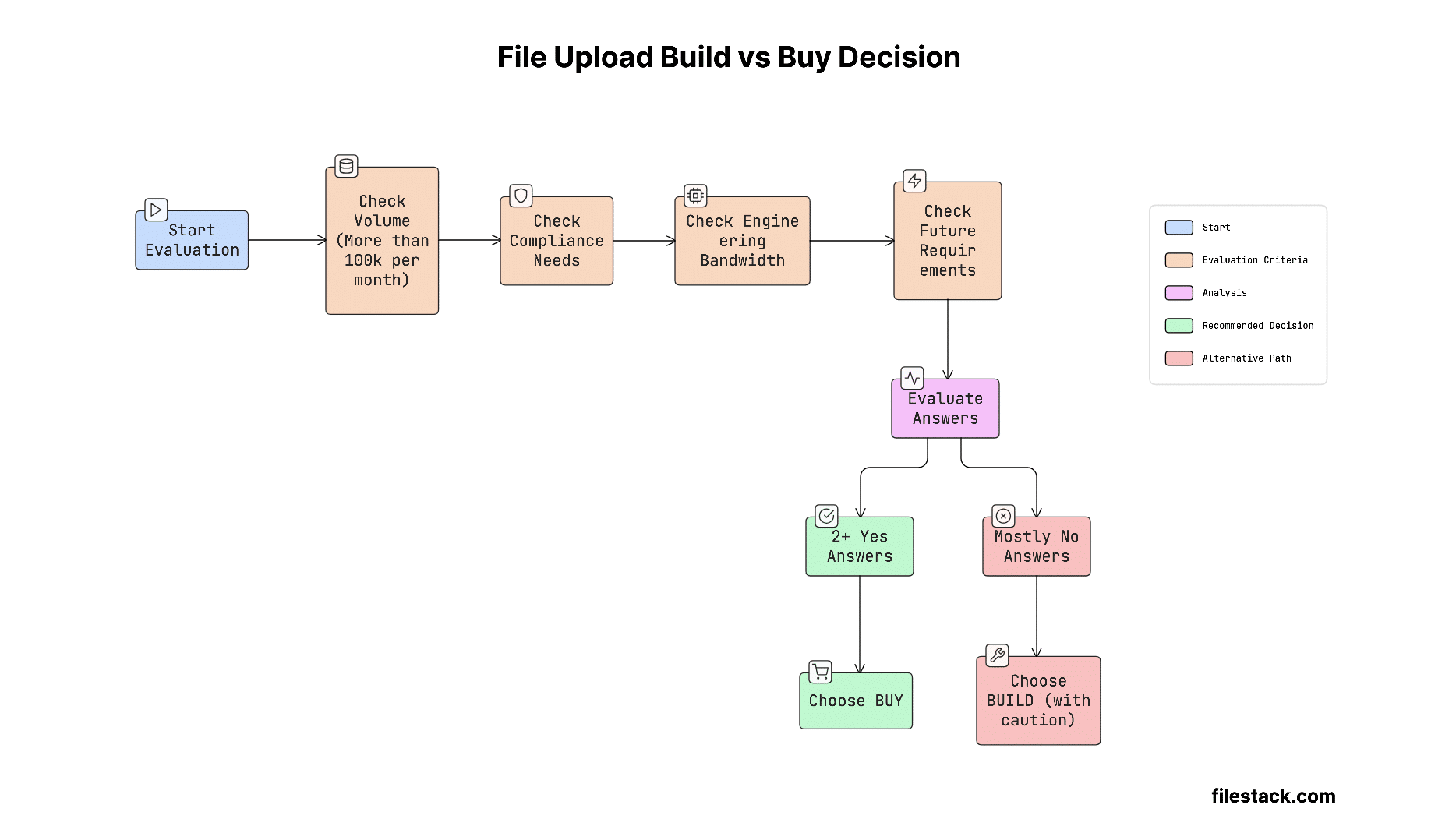

You can use this as a quick check before making your final decision.
Here are the key checks to decide if building your own system makes sense:
- Volume threshold: Are you handling (or expecting) more than 100k files per month? At this scale, buying is usually more cost-effective.
- Compliance exposure: Do you have enterprise customers, EU users, or strict regulations? If yes, using a certified vendor reduces risk and makes sales/compliance easier.
- Engineering opportunity cost: What could your team build instead of spending ~2 years on this? If it’s core product features that drive revenue, building uploads yourself is hard to justify.
- Future requirements: Will you need features like AI moderation, document processing, or video handling soon? And can your team realistically build and maintain all of that alongside your product?
If you answer yes to any two of these, building it yourself is usually not the right choice.


Shefali Jangid is a web developer, technical writer, and content creator with a love for building intuitive tools and resources for developers.
She writes about web development, shares practical coding tips on her blog shefali.dev, and creates projects that make developers’ lives easier.