
If you’re building or scaling a learning management system, you’ve probably seen this: exam week arrives, thousands of students upload assignments at once, and the system starts to slow down or crash.
Video processing delays document uploads. A failed virus scan blocks everything behind it. One bad file affects other students. When everything runs inside one big system, a small problem can impact everyone.
The fix isn’t just better servers. It’s a better architecture.
With a microservices approach, each task runs independently. You can scale specific parts, prevent failures from spreading, and meet strict education compliance requirements more easily. This guide is an architectural blueprint for technical decision-makers who need to build that system.
Key Takeaways
- EdTech platforms need a smarter architecture to handle deadline spikes, many file types, and strict privacy rules.
- Break the system into six clear services: Ingestion, Validation, Transformation, OCR, Metadata, and Delivery.
- Use events (like Kafka) so each service works independently, and failures don’t affect everyone.
- Keep files secure with limited access, encryption, audit logs, and regional data controls.
- Plan for monitoring, error handling, and build-vs-buy decisions from the start.
To understand why this architecture matters, we first need to understand what makes EdTech file processing fundamentally different from other platforms.
The EdTech File Processing Problem Is Different
Most file processing guides are written for e-commerce or general SaaS products. Education platforms operate under very different pressures, and those differences shape how the system must be designed.
Content types vary a lot. One course might include PDFs, .ipynb notebooks, MP4 lectures, DOCX essays, audio exams, and image-based lab reports. Each format needs different processing, storage rules, and delivery methods, yet they all pass through the same platform.
Traffic is unpredictable and spiky. Uploads often surge right before deadlines. A platform with 50,000 students might receive most weekly submissions in just a few hours. The system must handle these bursts smoothly without slowing down or losing data.
Compliance is foundational. Family Educational Rights and Privacy Act (FERPA) protects student education records, and the Children’s Online Privacy Protection Act (COPPA) applies to platforms serving children under 13. In many regions, data residency rules also control where student files can be stored or processed. These aren’t details to fix later, they must shape the architecture from the start.
Accessibility directly affects grading. Teachers need to clearly review student work. That may require OCR for handwritten submissions, transcription for audio responses, and alt-text for images. These steps aren’t just user experience improvements; they directly support fair evaluation and learning outcomes.
These pressures are exactly why a monolithic system struggles. The solution is to break the lifecycle into clear, independent stages.
That’s where service decomposition comes in.
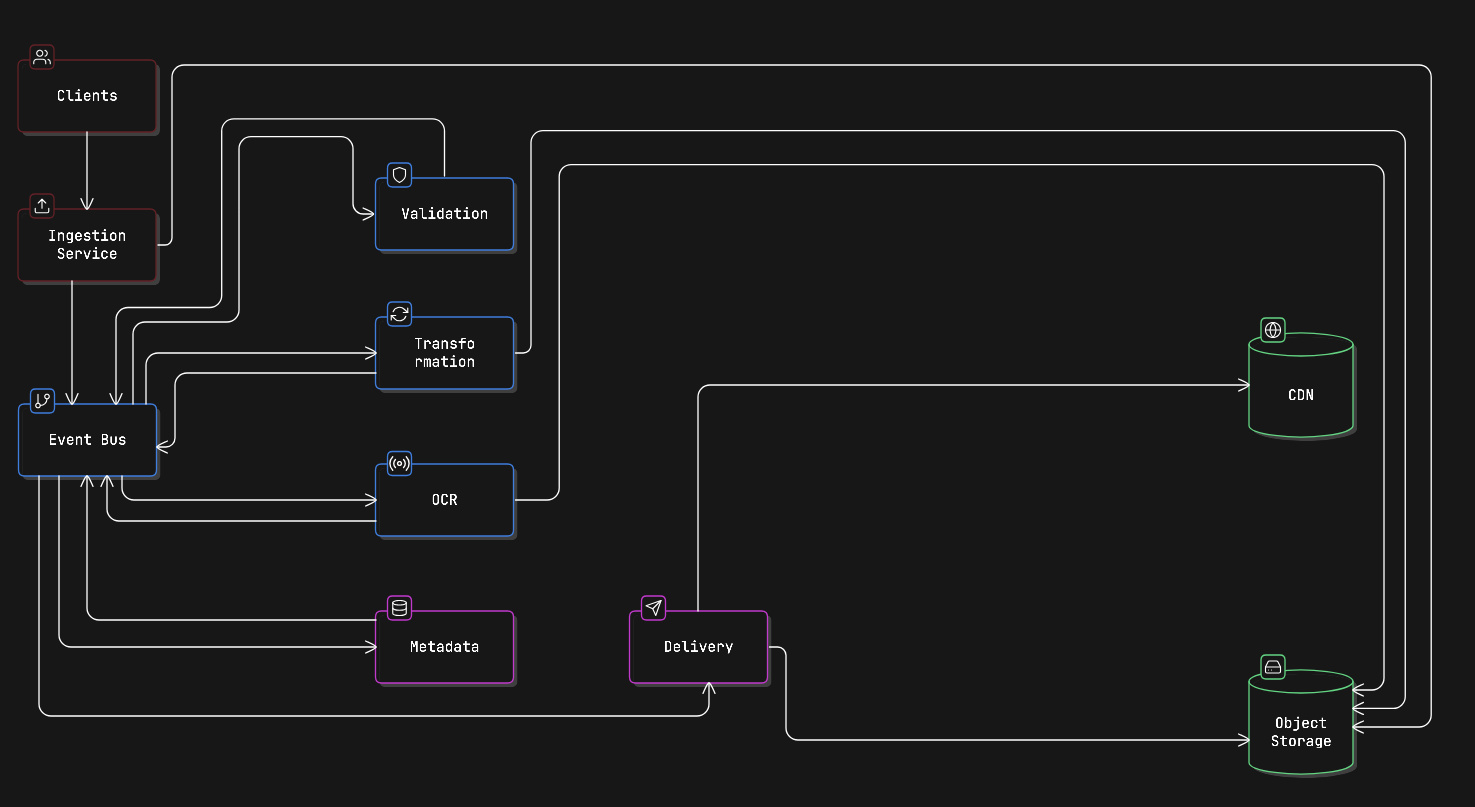
Service Decomposition: Six Focused Services
The main idea behind microservices is simple: decompose the file processing lifecycle into clear stages. Each stage is handled by a separate service. Services communicate through events, and each service owns only its own data.
Below is a typical way to divide responsibilities in an EdTech file pipeline:
1. Ingestion Service
The Ingestion Service is the single entry point for all file uploads. Whether a student uploads from a web app, mobile app, or an LMS like Canvas, Blackboard, or Moodle (via LTI), every file comes through this service first.
Its job is simple: receive the file, not process it. It assigns a unique ID (UUID), stores the raw file in object storage, and sends out a file.received event so other services know a new file is ready.
Keeping this service separate has big advantages. You can scale it during deadline rush hours, change your upload provider without breaking other services, and implement handling batch student submissions without touching validation or processing logic.
Key responsibilities:
- Handle large and chunked uploads.
- Convert different upload sources into a consistent internal format.
- Avoid duplicates using content hashing before saving.
- Emit a file.received event with UUID, source metadata, and raw storage reference.
Example file.received event:
{
  "event": "file.received",
  "file_id": "f3a1b2c4-d5e6-7890-abcd-ef1234567890",
  "source": "web_upload",
  "uploader_id": "student_88421",
  "course_id": "cs101_fall_2025",
  "assignment_id": "hw3",
  "original_filename": "submission_final_v2.pdf",
  "raw_storage_ref": "s3://edtech-raw/f3a1b2c4...",
  "received_at": "2025-11-15T22:14:03Z",
  "size_bytes": 2048744
}
Once a file enters the system, the next concern isn’t formatting; it’s safety and policy enforcement.
2. Validation Service
The Validation Service listens for file.received events. Before any processing happens, it checks whether the file is safe and allowed.
It verifies the real file type (not just the extension), runs antivirus scans, checks file size limits, and ensures the format matches the assignment rules. This prevents harmful or unsupported files from moving further in the pipeline.
If a file fails validation, the service emits a file.rejected event with a reason code. The system can then quickly notify the student. Importantly, this service never edits or converts files; it only approves or rejects them.
For security implementation details on protecting student-facing upload surfaces, see protecting educational platforms from malicious uploads.
Example internal API (OpenAPI fragment):
paths:
  /validate:
    post:
      summary: Trigger validation for a received file
      requestBody:
        content:
          application/json:
            schema:
              type: object
              required: [file_id, raw_storage_ref, assignment_policy_id]
              properties:
                file_id:
                  type: string
                  format: uuid
                raw_storage_ref:
                  type: string
                assignment_policy_id:
                  type: string
      responses:
        '202':
          description: Validation accepted, result delivered via event
Only after a file is approved should heavy processing begin.
3. Transformation Service
After a file passes validation, the Transformation Service prepares it for use. Its job is to standardise and optimise files so instructors and students can access them easily.
This may include converting DOC files to PDF for consistent grading, transcoding videos into adaptive streaming formats (like HLS), compressing and resizing images, or safely running and formatting code submissions in isolated containers.
This service usually requires the most computing power, so it’s a strong candidate for horizontal scaling (adding more instances during peak load). It may also rely on external processing tools or APIs, but those should be wrapped behind an internal interface so providers can be changed without affecting the rest of the system.
One important rule: transformation should be idempotent. If a job runs twice because of a retry or temporary failure, it should produce the same result. This can be done by generating output based on the file_id and transformation settings. If the processed file already exists in storage, the service simply returns its reference instead of processing it again.
Some content requires deeper extraction beyond simple conversion.
4. OCR / Text Extraction Service
The OCR / Text Extraction Service is separate because it behaves differently from other processing steps. It’s slower, more CPU-heavy, and often needs specialised models, especially for handwritten answers, math equations, or multiple languages.
This service listens for file.validated events (for supported document types). It extracts text from the file and then emits a file.text_extracted event that includes the extracted content and a confidence score.
Other services use this output. The Metadata Service can index the text for search. Accessibility tools can improve readability. In the future, an AI grading assistant could also analyse the extracted text.
Because OCR has unique performance and reliability challenges, keeping it isolated makes scaling and troubleshooting much easier.
For a deeper look at what’s possible with modern OCR in educational contexts, including handwriting recognition and equation parsing, see modern OCR capabilities for educational content.
Now that the file has been processed and analysed, the system needs a structured record of its state.
5. Metadata Service
The Metadata Service collects information from other services and builds a complete record for each file. It listens to events from validation, transformation, and OCR, then stores details like file type, processing status, extracted text, word count, video duration, and compliance labels.
This service owns the metadata database. No other service can directly read or write to it, all queries go through its API. That’s what allows advanced searches like “all handwritten submissions for Assignment 3 that are still ungraded,” without accessing raw file storage.
It also handles sensitive student information. Fields like student name, ID, and submission data must be protected at rest. Use field-level encryption for sensitive data and ensure only authorised roles can retrieve specific metadata records.
With processing complete and metadata stored, the final step is secure delivery.
6. Delivery Service
The Delivery Service controls who can access files and for how long. It generates signed URLs for instructors reviewing submissions and time-limited links for students viewing graded work. It also handles CDN cache updates when files change or access is revoked.
This service does not store or move files. It simply creates secure access paths to files already stored in object storage.
Because it’s isolated, you can change your CDN provider or update access control rules without affecting validation, transformation, or any other processing steps.
Breaking the system into services solves one problem. But how those services communicate determines whether the architecture truly scales.
Event-Driven Communication
All services communicate through a message broker instead of calling each other directly. This keeps them loosely coupled and easier to scale.
For large EdTech platforms, Apache Kafka is often preferred over RabbitMQ. Kafka stores durable, replayable event logs. That’s important for auditing file histories, meeting compliance requirements, and replaying events after outages.
Core file processing event lifecycle:
| Event | Producer | Consumers |
| file.received | Ingestion | Validation |
| file.validated | Validation | Transformation, OCR, Metadata |
| file.rejected | Validation | Ingestion (notify student) |
| file.transformed | Transformation | Metadata, Delivery |
| file.text_extracted | OCR | Metadata |
| file.ready | Metadata | Delivery, Instructor notifications |
| file.processing_failed | Any service | DLQ monitor, Ops alerts |
Dead Letter Queues (DLQs) are essential.
If a message fails after several retries, it should move to a DLQ with full context. Operations teams need tools to inspect failed files, retry processing, or notify students if something went wrong. During exam periods, losing a submission silently is both an academic and legal risk, so failure handling must be deliberate and visible.
Events coordinate behaviour. Storage handles the actual file bytes. Both must be designed carefully.
File Storage Strategy
All services use the same object storage system (like S3, GCS, or Azure Blob). But they don’t all get full access. Each service has limited permissions based on what it needs.
- Ingestion Service → can write files to raw/
- Transformation Service → can read from raw/ and write to processed/
- Delivery Service → can create secure read links for processed/
- No service has full access to everything
Use a UUID for every file. When a file is uploaded, it gets a unique ID (UUID). That UUID becomes the file’s main identity across the entire system.
- Storage paths include the UUID
- Services communicate using the UUID
- No service depends on the storage folder paths directly
This makes it easy to switch storage providers or reorganise buckets later without breaking anything.
File retention rules:
- Files in raw/ can be deleted after about 30 days (or once processing is confirmed).
- Files in processed/ follow school or legal retention rules. Some content must be kept longer due to compliance requirements.
Service deployment example (Docker Compose fragment):
services:
  ingestion:
    image: edtech/ingestion-service:latest
    environment:
      - KAFKA_BROKER=kafka:9092
      - S3_BUCKET=edtech-raw
      - S3_PREFIX=raw/
    depends_on:
      - kafka
      - minio

  validation:
    image: edtech/validation-service:latest
    environment:
      - KAFKA_BROKER=kafka:9092
      - ANTIVIRUS_API_URL=http://clamav:3310
      - MAX_FILE_SIZE_MB=500
    depends_on:
      - kafka

  transformation:
    image: edtech/transformation-service:latest
    environment:
      - KAFKA_BROKER=kafka:9092
      - S3_RAW_BUCKET=edtech-raw
      - S3_PROCESSED_BUCKET=edtech-processed
      - PROCESSING_API_URL=http://filestack-adapter:8080
    deploy:
      replicas: 4  # Scale horizontally for peak load
    depends_on:
      - kafka
For handling the chunked upload mechanics that make large lecture video ingestion reliable, see techniques for large educational media files.
At this point, the architecture is internally complete. The next question is: which parts should you build yourself?
Integrating External Processing APIs
Not every feature needs to be built from scratch. Things like video transcoding, OCR models, and file format conversion are complex and expensive to maintain. Instead of building and managing that infrastructure yourself, you can use specialised external APIs.
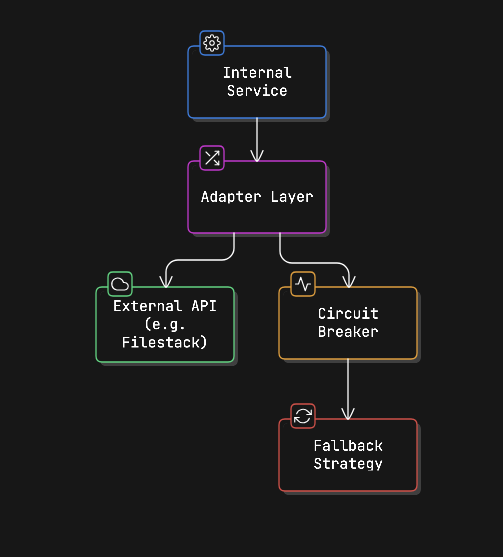
The smart way to do this is to hide external APIs behind your own internal service layer.
How the integration works:
- Internal Service: Your Transformation or OCR service triggers processing like normal.
- Adapter Layer: This translates your internal format (events, UUIDs, metadata) into the format the external API expects. If you ever change providers, you only update the adapter, not the whole system.
- Circuit Breaker: If the external API becomes slow or unavailable, this prevents failures from spreading through your system. It temporarily stops sending requests.
- Fallback Strategy: If the external service fails, you can:
- Retry later
- Switch to another provider
- Mark the file as “processing delayed” and notify the student
Why this is important:
- You avoid managing heavy infrastructure.
- You keep your architecture clean and modular.
- You prevent external outages from breaking your system.
- You can swap providers without rewriting your services.
💡Rather than building every adapter yourself, Filestack’s file processing APIs are designed to plug directly into the transformation and delivery layers described above: handling format conversion, virus scanning, CDN delivery, and more through a single integration point, so your team can focus on the educational logic that actually differentiates your platform.Start your free trial with Filestack!
For pre-built processing workflows, this article explains how advanced workflows can fit into EdTech architectures.
Regardless of what you build or buy, security must wrap every layer of this system.
Security and Compliance Implementation
Security isn’t a separate service. It must be built into every layer of the system.
- Service-to-service security: Each service should use short-lived JWT tokens to prove its identity. No request should be accepted without a valid token, even inside your private network. Adding mTLS gives extra protection between services.
- Audit logging: Every action on a student file: view, process, deliver, delete, must be recorded with who did it, when, and why. These logs should be permanent and stored according to institutional policy. Treat audit events as structured Kafka topics, not simple app logs.
- Encryption: Use TLS (1.2 or higher) for all communication. Store files with AES-256 encryption. For highly sensitive documents, use stronger protections like envelope encryption.
- Data residency: If a student’s data must stay in a specific region (like the EU), that rule should be added to the file’s metadata at ingestion. Processing services must respect this tag when choosing where to store or process the file. Adding this later is difficult; it should be designed in from the start.
Even a secure system can fail. That’s why visibility is just as important as design.
Monitoring and Observability
When one student upload passes through multiple services, you need full visibility. Use distributed tracing (like OpenTelemetry) across all services, and use the file_id as the trace ID. This lets you track exactly what happened to any submission from start to finish.
Important metrics to monitor:
- Queue depth per service: If queues grow suddenly, something downstream is slow.
- Processing time by file type: PDFs should be quick; videos can take longer but should stay within expected limits.
- Dead Letter Queue (DLQ) rate: Spikes mean repeated failures.
- Validation rejection rate: A sudden jump may signal a bug or a malicious upload attempt.
- Signed URL generation time: Delays here mean students are waiting to access their graded work.
Set alerts before peak deadlines. If submissions are due at midnight, you want warnings hours earlier, not after students start complaining.
Finally, architecture isn’t just about design; it’s about strategic decisions.
When to Build vs. Buy
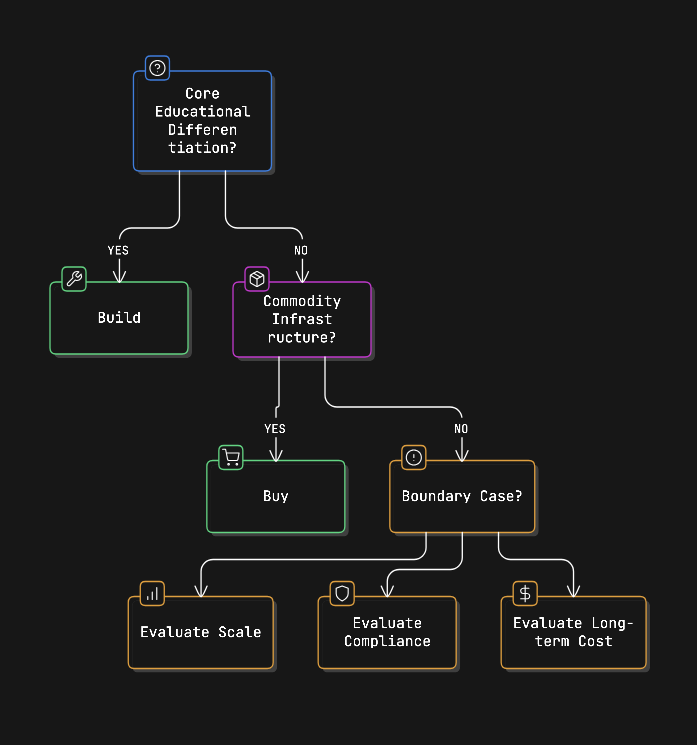
You don’t need to build everything yourself. Decide based on what truly makes your platform unique.
Build it if it directly affects your educational value, things like assignment rules, LMS integration, grading workflows, or compliance logic. These are part of your core product.
Buy or integrate if it’s standard infrastructure: file conversion, virus scanning, video transcoding, OCR, CDN delivery, or object storage. These are common problems with reliable third-party solutions.
Think carefully when it’s somewhere in between. For example, general OCR is easy to integrate. But if your platform specialises in chemistry equations or music notation, a custom OCR model might be worth building.
This architecture makes that boundary clear. External tools plug in through adapter layers. If a vendor changes pricing or performance drops, you replace the adapter, not your whole system.
When all these pieces come together: service isolation, event-driven flow, secure storage, external integration, and observability, you get a system built for long-term scale.
Conclusion
A strong EdTech file processing system is built around six focused services: Ingestion, Validation, Transformation, OCR, Metadata, and Delivery. These services communicate through durable events, use shared object storage with strict per-service permissions, and keep external processing tools behind internal adapters.
The benefit is clear: each stage can scale independently, failures stay isolated, audit trails are compliance-ready, and the system can grow without needing a complete redesign every time user numbers increase.
The real challenges aren’t in the basic upload flow. They’re in handling dead letter queues, maintaining FERPA-compliant audit logs, enforcing data residency rules, and setting alerts before deadline spikes. These should be designed from the beginning, not added later.
Ready to build your EdTech file processing system? Filestack offers education-specific pricing and a processing API designed to integrate directly into the transformation and delivery layers described here. See pricing for education teams!

Shefali Jangid is a web developer, technical writer, and content creator with a love for building intuitive tools and resources for developers.
She writes about web development, shares practical coding tips on her blog shefali.dev, and creates projects that make developers’ lives easier.
Read More →