

File uploads are one of the most useful features in web apps, but they can also be risky if not handled properly. Whether you’re building a document platform, a healthcare app, or a SaaS product with profile picture uploads, every file uploaded by users should be treated as untrusted.
A single insecure upload system can lead to serious security issues and data breaches.
The good part is that secure file uploads are not complicated when you follow the right steps: validate files early, scan them properly, store them safely, and control how they are delivered.
This guide explains each step in a simple and practical way, the common risks, the important decisions, and the best practices used in real-world applications.
Whether you’re using tools like Filestack or building your own upload system, these principles will help you create a secure file upload pipeline.
Key Takeaways
- File upload security works best when you use multiple layers of protection. Always validate files on both the client and server side, and never rely only on file extensions or MIME types.
- Every uploaded file should be checked for malware before users or systems can access it.
- Storing files outside your main application server in secure, encrypted cloud storage is one of the best ways to improve security.
- Signed URLs with expiration times are safer than public file links because they can expire and be controlled easily.
- Monitoring uploads and keeping security logs helps you detect suspicious activity early and respond before it becomes a bigger problem.
To understand how these protections work together, let’s first look at what a secure upload system actually includes.
What Is a Secure File Upload?
A secure file upload system is not just one feature; it’s a complete process. It includes everything from the moment a user uploads a file to the moment an authorised user downloads it, including every step where security issues could happen.
At a minimum, a secure file upload system should:
- Check file type and size before the file reaches your server.
- Scan every uploaded file for malware before making it available.
- Store files in a secure, isolated, and encrypted storage environment.
- Control file access using authentication, permissions, and temporary access URLs.
- Track upload activity and maintain logs for security monitoring and audits.
A simple way to think about it: treat every uploaded file like an unknown package. Assume it could be dangerous until it has been verified as safe, and follow proper security checks at every stage.
A secure upload system usually looks something like this behind the scenes:
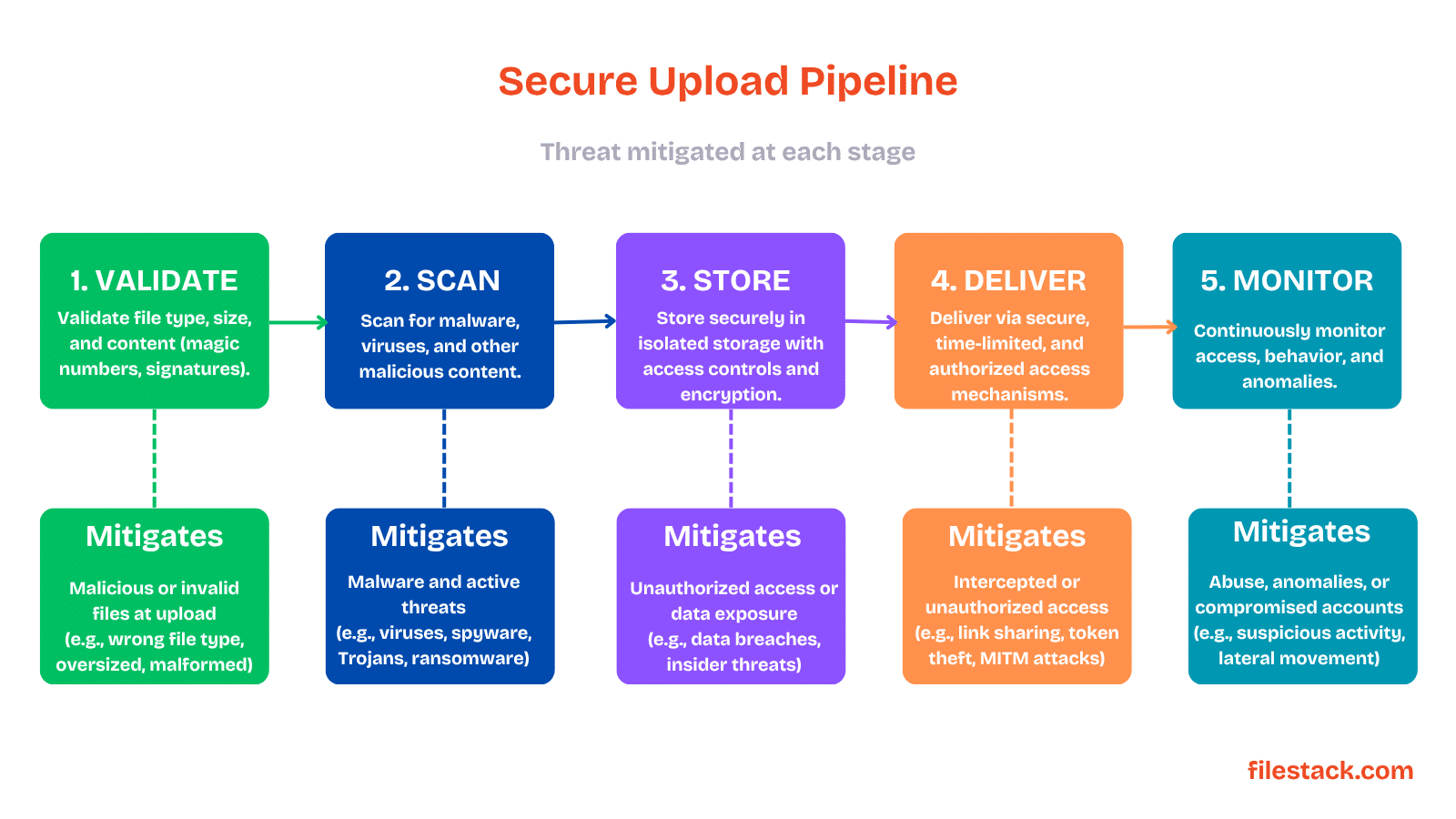
Each stage in this pipeline exists for a reason, especially because file uploads introduce more risks than many developers expect.
Why File Upload Security Matters
Now let’s understand why file upload security matters and the common risks that insecure upload systems can create.
One of the biggest mistakes is underestimating how many ways uploads can be abused.
The Attack Surface Is Larger Than It Looks
Upload endpoints are a common target for attackers because they are built to accept files and data from users. Some of the most common threats include:
- Malware and virus uploads: Attackers may upload harmful files or infected documents.
- Remote code execution (RCE): Specially crafted files can exploit tools like image processors or PDF converters and run malicious code.
- Cross-site scripting (XSS): Attackers can upload SVG or HTML files containing scripts that run in the browser.
- Denial-of-service (DoS): Sending very large or broken files to overload the server and slow down the system.
- Path traversal attacks: Manipulating file names or paths to store files in restricted areas of the server.
And if those risks are ignored, the impact can become very serious.
What’s at Stake
A vulnerable file upload system can lead to serious problems, including data breaches that affect thousands of users, compliance issues under regulations like GDPR, HIPAA, or SOC 2, and even full server compromise if uploaded files are stored too close to your application infrastructure.
It can also damage customer trust, which is often difficult to rebuild.
The good news is that most file upload security issues follow common and predictable patterns. With the right security practices and proper safeguards, most of these vulnerabilities can be prevented.
The best way to reduce these risks is by stopping dangerous files as early as possible.
Step 1: File Validation — Your First Line of Defence
File validation should start as early as possible and continue throughout the upload process. While client-side validation helps provide quick feedback to users, all important security checks should always be enforced on the server side.
The first rule of secure uploads is simple: never trust what the file claims to be.
Don’t Trust File Extensions
A file name alone cannot be trusted. For example, a file called invoice.pdf could actually be a harmful executable file. Since file extensions can be easily changed, they should never be your only method of validation.
Instead, validate files using multiple checks:
- MIME type checking: Check the
Content-Typeheader to understand the file type, but remember that attackers can fake this value. - Magic number or file signature inspection: Every file type has a unique byte pattern at the beginning of the file. For example, JPEG files start with
FFD8FF, while PDFs start with%PDF. Checking these signatures helps identify the real file type. - Allowlisting instead of blocklisting: Only allow specific file types your application actually needs, and reject everything else. This is much safer than trying to block only known dangerous formats.
File type validation alone is not enough without controlling upload size as well.
Enforce Size Limits
Allowing unlimited file upload sizes can make your application vulnerable to denial-of-service (DoS) attacks. To prevent this, always set strict upload limits, including:
- Maximum size for each individual file.
- Maximum total upload size per request.
- Reject oversized files as early as possible, ideally while they are still uploading, to avoid wasting server resources, bandwidth, and processing power.
Even something as simple as a file name can become a security problem if handled incorrectly.
Sanitise File Names
File names provided by users should never be trusted. A malicious file name like ../../../../etc/passwd or <script>alert(1)</script>.jpg can create serious security issues if stored directly.
A safer approach is to avoid using the original file name for storage. Instead, generate a unique ID or random hash for each uploaded file and store the original name only as metadata if you need to show it to users later.
Filestack handle this automatically by creating unique file identifiers instead of relying on user-provided file names.
It’s also important to understand where validation should happen and why both layers matter.
Client-Side vs. Server-Side Validation
Client-side validation, like checking file type or size before upload, is useful for improving user experience because it provides quick feedback and prevents unnecessary uploads. However, it should never be considered a security measure.
Attackers can easily bypass client-side checks, so all important validation rules must always be enforced again on the server side, no matter what the client reports.
Once files pass validation, the next step is making sure the content itself is safe.
Step 2: Malware Scanning and Content Inspection
Even files uploaded by trusted users can contain harmful content. For example, a team member might upload a document received from someone else without realising it contains malicious code or embedded malware.
That’s why malware scanning is an essential part of any production-ready file upload system handling real user files.
This is where malware scanning becomes essential.
Antivirus and Malware Detection
Every uploaded file should go through malware scanning before it becomes accessible to users or systems. A secure scanning solution should include:
- Real-time scanning: Files should be scanned immediately during upload, before they are stored or accessed.
- Multiple detection engines: Using more than one scanning engine improves detection because no single engine can catch every threat.
- Automatic quarantine or rejection: Infected files should be blocked automatically, quarantined, or deleted instead of being stored or delivered.
Filestack’s secure file upload pipeline includes built-in virus scanning that checks files during upload and blocks unsafe files before they become available.
But scanning for viruses alone still doesn’t catch every possible threat.
Content-Based Validation
Malware scanning alone is not enough. You should also inspect what uploaded files actually contain and whether their structure is safe.
Important checks include:
- Embedded script detection: Some file types, like SVGs, PDFs, or Office documents, can contain scripts, macros, or other active content. Depending on your application, you may want to remove or block these files.
- File structure validation: A file might claim to be a JPEG or PDF but have an invalid or suspicious structure. Always verify that the file matches the expected format.
- Polyglot file detection: Some specially crafted files can behave as two file types at the same time, such as both an image and a JavaScript file. These files can bypass basic validation checks and should be detected carefully.
After deciding what to scan for, the next question is when scanning should happen.
Synchronous vs. Asynchronous Scanning
There is always a balance between security and performance when choosing how file scanning should work.
- Synchronous scanning: The upload is completed only after the file passes security checks. This is more secure because unsafe files are never accessible, but it can slow down uploads.
- Asynchronous scanning: The file is uploaded first and scanned in the background while kept in a restricted state. After scanning, the file is either approved or removed. This improves upload speed but requires strict controls to prevent access before scanning is finished.
For high-risk applications like healthcare platforms, financial systems, or large-scale user-generated content platforms, synchronous scanning is usually the safer choice.
For lower-risk and performance-focused use cases, such as profile image uploads, asynchronous scanning with proper access restrictions can be a practical option.
Even properly scanned files still need to be stored safely.
Step 3: Secure Storage Architecture
File security is not only about validating uploads, but the way files are stored is equally important for protecting your application and user data.
A secure upload system starts with separating uploaded files from your core application infrastructure.
Keep Files Off Your Application Server
Storing uploaded files directly on your application server is a major security risk. If a malicious file bypasses validation and is stored on the same server, an attacker may be able to execute it and compromise your system.
A safer approach is to use dedicated object storage services like Amazon S3, Google Cloud Storage, Azure Blob Storage, or managed solutions like Filestack.
Uploaded files should never be executable, and your storage system should remain isolated from your main application server and domain.
Storage organisation matters too, especially when preventing unauthorised file access.
Randomise Storage Paths
Predictable file paths can expose user data and create security risks. If files follow a visible pattern like /uploads/user_123/document.pdf, attackers may try to guess and access other users’ files.
Instead, store files using random and hard-to-guess identifiers such as UUIDs, hashes, or secure tokens. The connection between the stored file and its original details should be managed securely in your database, protected behind authentication rather than exposed through the file path itself.
Beyond access control, stored files should also remain protected even if storage is compromised.
Encrypt at Rest
Uploaded files should always be encrypted while stored. Most cloud storage services provide server-side encryption using either provider-managed keys or customer-managed keys (CMKs).
For highly sensitive data like medical records, financial documents, or personal information, customer-managed keys offer stronger control because they allow you to manage and revoke access to encrypted data if needed.
Securing uploads doesn’t end once files are stored.
Step 4: Secure File Delivery and Access Control
Secure file storage is important, but file delivery is equally critical. Even safely stored files can become a security risk if access to them is not properly controlled.
One of the safest ways to control file access is through temporary delivery links.
Use Signed URLs for Delivery
Files should never be publicly accessible by default. A better approach is to use signed URLs, which provide temporary and controlled access to specific files.
Signed URLs offer several security benefits:
- Access expires automatically after a set time.
- Leaked URLs become less dangerous because they stop working after expiration.
- Access can be revoked by changing or invalidating signing keys.
- Access rules can be tied to specific users, sessions, or IP addresses.
- File access activity can be tracked and audited more easily.
Filestack provides built-in support for signed, time-limited URLs, helping manage secure file delivery without building the system from scratch.
The way files are delivered to browsers also affects security.
Set the Right Content Headers
The way files are delivered to browsers can also create security risks if not configured properly.
To improve security:
- Use
Content-Disposition: attachmentfor files that should be downloaded instead of opened directly in the browser. - Set accurate
Content-Typeheaders that match the real file type and avoid allowing browsers to guess the type. - Serve risky file types like HTML, SVG, or JavaScript from a separate domain to prevent them from executing within your application’s trusted environment.
Isolation becomes especially important when handling user-generated content.
Serve Files From a Separate Domain
Serving uploaded files from the same domain as your application can create serious security risks, especially for cross-site scripting (XSS) attacks. For example, if a user uploads an SVG file containing malicious JavaScript and it is served from your main application domain, that script could run inside your app’s trusted environment.
To reduce this risk, always serve user-uploaded files from a separate and isolated domain or through a CDN with strict content-type controls.
Filestack deliver files through a separate infrastructure (cdn.filestackcontent.com), keeping uploaded content isolated from the main application domain.
On top of secure delivery, every file request should also follow proper access rules.
Implement Authorisation at the File Level
Authentication and authorisation are both essential for secure file access. Authentication verifies a user’s identity, while authorisation controls which files that user is allowed to access.
Important access control practices include:
- Role-based access control (RBAC): Define which users or roles can upload, view, edit, or delete specific file types.
- Ownership checks: Confirm that the user requesting a file actually has permission to access it.
- Audit logging: Record file access activity, including timestamps, user details, file identifiers, and IP addresses for monitoring and security investigations.
Beyond validation and storage, the upload architecture itself also impacts security.
Step 5: Upload Architecture for Security and Scale
The way your file upload system is designed plays a major role in its overall security. A secure architecture can reduce risks, improve control, and help prevent vulnerabilities throughout the upload process.
Modern systems often improve security by changing where uploads are handled.
Direct-to-Cloud Uploads
In a traditional upload setup, files are sent from the client to your backend server first, and then your server uploads them to storage. This means your application server directly handles untrusted files, which increases both security risks and scaling challenges.
A safer and more scalable approach is direct-to-cloud or direct-to-storage uploads. In this model, your backend creates a temporary upload credential and sends it to the client, allowing the file to upload directly to cloud storage without passing through your server.
This approach offers several advantages:
- Your application server never directly handles potentially harmful file data.
- Upload performance scales more easily.
- Backend infrastructure becomes simpler and easier to maintain.
Filestack use this architecture by default, handling uploads, validation, scanning, and processing through a secure storage infrastructure instead of your application server.
Of course, direct uploads still need carefully controlled permissions.
Use Scoped Upload Credentials
When creating credentials for direct file uploads, keep their permissions as limited as possible to reduce security risks.
Best practices include:
- Use very short expiration times, ideally only a few minutes.
- Restrict uploads to specific file types and maximum file sizes.
- Give upload-only permissions so the credential cannot access, modify, or delete other files in storage.
And if uploaded files need processing, those workflows must stay isolated, too.
Isolate Processing Pipelines
If your application processes uploaded files, such as resizing images, generating PDFs, or converting documents, those tasks should run in isolated environments like containers or serverless functions, separated from your main infrastructure.
Never process user-uploaded content in shared or highly privileged environments, since attackers may try to exploit the processing step itself.
It’s also important to validate the transformed output before making it accessible, because some attacks specifically target file processing pipelines rather than the original uploaded file.
Even strong security controls are not enough without proper monitoring.
Step 6: Monitoring, Logging, and Incident Response
Security measures help prevent attacks, but monitoring is what helps you detect suspicious activity and respond quickly if something bypasses your defences.
Monitoring starts with understanding what normal upload activity looks like.
Track Upload Activity
Your upload system should be monitored to track important activity and detect unusual behaviour early.
Useful metrics to capture include:
- Upload success and failure rates, along with the reasons for failures.
- File type and file size patterns to identify suspicious or unexpected uploads.
- Upload frequency by user or IP address to detect spam or abuse attempts.
- Geographic upload patterns when location-based anomalies could indicate malicious activity.
Detailed logs also play an important role in investigations and compliance.
Log Security Events
Keep secure and tamper-resistant logs for important upload and access events, including:
- Files rejected because of invalid type or size.
- Malware detection results, including the affected file and action taken.
- Unauthorised attempts to access protected files.
- Signed URL generation and signing key usage activity.
These logs are important for security investigations, incident response, and compliance requirements.
And when something does go wrong, a fast response matters just as much as prevention.
Have an Incident Response Plan
When a security issue happens, your system should have a clear incident response process ready in advance.
Important steps include:
- Quickly quarantine or delete compromised files, including the ability to handle large numbers of files at once.
- Revoke affected signed URLs or signing keys to block further access.
- Identify the impact, including which files and users may have been affected.
- Notify affected users when required by legal, compliance, or company policies.
Despite clear best practices, a few security mistakes still appear very often in real applications.
Common Mistakes in Secure File Upload Implementation
Here are some of the most common mistakes developers make when implementing secure file uploads, many of which can lead to serious security vulnerabilities if not handled properly.
- Trusting client-side validation: Client-side checks improve user experience, but they are not secure. Always validate files again on the server.
- Allowing all file types: Accepting every file format increases security risks. Only allow the file types your application actually needs.
- Serving files from your application domain: Delivering uploaded files from the same domain as your app can lead to XSS attacks. Use a separate domain or CDN for file delivery.
- Skipping malware scanning: Even trusted users can upload infected files without knowing it. Always scan uploaded files for malware.
- Using static public file URLs: Permanent public URLs are risky because they cannot be controlled if leaked. Use signed URLs with expiration times instead.
- Processing files on your application server: Running file processing directly on your main server can expose your system to vulnerabilities. Use isolated environments for processing uploaded files.
To make implementation easier, here’s a simple checklist you can review before launching any upload system.
Secure File Upload Best Practices Checklist
Use this checklist before launching any file upload system:
- Validate file types using both MIME type checks and file signature (magic number) validation.
- Allow only specific file formats your application needs.
- Set upload size limits for individual files and total requests.
- Replace original file names with random or unique identifiers.
- Scan all uploaded files for malware before allowing access.
- Store files in secure object storage instead of on the application server.
- Make sure uploaded files cannot be executed directly.
- Encrypt files while they are stored.
- Use signed and time-limited URLs for file access.
- Serve uploaded files from a separate domain or CDN.
- Add authentication and authorisation checks for file access.
- Keep logs for uploads, access attempts, and security events.
- Monitor unusual upload activity and configure alerts.
- Prepare and test an incident response plan for compromised files.
At this point, it’s clear that secure file uploads require protection at every stage of the pipeline.

Conclusion
Secure file uploads are not just about blocking dangerous files; they are about building a complete system that validates, scans, stores, delivers, and monitors files safely at every stage. Even a small mistake in the upload pipeline can create serious security risks, which is why a layered security approach is essential.
By following best practices like strict validation, malware scanning, isolated storage, signed URLs, and proper monitoring, you can significantly reduce the risk of attacks while creating a safer experience for your users.
Ready to secure your upload pipeline? Explore Filestack’s secure file upload tools to add validation, virus scanning, secure storage, and controlled file delivery without building everything from scratch.
If you still have questions, here are some quick answers to common questions developers have about secure file uploads.
Frequently Asked Questions
What is a secure file upload?
A secure file upload is a multi-layered process that validates, scans, stores, and delivers files in a way that protects your system from malicious input. It’s not a single feature but a pipeline of controls applied at every stage of the file lifecycle.
How do I validate file types safely?
Don’t rely on file extensions. Check the actual file bytes against known signatures (magic numbers) for the expected format, and maintain an allowlist of types your application actually needs to accept.
Why is malware scanning important for file uploads?
Even files from trusted users can carry malicious payloads, through infected documents, embedded scripts, or files received from third parties. Scanning at upload time prevents infected files from ever becoming accessible.
What is the safest way to store uploaded files?
In isolated object storage, completely separate from your application server, using randomised file identifiers (not original file names), with server-side encryption at rest. Your application should never be able to execute a stored file directly.
How do signed URLs improve file security?
Signed URLs are time-limited, revocable, and can be scoped to specific users or contexts. Unlike static public URLs, they give you ongoing control over who can access a file, and the ability to cut off that access immediately if needed.
Should file uploads go through my backend or directly to storage?
For most production systems, direct-to-cloud upload, where your backend generates a scoped credential and the client uploads directly to storage, is preferable. It keeps raw file data off your application server and reduces the attack surface significantly.
What are the risks of insecure file uploads?
Malware distribution, remote code execution, stored XSS attacks, path traversal, denial of service, and unauthorised access to other users’ data, often in combination. A single unprotected upload endpoint has caused significant security incidents in production systems.
How can I prevent malicious files from being uploaded?
No single control prevents all malicious uploads. A defence-in-depth approach: type validation, size limits, filename sanitisation, malware scanning, isolated storage, and monitoring, reduces risk to an acceptable level for most applications. Purpose-built upload infrastructure like Filestack provides many of these controls as defaults, reducing the implementation burden significantly.

Shefali Jangid is a web developer, technical writer, and content creator with a love for building intuitive tools and resources for developers.
She writes about web development, shares practical coding tips on her blog shefali.dev, and creates projects that make developers’ lives easier.
Read More →