

Most receipt scanners hand you a number and ask you to trust it.
That works until the number is wrong, and on a creased thermal receipt photographed on a restaurant table it sometimes is. Now a finance reviewer has a figure they doubt and no way to check it short of opening the original and hunting for the total by eye. The extraction saved nobody any time.
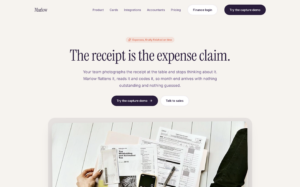
Building the version that fixes this yourself is a small computer vision project: find the receipt inside the photo, warp it flat, correct the exposure, run an OCR engine, keep the word positions, and host all of it somewhere that can take a phone upload. That is a model, a worker and a queue before you have approved a single expense.
This guide walks through Marlow, an expense capture app, and the detail worth stealing from it: Filestack’s ocr returns a bounding box for every word, so the app can draw the extracted figure back onto the photo it came from.
What we’re building
An employee photographs a receipt at any angle, in any light. The receipt is found and flattened, the colour is corrected, the text is read, and every word is outlined on the image where it was found. The claim lands in a finance queue with the total already pulled out.
Checking a total becomes a glance rather than a search.
Stack
| Layer | Tech |
|---|---|
| Framework | Next.js 16 (App Router) |
| Upload, storage, CDN, processing | Filestack |
| Client state | Zustand |
| Styling | Tailwind v4 |
| Language | TypeScript |
Submissions live in a persisted Zustand store, which is localStorage with a nicer API, so the employee side and the finance side share state without a server. Logins are emulated: you pick a finance account and look around. The file layer is the real thing.
Step 1: Two keys, and why
NEXT_PUBLIC_FILESTACK_API_KEY=your_api_key_here
FILESTACK_APP_SECRET=your_app_secret_here
The first is public by necessity, because uploads go from the phone straight to Filestack with no server hop. The second must never carry a NEXT_PUBLIC_ prefix.
The second one exists because Filestack tasks come in two kinds. resize, enhance and friends answer a plain URL. ocr and doc_detection reject unsigned requests: they need a policy signed with your app secret, which means a server has to be involved. That split shapes the whole app, and it is also where the most interesting bug in this codebase lives.
Step 2: Upload from the phone
The upload is the shared picker helper used across this series, opened with accept: ['image/*']:
// src/services/filestack.service.ts
export async function pickFiles(options: Partial<PickerOptions> = {}): Promise<IStoredFile[]> {
  const client = await getFilestackClient();

  return new Promise<IStoredFile[]>((resolve, reject) => {
    client
      .picker({
        fromSources: ['local_file_system', 'url', 'googledrive', 'dropbox', 'onedrive'],
        ...options,
        onUploadDone: (response) => resolve((response.filesUploaded ?? []).map(formatPickerMetadata)),
        onCancel: () => resolve([]),
        onFileUploadFailed: (_file, error) => reject(error),
      })
      .open()
      .catch(reject);
  });
}
Wrapping the picker in a promise turns a callback API into one await, which is the shape every caller in the app actually wants. A cancel resolves with an empty list rather than rejecting, so closing the picker is not treated as an error.
What comes back is trimmed to one shape, and the handle is the part that matters:
export interface IStoredFile {
  url: string;
  handle: string;
  filename: string;
  mimetype: string;
  size: number;
  uploadedAt?: string;
}
Step 3: Signing on the server
One route holds the secret and hands back finished URLs:
// src/app/api/filestack/sign/route.ts
const ALLOWED = /^(ocr|envelope_ocr|doc_detection(=[a-z_]+:(true|false)(,[a-z_]+:(true|false))*)?)$/;
const TTL_SECONDS = 60 * 10;

const policy = JSON.stringify({
  expiry: Math.floor(Date.now() / 1000) + TTL_SECONDS,
  call: ['read', 'convert'],
  handle,
});

const encodedPolicy = Buffer.from(policy).toString('base64');
const signature = createHmac('sha256', secret).update(encodedPolicy).digest('hex');

const url = [CDN, `security=p:${encodedPolicy},s:${signature}`, ...tasks, handle].join('/');
Three decisions here are worth copying:
- The policy names one handle. A leaked URL cannot be replayed against any other file.
- The TTL is ten minutes. The URL is handed to a browser, so it should stop working soon after the browser is done with it.
- The route has a task allowlist. Without it, you have built a signing oracle: anyone can post any task chain and get it signed with your secret.
The browser side is a single fetch:
const signed = await requestSignedUrl(uploaded.handle, [
  signedTaskSegment({ task: 'doc_detection', coords: false, preprocess: true }),
  signedTaskSegment({ task: 'ocr' }),
]);
const result = (await fetch(signed).then((r) => r.json())) as IOcrResult;
Step 4: Clean before you read
The reading chain is two tasks in one URL:
security=p:…,s:…/doc_detection=coords:false,preprocess:true/ocr/<handle>Tasks apply left to right. doc_detection finds the receipt inside the photo and warps it flat, removing the table, the shadow and the thumb holding it down. With coords:false it returns the processed image rather than the corner coordinates, and ocr reads that image instead of the original.
Running ocr on the raw photo would read a crooked, dim picture of a table with a receipt on it. The order is the accuracy.
Step 5: Drawing the boxes
The OCR response nests: document.text_areas[].lines[].words[], each word carrying a bounding box, plus a flat text field and a text_area_percentage.
The component normalises defensively rather than trusting one field layout:
// src/components/features/ReceiptReader.tsx
if (Array.isArray(raw) && raw.length >= 2) {
  // A list of points: derive the extent.
  const pts = raw as { x: number; y: number }[];
  const xs = pts.map((p) => p.x);
  const ys = pts.map((p) => p.y);
  x = Math.min(...xs);
  y = Math.min(...ys);
  w = Math.max(...xs) - x;
  h = Math.max(...ys) - y;
} else if (typeof raw === 'object') {
  const b = raw as { x?: number; y?: number; width?: number; height?: number };
  x = b.x; y = b.y; w = b.width; h = b.height;
}
Then it converts every box to fractions of the image, using the rendered image’s natural size, so the overlay survives any display width:
const norm = x <= 1 && y <= 1 && w <= 1 && h <= 1;
boxes.push({
  text: word.text ?? '',
  x: norm ? x : x / imgW,
  y: norm ? y : y / imgH,
  w: norm ? w : w / imgW,
  h: norm ? h : h / imgH,
});
The boxes belong to the processed image, not the original. They come from OCR that ran after doc_detection, so they have to be drawn over that chain’s output. Overlay them on the raw upload and every box lands in the wrong place, because the receipt in the raw photo is somewhere else and at a different angle.
Step 6: A total you can point at
function guessTotal(text: string): string | null {
  const matches = [...text.matchAll(/(?:total|amount due|balance)\D{0,12}([\d.,]+)/gi)];
  const last = matches.at(-1);
  if (last) return last[1];
  const money = [...text.matchAll(/\d+[.,]\d{2}/g)].map((m) => m[0]);
  return money.length > 0 ? money.sort(/* largest first */)[0] : null;
}
Taking the last match is deliberate. Receipts print subtotal, tax and total in that order, and “Subtotal” also matches total, so the one you want is the one at the bottom.
This is a heuristic and should be treated as one. It fails on a receipt that prints “Total items: 3” under the total, and the fallback’s parseFloat sort reads 1,234.56 as 1.234. It is acceptable here for one reason: the box is drawn on the image, so a wrong guess is visibly wrong rather than silently wrong.
What the browser builds and what the server signs
This is the part of the codebase most worth arguing about, because it gets the principle right and the implementation slightly wrong.
The principle: anything that answers an unsigned request can be built in the browser and dropped into an <img src>. Anything that needs a policy goes through the signing route. The image the boxes are drawn on, though, is built like this:
const cleanedTasks = ['doc_detection=coords:false,preprocess:true', 'enhance=preset:fix_dark'];
const cleanedUrl = file ? cdnUrl(file.handle, cleanedTasks) : '';
That is an unsigned URL containing doc_detection, which the app itself says rejects unsigned requests. Either the preview fails to load and the boxes have nothing to sit on, or your account accepts it unsigned and the signing route’s comment is wrong. One of them has to change, and it is the preview. Sign it.
That exposes the second problem. The two chains are not the same:
| Chain | Tasks |
|---|---|
| Shown on screen | doc_detection → enhance |
| Read by OCR | doc_detection → ocr |
The product copy says the receipt is “flattened, colour corrected and read, in that order, because each step makes the next more accurate”. The reading chain skips the colour correction, so the step that is meant to help OCR never reaches it. The boxes still line up, because enhance does not move pixels, but the reader is working from a dimmer image than the one on screen.
The fix is one chain, used twice:
const chain = ['doc_detection=coords:false,preprocess:true', 'enhance=preset:fix_dark'];
const imageUrl = await requestSignedUrl(handle, chain);
const ocrUrl = await requestSignedUrl(handle, [...chain, 'ocr']);
That needs enhance added to the route’s allowlist. Do that deliberately, as a fixed pattern like enhance=preset:(fix_dark|fix_tint), rather than loosening the regex.
One small layout bug worth knowing about
The boxes are positioned with left: calc(${box.x * 100}% + 0.5rem) inside a card with p-2 padding. Absolute percentages resolve against the card’s padding box, which is 1rem wider than the image. So boxes drift right by up to a rem towards the far edge of the receipt. On a narrow phone screen that is enough to put the box half on the wrong digit.
Wrap the <img> and the boxes in their own relative element with no padding, and use plain percentages. The coordinates are already fractions of the image, so they should be positioned against the image.
Beyond expenses
| Surface | Filestack feature |
|---|---|
| Invoice and purchase order capture | doc_detection, ocr |
| ID and proof-of-address onboarding | doc_detection, ocr |
| Delivery notes and proof of delivery | ocr, with boxes for the signature block |
| Mileage logs photographed from a diary | doc_detection, enhance, ocr |
| Screening uploads from personal devices | virus_detection in a Workflow |
| Running the chain once, on upload | Workflows |
The boxes are useful anywhere a human has to approve what a machine read. Most integrations throw them away.
Production checklist
- Sign the preview chain. It contains
doc_detection, so build it through the signing route like the OCR chain. - Read the same image you show. Put
enhancein the OCR chain, and add it to the allowlist as a fixed pattern. - Fix the overlay offset by positioning boxes against the image, not the padded card.
- Replace
guessTotalwith a real parser that handles thousands separators and currency, and keep the boxes either way. - Move the chain into a Workflow so one upload triggers everything server side, and store the OCR result against the claim instead of re-reading it.
- Downscale before
doc_detection. It has a maximum input size, and phone photos are large. - Check your plan’s quotas for
ocranddoc_detectionbefore launch. They are metered separately from transformations. - Move submissions out of
localStorageand put real auth in front of the finance queue. - Configure Security Policies: origin lock,
image/*, a size cap.
Further reading
| Topic | Link |
| File Picker configuration and sources | Pickers |
| Every transformation task | Processing API |
| OCR and document detection | Intelligence |
| Policies, signatures and expiry | Security |
| Chaining processing on upload | Workflows |
Key takeaways
- Show where the number came from. Filestack’s
ocrreturns a bounding box for every word, so the extracted total can be drawn back onto the receipt. A wrong value becomes visibly wrong instead of silently wrong. - Two kinds of tasks, two kinds of URLs.
resizeandenhanceanswer plain URLs.ocranddoc_detectionneed a signed policy, so the app secret lives on a server route and never in the browser. - Sign narrowly. Scope each policy to one handle, expire it in ten minutes, and allowlist the tasks the route will sign. Skip the allowlist and you have built a signing oracle.
- Order is accuracy. Run
doc_detectionbeforeocrso the reader sees a flat, cropped receipt instead of a crooked photo of a table. - Draw boxes on the image OCR actually read. The coordinates belong to the processed output, not the raw upload, and they should be positioned against the image itself rather than a padded card.
- One chain, signed once, used twice. Build the preview and the OCR request from the same chain (
doc_detection,enhance,ocr) so the image you show is the image you read. - Treat heuristics as heuristics.
guessTotalis acceptable only because its guess is visible. Replace it with a real parser that handles currency and thousands separators before going to production. - The pattern travels. Invoices, ID onboarding, proof of delivery, mileage logs: anywhere a human approves what a machine read, show them where it read it.
Final thoughts
Extraction is not the hard part any more. Trust is.
A number in a field is a claim.
A number with a box drawn around where it came from is evidence.
Filestack gives you the second in the same response as the first. The only work left is keeping the image you show and the image you read the same, which in this app means one chain, signed once, used twice.
The general shape holds well beyond receipts: whenever a machine reads something a human has to approve, show the human where it read it.
Try the live demo or grab the source on GitHub.

Favour is a Developer Relations engineer with 4+ years of experience helping developers adopt and succeed with technical products. Combining a strong software engineering background with a passion for community building, content creation, and developer education, he specializes in translating complex technologies into clear, engaging experiences for developer audiences.
Read More →