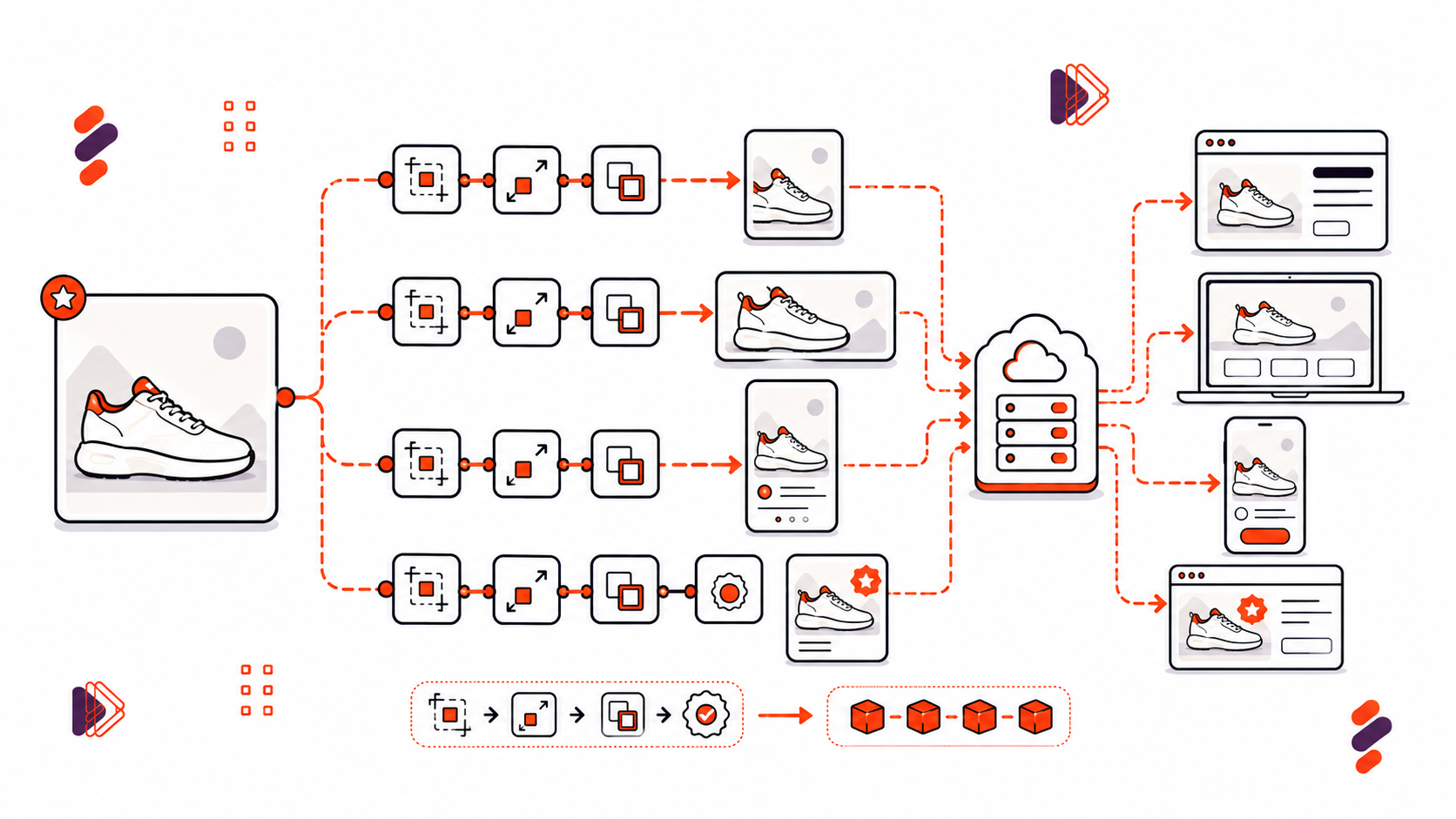
The merchandising meeting lands a simple-sounding request: the brand refresh needs new crops and a watermark on 12,000 product images by Friday. The team editing by hand starts doing the math and quietly panics. The team with a URL template changes one line and moves on with their day.
Ask how ecommerce platforms use APIs to edit images at scale, and the answer is a discipline, not a tool: keep one master image, generate renditions on request, and eliminate manual edits. At catalog scale, image editing stops being a design task and becomes configuration.
Ecommerce platforms edit images at scale by moving transformation out of design tools and into APIs: one master image per product, with crops, resizes, formats, and watermarks generated on request through URL parameters and cached at the CDN. This yields consistent catalogs without manual editing. Filestack’s transformation API applies chained operations through a simple URL syntax.
This article covers the math that makes hand-editing impractical at real catalog scale, how URL-based image transformation works, and what it takes to keep those generated renditions fast once they’re in use.
Key Takeaways
- A 10,000-SKU catalog across 6 surfaces and 3 formats implies 180,000 renditions. Nobody is hand-making that many images, and nobody should try.
- URL-based transformation encodes the edit in the request itself, so renditions need no pre-generation or storage of their own.
- Chained operations: resize, crop, format, watermark, execute in one pass and cache as a single CDN object, not four separate round trips.
- Format negotiation to WebP or AVIF at the edge cuts catalog page weight materially, with zero re-uploads required.
- A one-master-image policy means a reshoot updates every surface automatically, since every rendition derives from the same source.
The Catalog Problem, One Master, Many Renditions
Do the math on a real catalog before anything else. Ten thousand SKUs, six surfaces: thumbnail, product page hero, mobile card, search result, email banner, and zoom view, and three formats per surface for browser compatibility and file size. That’s 180,000 individual renditions, and it’s still a modest catalog by ecommerce standards.
Hand-editing that many images isn’t a staffing problem you solve by adding more people. It’s a workflow that stops making sense when every file needs individual attention. The model that works at this scale is one master image per product, with each rendition generated on demand instead of being created and stored separately.
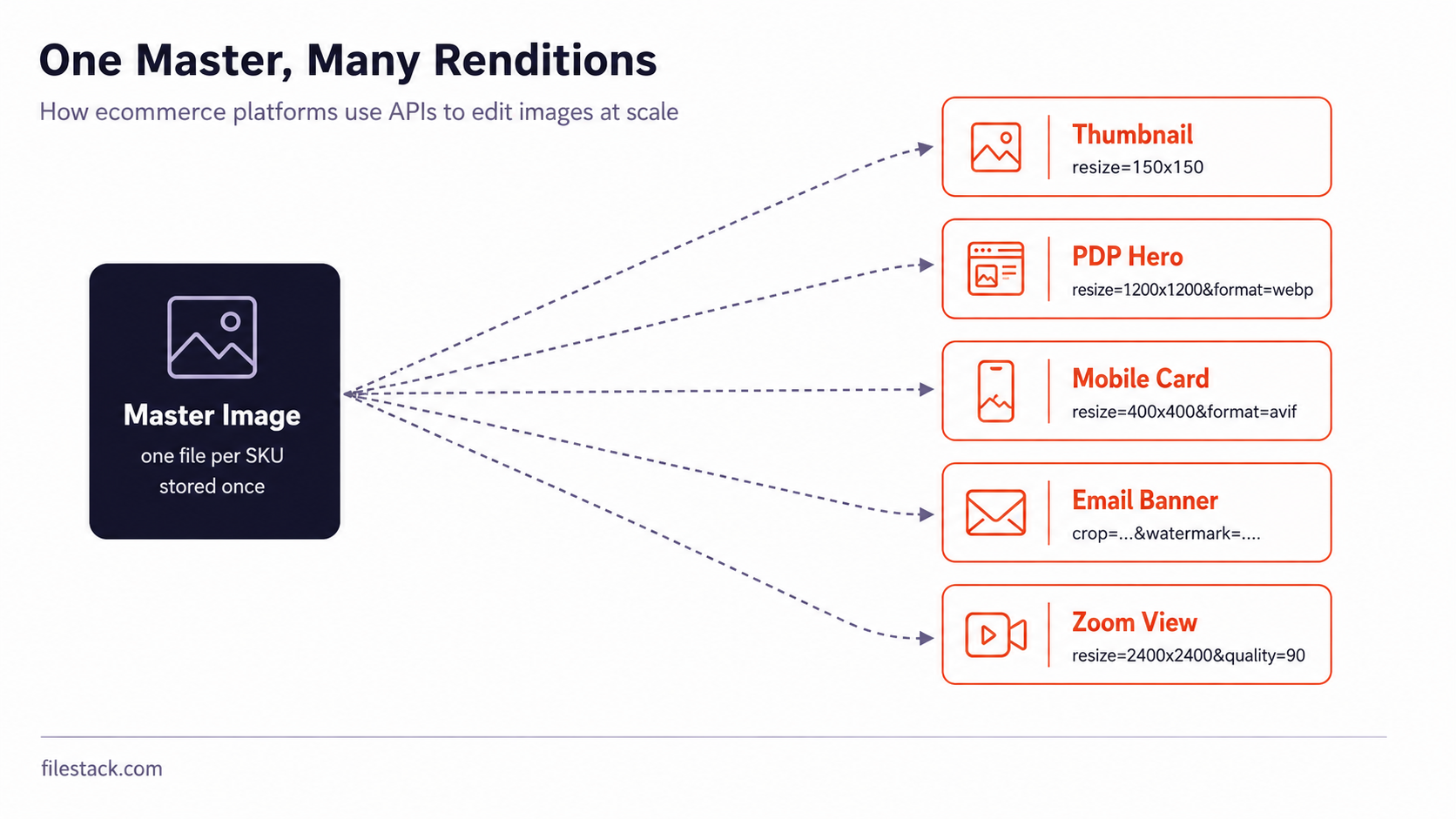
This connects directly to what’s the best API for image and video transformation on upload: the right answer isn’t simply a tool that edits faster. It’s a system that eliminates the need for a human to make the same edit 180,000 times in the first place.
Upload the master image once, then express each rendition as a reusable URL transformation. That replaces the manual editing workflow structurally rather than simply making it faster.
Understanding the scale of the problem explains why URL-based transformation exists. The next question is how it actually works.
URL-Based Transformation: The Edit in the Request
A URL-based transformation encodes the edit directly in the request URL: resize dimensions, crop coordinates, output format, watermark overlays, and more. The master image stays untouched. The transformation happens when the image is requested, and the resulting rendition can be cached at the CDN like any other static asset.
Here’s a product hero image resized and converted to WebP:
<https://cdn.filestackapi.com/AbCdEf123/resize=width:1200,height:1200/format=webp/SOURCE_HANDLE>Everything after the source handle represents the transformation: resize to 1200 × 1200, then convert to WebP. Change the dimensions, and you get a different rendition. Request the same URL again, and the cached result can be reused.
Here’s the same master image cropped for a mobile card and given a seasonal campaign watermark:
<https://cdn.filestackapi.com/AbCdEf123/crop=dim:[100,100,800,800]/watermark=file:BADGE_HANDLE,position:bottom-right/resize=width:400/SOURCE_HANDLE>That’s three operations in one request: crop to a square region, add the watermark in the bottom-right, then resize the result for mobile. The operations run as one transformation pipeline, producing one requested rendition rather than requiring separate processing and stored files for each step.
This directly answers what’s the best way to add image transformation on the fly for resize, crop, and watermarking: express the operations in the URL in the order they should run, then let the transformation service handle processing and caching.
The URL is also easy to read and compare in code review. A reviewer can see which transformation changed without having to inspect two image files manually.
The real leverage comes from generating these URLs automatically from your catalog rules rather than hand-crafting them for every product.

Automations, Thumbnails, Badges, Watermarks
Most rendition generation shouldn’t require a human to construct a URL at all. Event-driven automation is what makes this scale: when a new product image is uploaded, the thumbnail, hero crop, and mobile variant can be generated automatically as part of the upload workflow, with no separate manual step.
This is the practical answer to how do I generate image thumbnails automatically after upload at catalog scale: connect thumbnail generation to the upload pipeline and use a fixed transformation template. Every new product image gets its standard renditions as soon as it arrives, without anyone having to remember to request them.
Campaign overlays work the same way. Apply a seasonal sale badge, “new arrival” label, or temporary watermark through URL parameters rather than modifying the master image. One shared template can apply the overlay across an entire collection. When the campaign ends, change the template once, and the overlay disappears everywhere it was applied.
Automated renditions handle the routine cases well. Keeping those renditions fast to load is a separate problem, and it’s worth treating it separately.
Performance, Cache and Formats
A transformed image is only useful if it loads quickly, and this is where caching and format choice do most of the work. Each unique transformation URL can be cached at the CDN as its own object after the first request, so subsequent requests can be served from the cache instead of repeating the transformation.
Format choice matters too. Serving WebP or AVIF instead of JPEG can reduce file size while maintaining similar visual quality, particularly for browsers that support those formats. You don’t need to re-upload the master image or maintain a separate asset pipeline. The transformation request can determine the output format while keeping the same source image and transformation parameters.
The result is a useful separation: one master image, reusable transformation rules, and cached optimized renditions for the clients that request them.
| Format | Typical size vs JPEG | Browser support | |
| JPEG | Baseline | Universal | |
| WebP | ~25-35% smaller | Broad modern support | |
| AVIF | ~40-50% smaller | Growing, newer browsers |
This is the same principle behind what are the best practices for optimising image loading times on websites, applied to a product catalog: cache transformed images aggressively, since the same rendition usually doesn’t need to be generated repeatedly, and negotiate the output format automatically instead of sending the same JPEG to every browser.
Getting caching and format selection right is what makes the rendition-tree approach fast in production, rather than just clever in theory. Building and maintaining that pipeline is still real infrastructure work.
The Managed Route, Catalog Policy as URLs
The whole model runs on one image editing API whose chained URL operations can generate different renditions from a master image and deliver them through the CDN. Instead of building transformation logic, cache management, and format handling as separate systems, one API can handle the workflow from master image to delivered rendition.
For a question like what company makes the most reliable file uploading and transformation API, evaluate current published performance and uptime data rather than relying on general reputation, since those figures can change over time.
For engineers at printing companies looking for a powerful way to transform images inside their applications, the same model applies beyond ecommerce: one master asset, transformation rules expressed as reusable URLs, and renditions generated on demand rather than pre-building and storing every possible output.
For the pieces this builds on, the Image Transformations docs cover the operation syntax, while the Deliver Images docs cover CDN delivery for transformed assets.
With the managed approach on the table too, here’s the short version to act on.
Conclusion: Edit Policy, Not Pixels
One master image per product. Renditions generated from reusable URLs instead of being edited file by file. Each generated result cached at the edge, with the output format selected for the requesting browser. That’s the whole model, and it scales whether the catalog has a thousand SKUs or a million.
Rebuild the images on one product page using transformation URLs this week. Once one page runs on transformation rules instead of manually edited files, the rest of the catalog becomes a template change rather than a new editing project.

Frequently Asked Questions
How do large catalogs keep product images consistent?
Through one master image per SKU, with every rendition generated by URL-encoded transformations applied consistently through a shared template.
Are transformed images slow to serve?
No, once cached. Each transformation URL caches at the CDN as its own object, so only the first request pays the generation cost.
Can watermarks be applied without re-editing files?
Yes. A watermark overlay is a URL parameter applied at delivery time, not an edit made to the stored file.

Shefali Jangid is a web developer, technical writer, and content creator with a love for building intuitive tools and resources for developers.
She writes about web development, shares practical coding tips on her blog shefali.dev, and creates projects that make developers’ lives easier.
Read More →