
Every modern application serves images: product photos, user avatars, blog thumbnails, social previews. The problem is that each context demands a different size, format, or crop. Managing that manually doesn’t scale, and pre-generating every variant wastes storage and slows releases.
An image-editing API solves this by handling transformations in code, at request time, with no manual intervention. Whether you’re building an e-commerce platform, a CMS, or a mobile app, the API takes a single original image and produces exactly the version each user or device needs, automatically.
This guide walks through how image editing APIs work, what each core transformation does, and what to look for when choosing one for your stack.
Key Takeaways
- An image editing API lets you manipulate images programmatically, eliminating manual editing at scale.
- On-the-fly processing means transformations happen at request time, with no need to store multiple image variants.
- Cropping, resizing, watermarking, and format conversion can all be chained into a single API request.
- Dynamic resizing improves page speed, Core Web Vitals, and the experience across every device.
- Choosing an API with CDN integration, signed URLs, and format auto-selection covers both performance and security.
What Is an Image Editing API?
An image editing API is a service that lets applications modify images programmatically, through URL parameters, SDK calls, or direct API requests, without requiring any manual editing software.
Instead of a designer opening Photoshop to export twelve variants of a product photo, a developer writes a transformation rule once. From that point on, every image passes through it automatically.
Definition and Core Functionality
At its core, an image editing API accepts an image source and a set of transformation instructions, then returns a processed image. Those instructions can specify dimensions, crop regions, output format, watermark placement, compression level, or any combination of those.
The API sits between your storage layer and your users. You store one master image; the API handles the rest.
How Image Editing APIs Fit Into Modern Applications
The use cases span almost every industry:
- E-commerce: Product galleries need consistent aspect ratios and white backgrounds across thousands of SKUs.
- Content management systems: Blog thumbnails must fit responsive layouts without manual exports.
- Social media and community platforms: User profile images need square crops and size limits enforced on upload.
- Real estate: Property photos need watermarking and multiple sizes for listings.
- Mobile apps: Bandwidth-sensitive environments need the smallest file that still looks sharp on a high-DPI screen.
Why Developers Prefer API-Based Image Processing
The practical appeal is straightforward: automation replaces repetitive work, the output is consistent because the same rules apply every time, and scaling from ten images to ten million doesn’t require infrastructure changes on your side. You also avoid maintaining a library of pre-generated variants, update the transformation rule, and every future request reflects the change immediately.
How On-the-Fly Image Transformations Work
The workflow that makes this possible is simpler than it sounds.
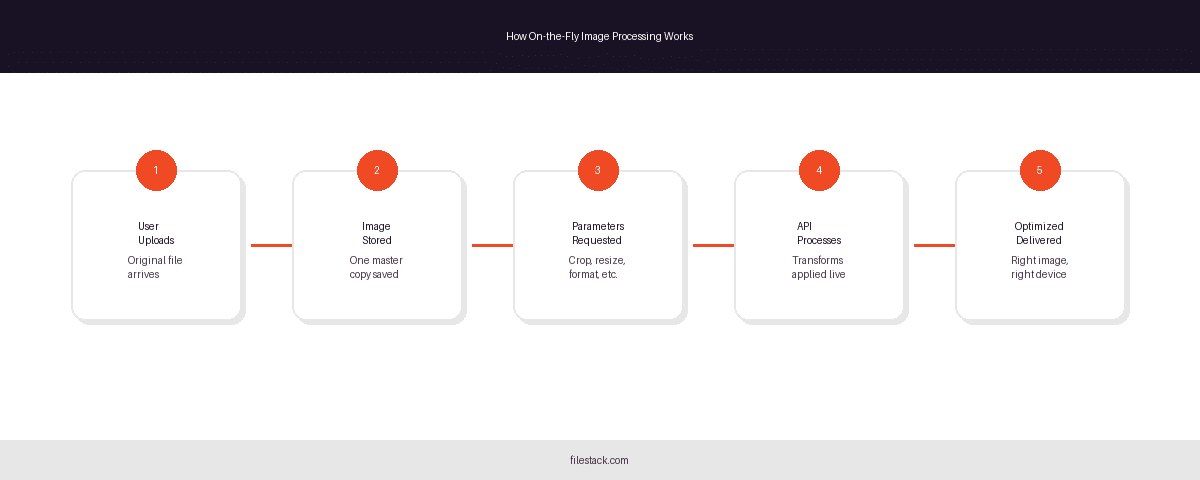
Processing Images at Request Time
When a user requests an image, the API intercepts that request, reads the transformation parameters (encoded in a URL or passed via SDK), applies them to the stored original, and returns the result. Nothing is stored permanently unless you configure it to be cached.
Here’s the basic flow:
- User uploads image: The original file arrives in your system.
- Original image is stored: One master copy, untouched.
- Transformation parameters are requested: Crop dimensions, output format, watermark, etc.
- API generates the required version dynamically: At request time, not beforehand.
- Optimised image is delivered: The right version reaches the right user or device.
Benefits of Dynamic Transformations
Processing at request time means you never maintain a growing library of pre-sized variants. Change your thumbnail dimensions site-wide by updating one parameter. Roll out a new watermark to all images without reprocessing anything. Infrastructure costs stay lower because you’re not storing dozens of versions per image, and deployment is faster because image decisions don’t require a pipeline rebuild.
Cropping Images with an Image Editing API
Cropping seems like a small thing until you’re managing a product catalog with inconsistent source images, or a news site where editorial photos arrive in every conceivable aspect ratio.
Why Cropping Matters
Inconsistent cropping breaks visual rhythm in grids and galleries. It distorts product presentation. On social platforms, a face cropped out of a profile photo erodes user trust immediately. Getting cropping right automatically is a meaningful quality improvement.
Types of Cropping
Center Crop is the simplest approach: the API trims equal amounts from each edge to reach the target dimensions. It works well for abstract imagery, landscapes, or any subject that sits near the middle of the frame.
Face-Aware Cropping uses AI to detect faces in an image and keep them in frame regardless of the target dimensions. This is the right default for user-generated profile photos, where you can’t predict where the subject will appear in the original.
Custom Coordinate Cropping lets developers specify exact pixel regions to extract. This is useful when business logic determines the region of interest, for example, always cropping to a product’s defined bounding box rather than relying on detection.
Common Cropping Use Cases
E-commerce product galleries benefit from consistent center crops. User profile images need face-aware processing. Blog thumbnails typically need a specific aspect ratio to fit a template layout. News websites often want a specific editorial region preserved. An API that supports all three cropping modes covers most of these without custom code.
Resizing Images for Every Device
Serving the same large image to a mobile visitor on a slow connection is a performance decision masquerading as an image decision. Resizing APIs makes it easy to serve the right dimensions to every context.
The Challenge of Responsive Images
A desktop retina display might benefit from a 2400px-wide hero image. A phone on LTE does not need, and should not receive, that same file. The bandwidth cost is real, and the page speed impact shows up directly in Core Web Vitals scores.
Manually maintaining breakpoint-specific image sets for every image in a large application is impractical. An API that resizes dynamically removes that burden.

Automatic Image Resizing
Dynamic resizing works by reading width and height parameters at request time and returning an image at exactly those dimensions. You can pass these parameters via URL or SDK, and the API handles the computation. The original image is never touched; only the delivered copy changes.
Maintaining Aspect Ratios
Distorted images, stretched horizontally or squashed vertically, look broken and damage trust. Good image editing APIs preserve the original aspect ratio by default when only one dimension is specified and offer explicit fit modes (contain, cover, fill) when both dimensions are required.
Why should images be resized dynamically?
Dynamic image resizing delivers appropriately sized images to each device, reducing file size, improving page speed, and minimising bandwidth consumption without requiring you to store or manage multiple variants.
Performance Benefits of Image Resizing
Smaller files load faster. Faster loads improve Core Web Vitals, particularly Largest Contentful Paint (LCP). Better Core Web Vitals contribute to search rankings. Reduced bandwidth also has direct cost implications at scale, both for your infrastructure and for users on metered data plans.
Adding Watermarks Programmatically
For any platform that handles user-generated content or distributes proprietary imagery, watermarking is a necessity. Doing it manually at volume is not.
Why Watermark Images?
Watermarks serve two related purposes: they protect intellectual property by making unauthorised reuse attributable, and they reinforce brand presence when images are shared across platforms. For professional photography marketplaces, real estate platforms, and stock media services, automatic watermarking is a baseline requirement.
Types of Watermarks
Text Watermarks are the simplest form: a copyright notice, a domain name, or a username overlaid on the image. Placement, opacity, and font can typically be configured per request.
Logo Watermarks use a separate image file as the overlay. Placement conventions vary: corner placement is common for editorial content; centered, semi-transparent watermarks are standard for stock previews where the image is visible but not freely usable.
Dynamic Watermarks go further, generating watermark content based on session or user data. A platform might embed a unique identifier into every downloaded image so that if a copy appears elsewhere, its origin can be traced.
Watermarking at Scale
The practical value of API-based watermarking becomes clear at the numbers where manual editing breaks down. A real estate platform with 50,000 active listings doesn’t have a team manually watermarking each photo. The API applies the rule to every image, every time, without exception.
Converting Image Formats Automatically
Format choice affects file size, visual quality, browser compatibility, and SEO. Serving the wrong format is an easily avoided performance penalty.

Why Image Format Conversion Matters
JPEG has been the default for photographs for decades, but it’s not the most efficient option on modern browsers. Serving a JPEG to a browser that supports AVIF means delivering a larger file than necessary. Format conversion APIs make it possible to serve the optimal format without maintaining separate files.
Popular Image Formats
JPEG remains the right choice for photographic content on browsers where newer formats aren’t supported. It offers good compression with acceptable quality loss and broad compatibility.
PNG is the correct choice when transparency is required: logos, icons, and interface elements with alpha channels. It uses lossless compression, so file sizes are larger than JPEG for photographic content.
WebP offers significantly better compression than JPEG and PNG while maintaining comparable visual quality and supporting transparency. Browser support is now effectively universal.
AVIF is the most modern format, offering better compression than WebP with excellent visual fidelity. It’s the right choice for performance-critical applications targeting current browsers.
Automatic Format Selection
Rather than choosing a single format globally, the best practice is content negotiation: the API reads the browser’s Accept header and delivers the most efficient format that the browser supports. The developer sets the policy once; the API makes the right call for every request.
Storage and Performance Advantages
Storing images in one original format and converting on delivery means your storage footprint stays predictable. Delivering the smallest viable format reduces CDN egress costs, improves page load times, and directly benefits SEO performance, particularly for image-heavy pages.
Combining Multiple Transformations in a Single Request
Individual transformations are useful. The real efficiency gain comes from chaining them.
Chaining Image Operations
A well-designed image editing API lets you apply crop, resize, watermark, and format conversion within a single request. Rather than running four sequential operations, each with its own latency and error surface, you describe the end state once, and the API produces it directly.
A typical pipeline might look like this:
- User upload: The original image enters the system at whatever size and format the user provides.
- Automated processing: The API crops to the product aspect ratio, resizes to the delivery dimensions, applies the brand watermark, and converts to WebP.
- Optimised delivery: The final version reaches the user or CDN without any intermediate manual steps.
Benefits of Transformation Pipelines
Fewer round trips mean lower latency. A single transformation pipeline is easier to reason about, test, and debug than a sequence of independent operations. And because the pipeline is defined in code, it’s version-controlled, reviewable, and consistent across environments.
Security and Reliability Considerations
Giving an API control over your images requires confidence that access is controlled and delivery is dependable.
Secure Image URLs
Signed URLs prevent unauthorised parties from crafting arbitrary transformation requests. Without signing, a bad actor could request your original image at full resolution or exhaust your processing quota with malformed requests. Signed URLs include a cryptographic token that validates that the parameters haven’t been tampered with.
Beyond URL signing, production APIs should support transformation allowlists, rules that restrict which operations are permitted for a given origin or API key. This limits the blast radius of a compromised credential.
High Availability and Global Delivery
CDN integration means transformed images are cached at edge nodes close to users, reducing origin load and latency. For applications with global audiences, edge delivery is the difference between images that load instantly and images that keep users waiting.
Key Features to Look for in an Image Editing API
Not all image APIs are built the same. Before committing to one, it’s worth evaluating against a consistent set of criteria.
When evaluating an image editing API, look for: real-time transformation support, developer-friendly SDKs with clear documentation, AI-powered capabilities like face-aware cropping, CDN integration for edge delivery, automatic format optimisation based on browser support, scalable infrastructure that doesn’t require capacity planning on your end, and granular controls over which transformations are permitted.
Any API that’s missing multiple items from that list will create friction as your application grows.

Using Filestack for Real-Time Image Transformations
Filestack’s image transformation capabilities cover the full workflow described in this article: upload, store, transform, and deliver, within a single platform.
Unified Upload, Storage, and Transformation Workflow
Managing separate vendors for file upload, cloud storage, and image processing introduces coordination overhead and multiple points of failure. A unified platform keeps the data flow simple: the file arrives, it’s stored, and transformations are applied via the same API that handled the upload.
Built-In Image Processing Capabilities
Filestack supports cropping (including smart and face-aware modes), resizing with aspect ratio preservation, watermarking with text and image overlays, format conversion including WebP and AVIF output, and compression optimisation, all configurable via URL parameters or the SDK.
Developer Benefits
Faster time-to-implementation matters. Rather than integrating and maintaining three separate services, developers get a consistent API surface, thorough documentation, and SDKs across major languages. Infrastructure scaling is handled on Filestack’s side, so image delivery stays reliable as your application grows.
That said, Filestack is one option among several in this space. The right choice depends on your specific stack, volume requirements, and the transformations your application actually needs.

Conclusion
Image management is a solved problem for applications that take it seriously. An image editing API removes the manual work, the storage overhead, and the inconsistency that comes from handling transformations ad hoc. Crop, resize, watermark, format-convert, applied automatically, at scale, to every image that passes through your system.
The most effective approach is a pipeline: one original image, one set of transformation rules, and an API that executes them correctly on every request. Paired with CDN delivery and proper access controls, that pipeline handles the image layer of your application so your team doesn’t have to.
If you’re evaluating options, Filestack’s image transformations product is a reasonable starting point for teams that want upload, storage, and processing in one place.
Frequently Asked Questions
What is an image editing API?
An image editing API is a service that modifies images automatically through code or URL parameters, allowing applications to crop, resize, watermark, optimise, and convert images without manual editing.
How does image resizing work through an API?
You pass width, height, or both as parameters in an API request or URL. The API returns an image at those dimensions, preserving the original aspect ratio unless you specify otherwise.
Can an image editing API add watermarks automatically?
Yes. You can configure text or image watermarks as part of a transformation rule. The API applies them to every matching request without any manual steps.
What image formats can be converted using an image API?
Most image editing APIs support JPEG, PNG, WebP, and AVIF. The best ones support automatic format selection based on the requesting browser’s capabilities.
Is on-the-fly image processing better than storing multiple image versions?
Generally, yes, for most use cases. You reduce storage costs, simplify your pipeline, and can update transformation rules without reprocessing existing files.
How does automatic image optimisation improve website performance?
Smaller, correctly sized images load faster, which improves Core Web Vitals, particularly Largest Contentful Paint, and contributes positively to search rankings.
Can image editing APIs support responsive images?
Yes. By passing device-appropriate dimensions at request time, you can serve different sizes to desktop, tablet, and mobile without maintaining separate files.
What should developers look for when choosing an image editing API?
Signed URLs, CDN integration, format auto-selection, face-aware cropping, chained transformation support, clear SDK documentation, and scalable infrastructure.
How do image transformation APIs reduce storage costs?
You store one original per image rather than a variant for every size, format, and crop. The API generates variants on demand without persisting them.
Can multiple image edits be performed in a single API request?
Yes. Most mature image editing APIs support chained transformations, applying crop, resize, watermark, and format conversion within a single request.

Shefali Jangid is a web developer, technical writer, and content creator with a love for building intuitive tools and resources for developers.
She writes about web development, shares practical coding tips on her blog shefali.dev, and creates projects that make developers’ lives easier.
Read More →