
A few months back, someone on a design team discovered that preview images from 2023 were still publicly accessible. Nobody had intended to keep them around. The upload flow was designed to feel temporary, but nothing actually removed the files.
That’s the gap this post addresses. A temporary image upload service should do more than provide an expiring link. It should support lifecycle rules that automatically remove files after a defined period, making it useful for previews, one-time shares, and moderation queues where permanent storage creates unnecessary risk.
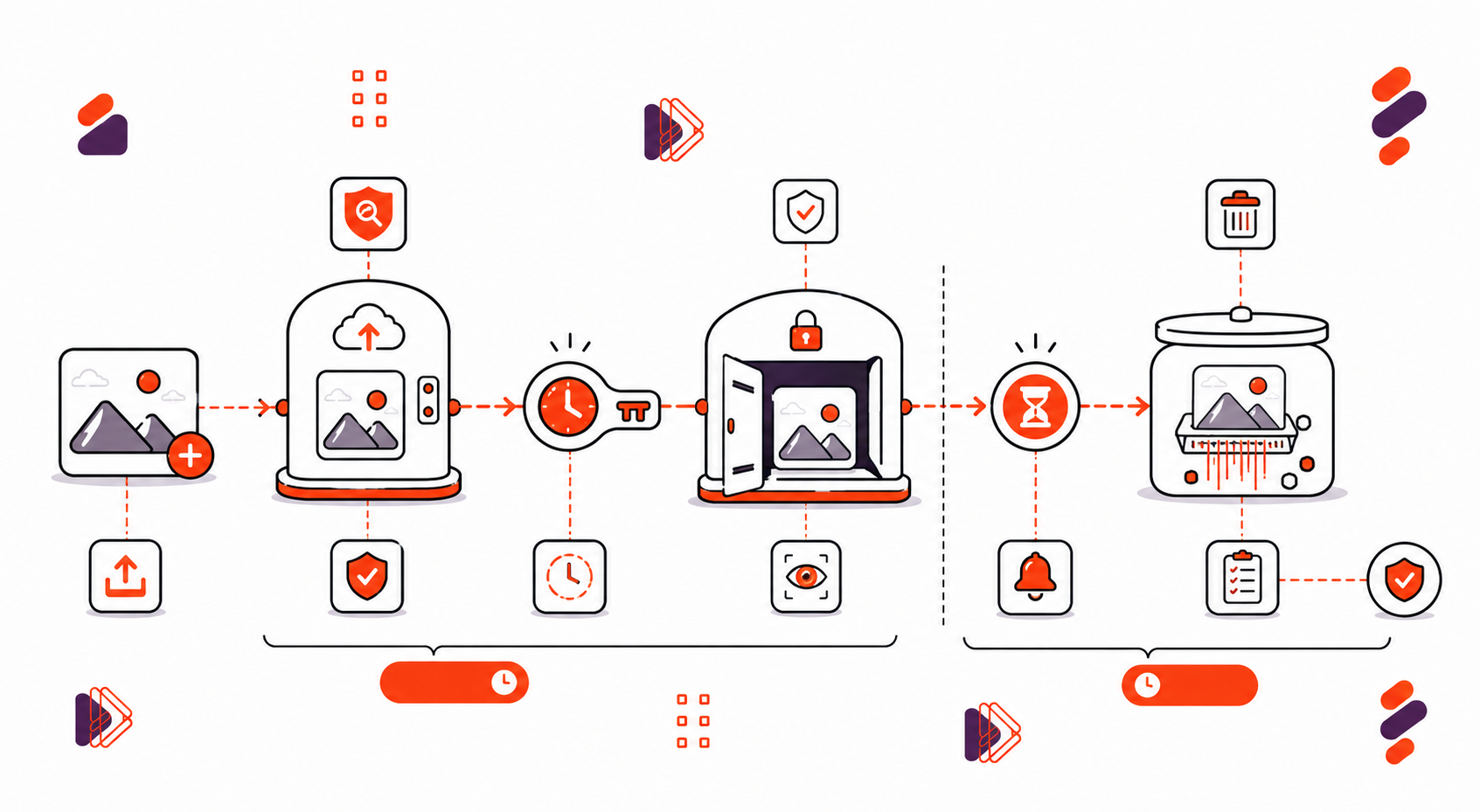
The important part is that “temporary” means two separate things: the link stops working, and the underlying file gets deleted. Those are different mechanisms, and both need to be implemented deliberately.
Let’s look at what each one requires.
Key Takeaways
- Temporary uploads make two separate promises: access ends, and the file itself is deleted. You need both.
- Signed URLs with expiry timestamps are what make a link stop working at a set time.
- Cleanup policies are what actually remove the bytes from storage, not just the link.
- Files with no active link but no deletion rule become “orphaned” and quietly cost you money.
- Temporary hosting still needs scanning and abuse checks; expiry alone doesn’t stop bad actors.
When Temporary Is the Feature
Not every upload needs to live forever. In some workflows, the shorter a file remains available, the better the product works.
Some use cases are built around files that should disappear once their purpose is served. A design preview only matters until the client approves it. A one-time share only needs to remain available for its intended recipient. A moderation queue needs an image long enough for a human or automated system to review it, and no longer.
Even compliance-driven retention follows the same principle: keep files for exactly as long as the applicable policy requires, then remove them.
The common thread is that permanence can be a liability. Every file that remains after its purpose is finished is another asset to secure, another storage cost to carry, and another piece of data to account for if something goes wrong.
| Use Case | Typical Expiry | Link Expiry Needed? | Deletion Needed? |
| Design previews | 24–72 hours | Yes | Yes |
| One-time shares | Single view/hours | Yes | Yes |
| Moderation queues | Until reviewed | Yes | Yes, after review |
| Compliance holds | Set by policy | Yes | Delayed, on schedule |
Expiring Links, Access That Ends
The first half of “temporary” is about who can open the file and for how long.
This is handled with signed URLs. A signed URL includes an expiration time, so once that time passes, the link can no longer be used. Access can also be scoped to a particular recipient or request context, and links can be revoked early when necessary. The deliver images docs cover the delivery and URL configuration options in more detail.
The important part is that these checks happen when someone requests the file, before the file is delivered. An expired or unauthorised request is rejected before any bytes are sent.

But here’s the catch: an expired link doesn’t mean the file is gone. It only means that particular door is locked. The image is still sitting in storage.
That’s a different problem, and it needs a different fix.
Cleanup Policies, Bytes That End
If expiring links lock the door, cleanup policies are what actually clear out the room.
This is where scheduled deletion comes in: rules that automatically remove files from storage once their retention period expires. Good systems can also run orphan sweeps to catch files that no longer have an active reference, since abandoned files can quietly accumulate and increase storage costs.
A verified-delete audit trail adds another layer of accountability by recording what was removed and when. Cleanup then becomes something you can demonstrate, not simply something you assume happened.
This matters particularly for moderation queues. You want the original file to remain fully available while it’s under review, then become inaccessible and, where required, actually deleted once the review is complete.
If you’re building this yourself, security questions such as how to prevent file upload vulnerabilities in a web application naturally connect to lifecycle management. A file that can’t be reliably removed is also harder to govern and secure throughout its lifecycle.

Abuse Prevention on Ephemeral Infrastructure
Here’s something worth saying clearly: temporary doesn’t mean safe by default.
An upload flow without file scanning can still be abused even if every link expires quickly. Security policies can add controls around what is allowed into the upload workflow, alongside scanning and rate limiting.
An attacker only needs a valid link during its active window. That’s why malware scanning, rate limiting, and high-entropy URLs still matter for short-lived uploads.
This is why how to detect and block malicious files during upload remains an important security concern regardless of how long the files are retained. Short retention limits exposure over time, but it doesn’t replace controls at the point of upload.
Expiry and cleanup control when a file disappears. Scanning and rate limiting control what enters the system in the first place. A secure temporary-upload workflow needs both.
The Managed Route, Temporary on Real Infrastructure
Once you’ve mapped out signed URLs, cleanup jobs, orphan sweeps, and scanning, you start to see how much of this is genuinely infrastructure work, not a small feature.
The production version of this setup is a full image upload service, where expiry is handled through signed URLs and cleanup through a managed deletion workflow. If you’re weighing this against building it in-house, it’s worth looking into what tools provide a CDN for delivering user-uploaded files, whether there’s a free tier for file upload APIs to test with first, and generally what features to look for in a reliable file upload service before committing either way.
None of this is meant to talk you out of building it yourself. Some teams have good reasons to. But it’s worth understanding what “temporary” actually requires before committing to maintaining the whole lifecycle long-term.
Conclusion: Build Both Halves of Temporary
Ephemeral uploads sound simple on the surface, but they only work if you handle both sides of the promise. Expire access with signed URLs, remove the underlying files with cleanup policies, and keep an audit trail for both. Skip either half, and you can end up with files that look temporary but quietly remain in storage, just like those forgotten previews from 2023.
If you’re not sure where you stand, there’s a simple test: find your oldest “temporary” upload and see whether the link still works. At Filestack, we built expiring links and deletion workflows to make temporary file handling part of the system rather than something you have to remember to clean up manually.

FAQ
What is a temporary image upload service?
It’s image storage that sits behind expiring links, paired with automatic lifecycle deletion so files don’t linger after they’re no longer needed.
Is an expired link the same as a deleted file?
No. An expired link just means access has ended; the file can still exist in storage. Deletion is what actually removes the bytes. A solid setup handles both.
Do temporary uploads still need scanning?
Yes. Ephemeral hosting without scanning can still be misused; expiry alone doesn’t stop bad actors from using a link while it’s still active.

Shefali Jangid is a web developer, technical writer, and content creator with a love for building intuitive tools and resources for developers.
She writes about web development, shares practical coding tips on her blog shefali.dev, and creates projects that make developers’ lives easier.
Read More →