

Uploading a file from a desktop browser on a stable Ethernet connection is a mostly solved problem. Mobile is a different environment entirely. Users are moving between networks, operating on devices with power and memory constraints, and uploading files that are larger than ever: 4K video, RAW photos, uncompressed audio. They expect the process to be seamless regardless.
For most applications, the gap between that expectation and the default upload behaviour is where users get lost. A 500MB video upload that fails at 94% and has to start over is not a minor inconvenience; it’s the kind of experience that gets an app uninstalled.
This guide covers the technical approaches that close that gap: chunked transfers, resumable uploads, retry logic, and the UX patterns that keep users informed and in control throughout.
Key Takeaways
- Mobile uploads fail more often than desktop uploads because of unstable networks, larger file sizes, and device-level constraints that desktop environments don’t face.
- Chunked uploading breaks large files into smaller segments, so a dropped connection only costs you one chunk, not the whole transfer.
- Resumable uploads let interrupted transfers pick up exactly where they left off, rather than forcing users to start over.
- Real-time progress feedback: status updates, progress bars, and time estimates directly reduce upload abandonment.
- A reliable mobile upload solution should combine chunking, resume support, auto-retry logic, and security controls in a single workflow.
Why Mobile File Upload Is More Challenging Than Desktop Upload
Understanding why mobile uploads break is the first step toward building ones that don’t.
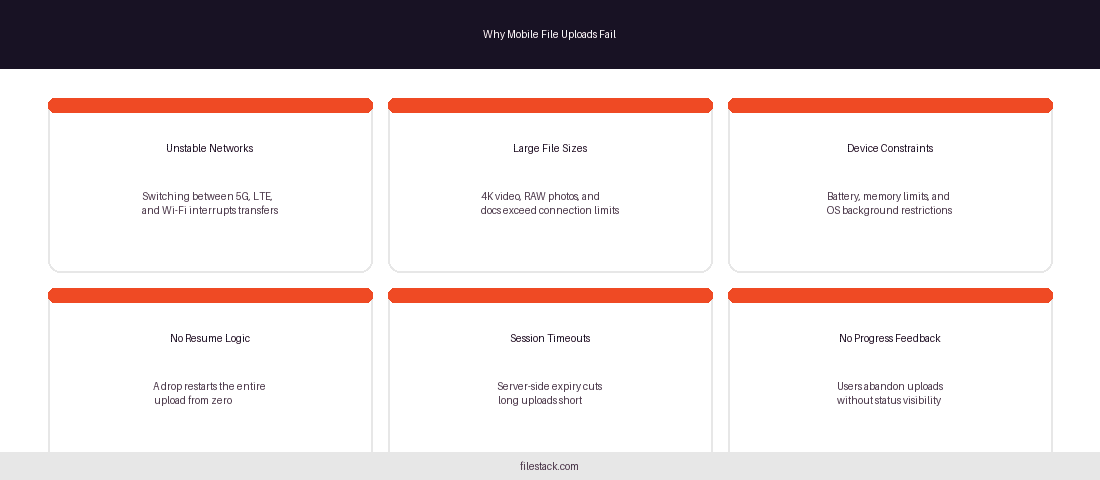
Unstable Network Conditions
A mobile user rarely stays on one network for the duration of a long upload. They move from their home Wi-Fi to LTE on the way out the door, hit a dead zone in an elevator, and pick up a coffee shop’s public Wi-Fi ten minutes later. Each of these transitions is a potential interruption. Without specific handling for connection changes, any of them can terminate the upload silently.
This isn’t an edge case; it’s the normal pattern of mobile usage. Upload architectures that assume a stable connection are optimised for conditions that mobile users rarely have.
Larger File Sizes
Modern smartphones produce larger files than ever. A single 4K video clip from a flagship phone can exceed 1GB. RAW photo formats from newer camera systems run 20–40MB per image. Business documents with embedded media routinely reach sizes that would have been unusual even a few years ago.
These file sizes strain even stable connections. On LTE or shared Wi-Fi, they represent real transfer times, minutes, not seconds, during which a lot can go wrong.
Limited Device Resources
Mobile devices impose constraints that desktop environments don’t. Uploads running in the background can be suspended by the OS to conserve battery or free memory. Storage for partially uploaded files is limited. Long-running network processes compete with foreground apps for resources. An upload that looks fine to the developer on a plugged-in test device may behave very differently on a user’s phone at 15% battery.
User Expectations
Despite all of this, users expect mobile uploads to work. They’ve experienced seamless background syncs from cloud photo apps, and they’ve internalised that as the baseline. When a manual upload fails, the reaction isn’t sympathy for network complexity; it’s frustration with the app.
The Impact of Slow Connections on File Uploads
A failed upload isn’t a neutral event. It has downstream consequences worth understanding.
Common Upload Failures
The failure modes are consistent across applications: timeout errors when a transfer takes longer than the server’s session window, connection drops that terminate the upload mid-stream, partial file transfers that arrive incomplete and unusable, and session expirations that invalidate in-progress work. Any of these sends the user back to square one.
Poor User Experience
Failed uploads produce a specific kind of frustration, one that’s disproportionate to the action required. The user did the right thing, waited, and lost their work anyway. Without visible feedback during the upload, they may not even realise something went wrong until they look for the file later. That uncertainty compounds the problem.
Why do mobile file uploads fail on slow connections?
Mobile file uploads often fail because unstable network connections interrupt transfers mid-stream. Without mechanisms like resumable uploads and chunked transfers, users have to restart the entire upload from the beginning rather than continuing from the point of failure.
Business Consequences
At the application level, upload failures affect more than user satisfaction. For platforms where file upload is part of a revenue-generating workflow, such as submitting a contract, completing an order, or delivering creative work, a failed upload is a failed transaction. The support burden increases, completion rates drop, and users who experience repeated failures are more likely to stop using the product.
Use Chunked Uploads for Better Reliability
The most effective structural change you can make to a mobile upload workflow is switching from a single monolithic transfer to chunked uploading.
What Is Chunked Uploading?
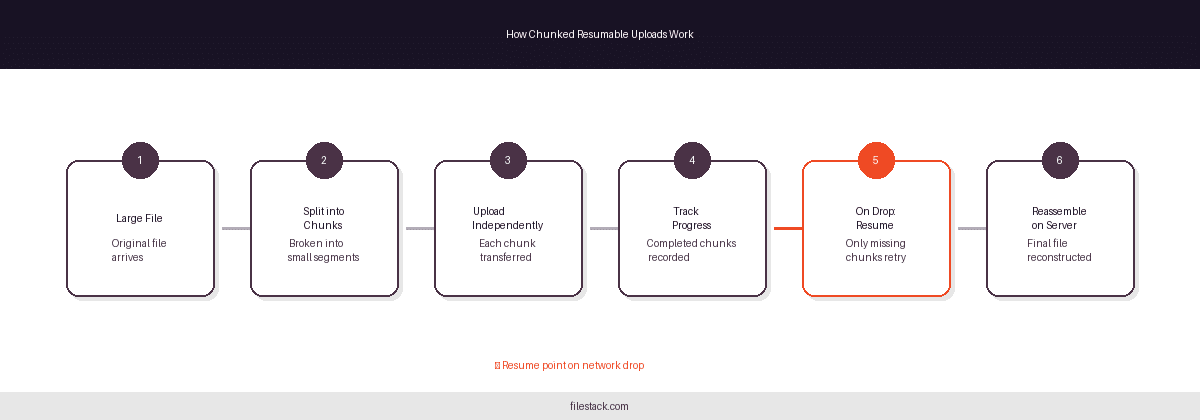
Chunked uploading divides a large file into smaller segments, typically between 5MB and 25MB each, and transfers them independently. The server receives the chunks, tracks which ones have arrived, and reassembles them into the complete file once all segments are present.
How Chunked Uploads Work
File Segmentation: The client splits the original file into fixed-size pieces before transfer begins. The size of each chunk is configurable based on network conditions and file type.
Sequential or Parallel Transfer: Chunks can be sent one at a time or in parallel depending on available bandwidth. Parallel uploads improve speed on strong connections; sequential transfers are safer on unstable ones.
Server-Side Reconstruction: Once all chunks are received, the server stitches them back together into the original file. The end result is identical to a single-transfer upload, just more reliable in how it got there.
Benefits of Chunked Uploads
The reliability improvement is straightforward: a dropped connection only loses the in-progress chunk, not the entire file. If a 1GB upload is divided into 40 chunks and the connection drops on chunk 37, only that one chunk needs to be retransmitted. The 36 before it are safe.
This also gives the system more surface area to work with. Chunk sizes can be adjusted dynamically based on measured network quality. Failed chunks can be retried independently. Progress can be tracked precisely, which enables meaningful status reporting to the user.
Why Chunking Matters for Mobile Devices
Every upload attempt carries risk on a mobile network. Chunking reduces the blast radius of each risk. Smaller transfers are less likely to be interrupted by the OS, complete faster on variable bandwidth, and require less memory to hold in transit. For large file types like video, chunking is the difference between a workflow that completes and one that doesn’t.
Implement Resumable Uploads
Chunking handles the transfer mechanics. Resumable uploads handle what happens when something goes wrong mid-transfer.
What Are Resumable Uploads?
A resumable upload maintains a persistent state about which portions of a file have been successfully transferred. If the connection drops or the user closes the app, the upload can continue from the last confirmed chunk rather than starting from zero.
How Resume Functionality Works
Upload Progress Tracking: As each chunk completes, the server records its arrival. The client maintains a corresponding record of what’s been sent and confirmed.
Recovery After Disconnection: When connectivity returns, the client queries the server for the list of received chunks, identifies the gaps, and resumes from the first missing segment. Only unconfirmed data is re-sent.
Session Persistence: The upload session is stored durably enough to survive app restarts, device sleep, and network transitions. The session isn’t tied to a single HTTP connection; it can span multiple connections, networks, and time periods.
What is a resumable file upload?
A resumable file upload allows interrupted transfers to continue from the point of failure instead of restarting the entire upload from the beginning, improving completion rates on unstable mobile networks where interruptions are common.
Benefits for Mobile Applications
The measurable impact is higher completion rates. Users who experience an automatic recovery, where the app picks up where it left off without any action required, are far more likely to complete the upload than users who see an error and a retry prompt. Resumable uploads also reduce bandwidth consumption, since no data is re-sent unnecessarily. On metered mobile connections, that matters.
Optimise File Upload Performance
Chunking and resumability address reliability. There’s a parallel set of optimisations that reduce the amount of data that needs to travel in the first place.
Compress Files Before Upload
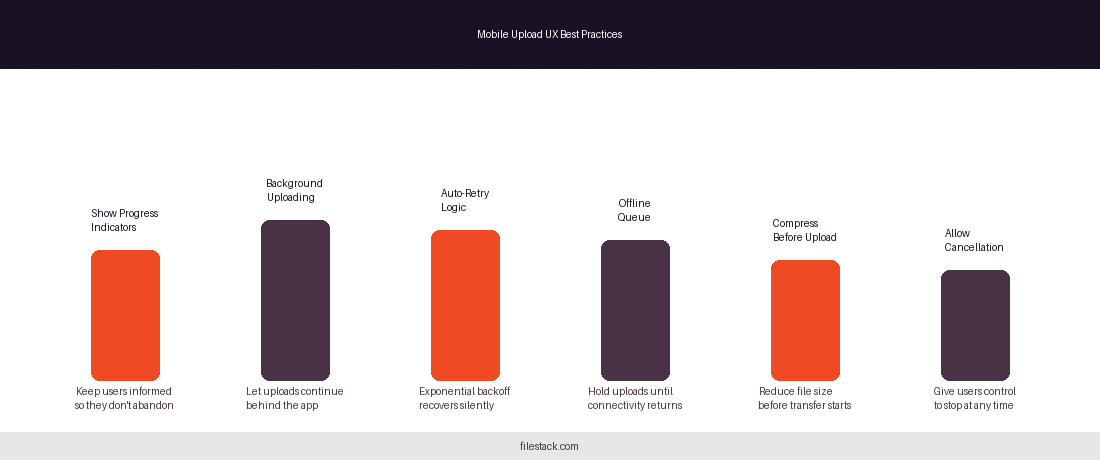
Many file types can be compressed before transfer with no meaningful quality loss for their intended use. For files where size reduction is acceptable, pre-upload compression reduces transfer time, bandwidth consumption, and the number of chunks required.
Resize Images Automatically
Full-resolution photos from mobile cameras are often larger than the application actually needs. A profile photo doesn’t require 12 megapixels. A document thumbnail doesn’t need to be RAW. Automatically resizing images to the maximum dimensions the application will display, before the transfer begins, can reduce file sizes by 70–90% without any visible quality difference to the user.
Limit Unnecessary Metadata
Image and video files often carry embedded metadata: GPS coordinates, device information, and camera settings that aren’t needed for most applications. Stripping this metadata before upload reduces payload size without affecting the content.

Choose Efficient File Formats
Where format choice is in the developer’s control, modern formats deliver meaningful size advantages. WebP produces smaller files than JPEG or PNG at comparable quality. Modern video codecs like H.265 and AV1 compress significantly better than H.264. For documents, optimising embedded images and removing unused embedded objects reduces file sizes before transfer.
Provide Real-Time Upload Feedback
Optimisation makes uploads faster. Feedback makes slow uploads survivable.
Show Upload Progress Indicators
A progress bar does more than display a number; it demonstrates that the upload is active and something is happening. Without visible feedback, users have no way to distinguish between a slow upload and a stalled one. That ambiguity leads to cancellation.
Display Upload Status Updates
Status labels communicate more precisely than a progress bar alone. A user who sees “Reconnecting…” understands that their network dropped and the app is handling it. A user who sees a frozen progress bar at 67% with no label has no idea what’s happening and is likely to close the app.
Common status states worth surfacing: Uploading, Paused, Reconnecting, Resuming, Completed, Failed.
Estimate Remaining Time
Time estimates set expectations. Even a rough estimate, “About 3 minutes remaining”, gives users enough information to decide whether to wait or come back. Without an estimate, every slow upload feels potentially broken.
Improve Perceived Performance
Perceived performance and actual performance are both worth optimising. Applications that communicate clearly, that show users what’s happening and why, retain users through slow uploads that would otherwise trigger abandonment. Feedback is a retention mechanism, not just a cosmetic detail.
Handle Network Interruptions Gracefully
The architecture around upload interruptions deserves the same attention as the upload itself.
Detect Connection Changes
Monitoring network status during an active upload lets the application respond proactively. When a network transition is detected, not after it causes a failure, but at the moment it happens, the upload can pause cleanly, preserve state, and prepare to resume rather than waiting for a timeout to surface the problem.
Automatically Retry Failed Uploads
Automatic retry with exponential backoff is the right default for transient failures. When a chunk fails to upload, the client waits a short interval and tries again. If it fails again, the interval doubles. This pattern handles temporary network drops without spamming the server with retries and without requiring any user action for the common case.
Support Offline Scenarios
For applications where uploads might be initiated without reliable connectivity, or where connectivity is expected to drop before completion, a queue-based approach lets users start uploads that will complete when the network is available. The upload is queued, the device monitors connectivity, and the transfer begins or resumes automatically when conditions allow.
Continue Uploads When Connectivity Returns
Recovery should be automatic wherever possible. Users who have to manually restart an upload after a network drop are more likely to abandon it. Users whose app quietly resumes in the background experience the same event as a minor delay rather than a failure.
Improve Mobile Upload Security
Reliability and security aren’t competing priorities; they need to be designed together.
Encrypt Data in Transit
All upload traffic should travel over HTTPS. For applications handling sensitive content: medical records, financial documents, personal media- end-to-end encryption from the device to storage is the appropriate standard.
Validate Files Before Upload
Client-side validation that checks file type, size, and basic structure before the transfer begins prevents wasted bandwidth on files that will be rejected server-side anyway. Server-side validation is still required; client checks are easily bypassed, but layering both reduces unnecessary transfers.
Use Secure Upload Endpoints
Authenticated upload workflows prevent unauthorised users from consuming upload capacity or injecting malicious files. Signed upload tokens that expire after a short window are a good baseline: they’re valid long enough to complete a legitimate upload, but not long enough to be useful if intercepted.
Protect Sensitive User Content
Upload security extends beyond the transfer. Uploaded files should land in access-controlled storage, with permissions that reflect the content’s sensitivity. Temporary URLs for content delivery, rather than persistent public links, are appropriate for private user content.
Mobile UX Best Practices for File Uploads
The technical implementation determines whether uploads are complete. The UX determines whether users trust the process enough to let them.
Allow Background Uploading
Background upload support is essential for large files. Users shouldn’t have to keep the app open and the screen active for the duration of a long transfer. Platforms that support background upload and communicate clearly that it’s happening remove a significant source of anxiety from the user experience.
Minimise User Interaction
Every additional step between “select file” and “upload complete” is an opportunity for abandonment. The upload flow should require as little from the user as possible: select the file, confirm if necessary, and let the system handle the rest. Progress and status updates should be informative without requiring action.
Support Native File Pickers
Native file pickers, the system-provided interfaces for selecting files, photos, and documents, are familiar to users and require no learning. Using them instead of custom file selection UI reduces friction and improves accessibility. This includes supporting sharing from other apps, which is how many mobile users move content between applications.
Enable Upload Cancellation
Users should always be able to cancel an in-progress upload. Forced waits with no exit path are frustrating. A clear cancel option, with a confirmation step for large or irreversible uploads, keeps users in control.
Preserve Upload State
If a user leaves the app during an upload and returns later, the upload should still be there, in whatever state it was when they left. State preservation across app restarts is part of what makes resumable uploads genuinely useful, not just technically possible.
Scaling Mobile File Upload for High-Volume Applications
Individual upload reliability is one concern. Applications at scale have additional considerations.
Managing Concurrent Uploads
Upload queues prevent users from saturating their connection by starting too many simultaneous transfers. A well-designed queue manages bandwidth allocation, prioritises active uploads, and surfaces clear status for all pending work.
Supporting Global Users
Upload performance degrades with physical distance to the server. Geographically distributed infrastructure, upload endpoints located close to users rather than in a single region, reduces latency and improves throughput for international audiences.
Handling Peak Traffic
Upload volume isn’t constant. Product launches, campaign deadlines, and seasonal traffic patterns can concentrate upload demand. Scalable upload infrastructure that handles peak volume without degrading performance for individual users requires architecture that can expand elastically rather than being sized for average load.
Monitoring Upload Performance
What you don’t measure, you can’t improve. Upload monitoring should track success rates, average upload duration, failure causes, and network conditions at the time of failure. Patterns in that data, particular device types, network types, or file sizes that fail disproportionately, reveal where the next round of optimisation should focus.
Key Features to Look for in a Mobile File Upload Solution
Before choosing a platform or building a solution, measure it against these requirements: resumable upload support that persists across sessions, chunked transfer capability with configurable chunk sizes, real-time progress tracking exposed to the client, automatic retry logic with backoff, native SDK support for iOS and Android, security controls including signed tokens and file validation, globally distributed delivery infrastructure, and proven performance at the file sizes your application handles.
Any solution missing multiple items from this list will create reliability problems as your user base grows or your files get larger.
Using Filestack to Improve Mobile File Upload Reliability
Filestack’s file upload product is designed around the reliability requirements outlined in this guide, particularly for mobile environments where uploads are most likely to fail.
Built for Large File Transfers
Filestack handles large file transfers across mobile networks using a chunked, resumable upload architecture by default. There’s no threshold below which uploads are reliable, and above which they aren’t; the same infrastructure handles small documents and multi-gigabyte video files.
Intelligent Upload Handling
The platform manages chunked transfers, tracks upload state across interruptions, handles automatic retry, and monitors progress without requiring developers to implement this logic from scratch. The SDK surfaces progress events to the client, so building progress indicators and status updates doesn’t require custom server infrastructure.
Developer-Friendly Integration
SDKs are available for iOS, Android, and the major web frameworks. The API surface is consistent across platforms, so the upload behaviour is predictable whether a user is on a phone, tablet, or desktop browser. Implementation time is significantly lower than building equivalent functionality independently.
Improved User Experience
Reliable uploads produce better outcomes. Higher completion rates, less user frustration, and fewer support requests are the practical consequences of infrastructure that handles mobile conditions correctly. Filestack is one option for teams that want this without owning the infrastructure; others exist, and the right choice depends on your stack and requirements.

Conclusion
Mobile file upload is harder than desktop upload, and the gap between them grows as file sizes increase and user expectations rise. The technical tools to close that gap are well understood: chunked transfers, resumable sessions, retry logic, real-time feedback, and graceful handling of the network interruptions that are inevitable in a mobile environment.
The applications that get this right treat upload reliability as a core feature rather than a secondary concern. Users notice the difference, not always consciously, but in whether they complete their task or abandon it.
If your current upload workflow doesn’t handle interruptions gracefully, Filestack’s file upload product is a practical starting point for adding chunking, resumability, and progress tracking without building it from the ground up.
Frequently Asked Questions
What is mobile file upload?
Mobile file upload is the process of transferring files, such as photos, videos, and documents, from a mobile device to a server or cloud storage over a cellular or Wi-Fi network.
How do chunked uploads improve mobile file transfer reliability?
Chunked uploads split large files into smaller segments. If the connection drops, only the in-progress chunk is lost; the rest are already received. Recovery is fast and requires minimal re-transfer.
What are resumable uploads and why are they important?
Resumable uploads allow interrupted transfers to continue from the last confirmed chunk rather than restarting from the beginning. They’re essential for large files on mobile networks where interruptions are common.
How can developers optimise uploads on slow mobile networks?
Use chunked and resumable transfers, compress files before upload, resize images to necessary dimensions, select efficient formats, and implement auto-retry logic with exponential backoff.
Why do large mobile uploads fail?
The most common causes are network interruptions during transfer, server-side session timeouts, device OS restrictions on background processes, and the absence of resume logic that forces restarts on failure.
How can apps recover from interrupted uploads?
By persisting the upload state, specifically which chunks have been confirmed, and resuming from the first missing chunk when connectivity returns. This should happen automatically without user action.
What security measures should mobile file uploads include?
HTTPS for all transfer traffic, client- and server-side file validation, signed upload tokens with short expiry windows, access-controlled storage, and authenticated upload endpoints.
How do upload progress indicators improve user experience?
Progress indicators eliminate ambiguity. Users who can see that an upload is active and progressing are far less likely to abandon it than users watching a frozen screen with no feedback.
What is the best way to upload large video files from mobile devices?
Chunked, resumable uploads over HTTPS, with pre-upload compression where the format allows it, automatic retry on failure, background transfer support, and real-time progress feedback to the user.
What features should businesses look for in a mobile file upload platform?
Resumable and chunked transfer support, automatic retry, real-time progress tracking, native mobile SDKs, signed URL security, globally distributed infrastructure, and proven performance at scale.

Shefali Jangid is a web developer, technical writer, and content creator with a love for building intuitive tools and resources for developers.
She writes about web development, shares practical coding tips on her blog shefali.dev, and creates projects that make developers’ lives easier.
Read More →