

Every day, businesses deal with a lot of paperwork, like invoices in emails, scanned forms, or ID photos. The data is there, but it’s stuck inside images, so it can’t be used directly. Someone still has to open each file and type the information manually.
In today’s fast-moving digital world, this is a problem. Manual data entry is slow, costly, and easy to mess up. Instead of hiring more people to do it, the smarter solution is to let machines handle it.
That’s exactly what an OCR API does. It reads text from images and turns it into structured data your apps can use. And in 2026, thanks to advances in AI and machine learning, OCR is now faster, smarter, and more reliable than ever before.
Key Takeaways
- An OCR API turns images and documents into usable data through a simple cloud request; there is no need to set up heavy systems or GPUs.
- Modern OCR is powered by AI (neural networks), not old rule-based methods, so it works well with handwriting, different fonts, tilted scans, and multiple languages.
- Big wins for developers: speed and scale; you can integrate it quickly, handle thousands of files at once, and avoid building complex models from scratch.
- Common use cases in 2026 include automating invoices, KYC verification, digitizing healthcare records, searching legal documents, and improving accessibility.
- When choosing an OCR API, focus on how accurate it is for your use case, supported languages, file formats, and how well it handles data security and compliance.
The 2026 Context: OCR Gets a Neural Upgrade
OCR has been around since the 1950s, but for a long time, it was limited. It worked well only on clean, printed text and struggled with anything messy, like handwriting or low-quality scans. Older systems relied on fixed patterns, which made them easy to break.
That changed with deep learning. Modern OCR systems are trained on huge datasets, so they don’t just match shapes; they actually understand text patterns. This helps them read tilted images, handwriting, mixed languages, stamps over text, and even blurry photos much more accurately.
Because of this, we now have a more advanced form called intelligent character recognition (ICR). And instead of setting up complex systems locally, most developers simply use it through cloud APIs; no need to manage infrastructure, train models, or deal with GPUs.
Now that you understand how OCR has evolved, let’s look at what an OCR API actually is.
What Is an OCR API?
An OCR API (Optical Character Recognition Application Programming Interface) is a cloud service that lets developers extract text from images or documents. You simply send a file to an API, and it returns the text in a structured, machine-readable format, without building or maintaining the underlying recognition engine yourself.
Think of it like this: instead of building your own system to “read” documents, you let the API do it. You send a file, and it sends back the extracted text and data.
To understand it better, let’s break down the main parts that make it work.
Key Components of an OCR API
Every OCR API, regardless of vendor, is built around three core components:
1. The Uploader
This is how you send files to the API. You can upload files directly, use a URL, or send encoded data. Good APIs support common formats like PDF, PNG, JPEG, and more, and they can handle different file qualities without extra work on your side.
2. The Processing Engine
This is the “brain” of the OCR. Modern engines combine convolutional neural networks (CNNs) for image feature extraction with recurrent neural networks (RNNs) or transformer models for sequence recognition, the same families of architecture that power large language models. It can fix tilted scans, reduce noise, detect languages, and recognize characters, all automatically.
3. The JSON Output
This is what you get back. Instead of just plain text, a good OCR API returns structured data, like confidence scores, text positions (coordinates), detected language, and even specific fields (such as invoice totals or names).
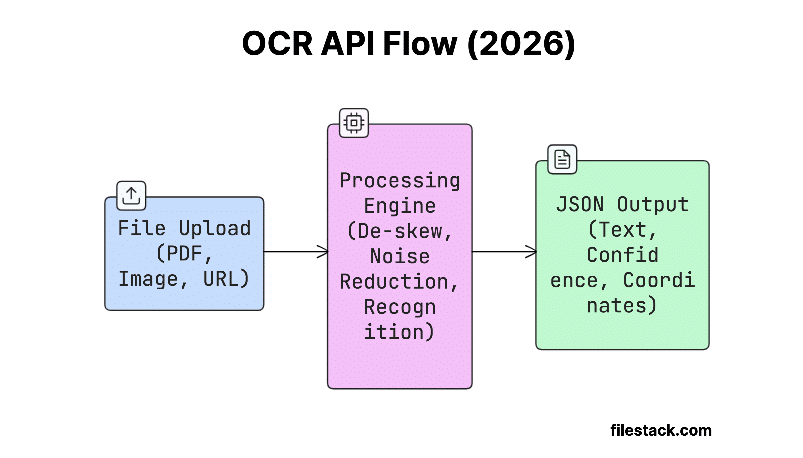
Now that you know the parts, let’s see how everything works step by step.
How Does an OCR API Work? The Step-by-Step Process
Image Pre-processing
Before OCR can read any text, the image needs to be cleaned up first. Most OCR APIs do this automatically, but knowing what happens behind the scenes can help you get better results.
- De-skewing corrects for documents that were scanned or photographed at an angle; a few degrees of rotation can meaningfully reduce accuracy. The engine detects the dominant angle of text lines and rotates the image to align them horizontally.
- Noise reduction removes visual artifacts: scanner dust, JPEG compression artifacts, fax transmission errors, or background textures that could be misread as characters. Median filtering and morphological operations clean the image while preserving character edges.
- Binarization converts a color or grayscale image to pure black and white, isolating text from the background. Adaptive thresholding handles uneven lighting, which is critical for photos taken with a phone rather than a flatbed scanner.
Once the image is ready, the next step is actually reading the text.
Character Recognition
This is the main part where the OCR actually reads the text.
Older OCR systems used a simple method called matrix matching. They compared each character to a fixed set of templates. This worked only for clean text and known fonts.
Modern OCR is much smarter. It uses AI to break each character into small features like curves, lines, and shapes. Then it uses these patterns to predict what the character is. It also gives a confidence score, showing how sure it is about each result.
For handwritten text, transformer-based architectures now outperform earlier RNN approaches by better capturing long-range dependencies. They don’t just look at one letter; they understand it in the context of the whole word, which improves accuracy a lot.
After the text is read, it still needs some cleanup before final use.
Post-processing and Output
After the text is recognized, the result is cleaned up to improve accuracy.
OCR systems use language rules to fix small mistakes. For example, if it reads “inv0ice”, it can understand that “0” should actually be “o” based on context. Things like dictionaries, grammar rules, and domain-specific words help make the final output more accurate.
Once cleaned, the result is returned in a structured format (usually JSON), which your app can easily use:
{

  "text": "Invoice #10452",

  "confidence": 0.98,

  "bounding_box": { "x": 142, "y": 56, "width": 210, "height": 28 },

  "language": "en"

}
Some OCR APIs go a step further. For specific use cases like invoices or ID cards, they also extract key fields (like total amount, name, or date) directly from the document.
Now that you understand how OCR works, let’s see why developers prefer APIs over building their own systems.
Why Developers Use an OCR API Instead of Building One
Building your own OCR system sounds powerful, but it’s complex, time-consuming, and expensive. Most developers choose OCR APIs for the following reasons:
Scalability Without Infrastructure
Running OCR at scale isn’t just about writing code; it’s about managing infrastructure. If you want to process thousands of documents at once, you need systems that can handle high load, scale when needed, and stay reliable.
A managed OCR API removes this burden. You simply send a request, and the provider takes care of handling traffic, scaling resources, and processing everything efficiently in the background.
Accuracy Out of the Box
Top OCR APIs come with models that are already trained on huge amounts of data: different fonts, languages, handwriting styles, layouts, and image qualities.
Building something like this on your own isn’t practical for most teams. When you use an OCR API, you benefit from years of research, training, and continuous improvements without doing that work yourself.
No Library Maintenance
Running libraries like Tesseract locally means a lot of extra work: updating versions, managing language packs, tweaking settings for your documents, and fixing issues when something breaks in your environment.
With an OCR API, things are much simpler. You just call a stable HTTP endpoint, and the provider handles updates, performance, and uptime for you.
Faster Time to Deployment
Building a full OCR system from scratch takes a lot of time and expertise: collecting data, training models, handling image processing, setting up infrastructure, and more. It can take months to get right.
With an OCR API, you can integrate it in just a few hours. For most teams, using an API is the faster and more practical choice.
Here’s a quick comparison to make the decision even clearer:
| Factor | Build Your Own | OCR API |
| Time to Deploy | Takes months to build and test | Ready in hours or days |
| Maintenance | Ongoing updates, fixes, and tuning needed | Handled by the provider |
| Accuracy | Hard to achieve high accuracy | High accuracy out of the box |
| Scalability | Requires infrastructure and scaling setup | Scales automatically |
| Upfront Cost | High (team, infra, training) | Low (pay-as-you-go) |

Now let’s look at where OCR APIs are actually used in real-world applications.
5 High-Impact Use Cases for OCR APIs in 2026
1. Automated Invoice and Receipt Processing
Handling invoices manually takes a lot of time. Teams often have to open each document, find details like vendor name, invoice number, total amount, and due date, and then enter everything into a system.
With an OCR API, this process becomes automatic. It can read the document, extract all the important details, and send them directly to your system. It can even match vendor names, detect errors, and flag anything unusual for review.
The result is faster processing, fewer mistakes, and more time for teams to focus on important work.
This also works for expense tracking. Employees can simply take a photo of a receipt, and the OCR API pulls out details like store name, date, and amount without manual typing.
2. Digital Onboarding and KYC Verification
When users sign up on platforms like banks or fintech apps, their identity needs to be verified. This usually involves uploading an ID and checking if it matches the person.
An OCR API makes this process fast and automatic. It can read details like name, date of birth, ID number, expiry date, and address from documents like passports, driver’s licenses, or national IDs.
When combined with face matching and liveness checks, the whole verification process can be completed in under a minute, instead of taking days with manual review.
3. Healthcare Record Management
Many healthcare systems still rely on old paper records: handwritten notes, lab reports, prescriptions, and scanned documents. The problem is, this information can’t be easily searched or used in digital systems.
OCR APIs help by converting these documents into structured, searchable data. This makes it easier to quickly access important information, like a patient’s medical history or allergies, and even analyze large sets of data for better insights.
Since healthcare data is sensitive, security and compliance are important. Many OCR providers now offer strong data protection and follow industry regulations, making them safe to use in such environments.
4. Legal Document Digitization
Law firms and government offices often have huge collections of old documents like contracts, case files, and records that exist only on paper or as scans. Without OCR, it’s very hard to search or use this information.
OCR APIs solve this by turning these documents into searchable text. This makes it easy to find specific information and also use the data in tools for contract analysis, research, and legal work.
Even for older documents with unusual fonts or handwriting, modern OCR models can handle them much better than before.
5. Accessibility and Assistive Technology
Text inside images, like screenshots, signs, menus, or infographics, can’t be read by screen readers. This makes them inaccessible to visually impaired users.
OCR APIs fix this by extracting the text from images and making it usable for assistive tools. The text can then be read aloud using text-to-speech or accessed by screen readers.
This not only improves accessibility but is also becoming a legal requirement in many places for digital products.
Now that you’ve seen the use cases, let’s understand how to choose the right OCR API.
Choosing the Right OCR API: Key Features to Look For
Picking the right OCR API matters because not all of them perform the same. The best choice depends on your specific use case, data type, and scale. Before integrating, it’s important to evaluate a few key factors to make sure it fits your needs.
Language and Script Support
If your documents include multiple languages or scripts (like Arabic, Chinese, Japanese, or Hindi), don’t just check if the API “supports” them; test how well it actually performs.
Look at real examples similar to your documents and see how accurate the results are. Language support on paper doesn’t always mean good accuracy in practice.
Format Flexibility
Your OCR API should support common file types like PDF, PNG, JPEG, TIFF, and WebP. This ensures it works smoothly with different kinds of documents.
Multi-page PDF support is especially important for things like invoices and contracts. Also, make sure the API can handle both scanned PDFs (which are basically images) and native PDFs (which already contain text).
A good API should handle both properly, using the right method for each.
Integration Ease
Check how easy the API is to work with. A clean REST API, good SDK support for your tech stack, and clear documentation can save you a lot of time.
Look for APIs that provide code examples in your language, so you can integrate faster. Also, webhook support is useful; it lets you handle large or slow document processing asynchronously without blocking your app.
Accuracy on Your Specific Document Types
Overall accuracy numbers don’t tell the full story; what really matters is how well the OCR works on your documents.
Most providers offer free trials or credits, so use them to test with real samples from your workflow. This gives you a clear idea of how accurate and reliable the API will be for your specific use case.
Data Security and Compliance
Know what happens to your data after you upload it.
Check where the files are processed, does it match your compliance requirements (like region or country)? Also, see if the provider stores your files after processing, and for how long.
Make sure they offer proper security, like encryption during transfer and storage. If needed, confirm they support regulations like GDPR or HIPAA with the right agreements in place.
Pricing Model
OCR APIs usually charge based on how many pages you process.
Compare pricing based on your expected usage, look at per-page cost, monthly limits, and what happens if you go over. Also, check what’s included in each plan. Some tiers only give basic text extraction, while others include advanced features like invoice or ID parsing.

Now let’s wrap everything up.
Streamline Your Data Workflow with OCR
OCR has evolved from a simple tool for reading printed text into a core part of modern document workflows. In 2026, using an OCR API is the fastest way to turn everyday documents into structured, usable data.
Whether you’re automating invoices, speeding up user onboarding, digitizing old records, or building accessibility features, the idea is the same: send an image, get usable data back.
Filestack’s OCR and Intelligence features are built for developers who need to integrate this capability quickly, reliably, and at scale, with enterprise-grade security and a flexible pricing model that grows with your usage.
Ready to see it in action?
Sign up for a free Filestack account and test OCR and data capture features on your own documents today.
Still have questions? Here are some quick answers.
Frequently Asked Questions
What is the difference between OCR and ICR?
OCR (Optical Character Recognition) means reading printed text from images, while ICR (Intelligent Character Recognition) is used to read handwritten text using AI.
Today, most OCR APIs include both, so “OCR” is often used as a general term for reading any text from images.
Can an OCR API read handwritten text?
Yes, modern OCR APIs can read handwritten text, but accuracy depends on how clear the writing is and how well the model is trained.
Neat, block-style handwriting is usually very accurate, while cursive handwriting remains more challenging, though transformer-based models have significantly improved performance in recent years. Testing on samples representative of your actual input is always recommended.
How accurate are modern OCR APIs?
For clean, printed documents like invoices or ID cards, top OCR APIs can achieve over 99% accuracy.
Accuracy drops if the document quality is poor (like blurry or low-light photos). Also, models trained for specific document types (like receipts or passports) usually perform better than general ones.
Do I need special hardware to run an OCR API?
No. OCR APIs run in the cloud, so you don’t need any special hardware.
You just make a simple HTTP request, like any other API call. This means you can use it from a web app, mobile app, backend server, or even a serverless function.
What file formats do OCR APIs support?
Most OCR APIs support common formats like PNG, JPEG, TIFF, PDF, and WebP.
They usually handle both text-based PDFs and scanned (image) PDFs, including multi-page files. Just check the limits for file size and number of pages in the API docs.
How much does it cost to use an OCR API?
OCR APIs usually charge per page, typically between $0.001 and $0.015, depending on the provider and features.
Most offer free tiers or trial credits for testing. For large-scale use, you can get discounted pricing and better support with enterprise plans.

Shefali Jangid is a web developer, technical writer, and content creator with a love for building intuitive tools and resources for developers.
She writes about web development, shares practical coding tips on her blog shefali.dev, and creates projects that make developers’ lives easier.
Read More →