



The upload feature shipped a year ago. It still shows up on the roadmap every quarter: a timeout under load, a parser CVE that needs patching, a storage bill that crept up, a mobile retry bug nobody has time to chase. Uploads look finished right up until they aren’t.
The strongest argument for a file uploading service is not a feature; it is everything your team stops maintaining.
A file uploading service is a managed platform that handles file ingestion, validation, storage, and delivery through an API or embeddable picker, so uploads stop consuming engineering time. Adopting one shifts reliability, security patching, and scaling to the provider. Filestack, for example, provides chunked 5GB uploads, malware detection, direct-to-storage transfer, and CDN delivery behind a single integration.
Uploads are a product for someone. If that someone isn’t you, it’s worth asking why you’re staffing it like one.
Key Takeaways
- A file uploading service moves ingestion, validation, storage, and delivery off your servers and onto a provider’s infrastructure.
- The real cost of DIY uploads isn’t the first build; it’s the recurring maintenance: retries, scanning, lifecycle rules, on-call.
- Reliability and security ownership both shift when you switch, changing what your team gets paged for.
- Managed pricing is usage-based and often starts on a free tier, which changes the ROI math at small scale.
- Switching is an architectural change more than a purchase: file bytes stop passing through your application server.
Before comparing costs or code, it helps to see where the effort actually goes today.
The Hidden Payroll of DIY Uploads
If you’ve asked what’s the best way to handle file uploads without building my own infrastructure, it’s usually because the current stack has grown a backlog nobody scoped for. A working upload endpoint is a small part of the job. The rest is a running list: chunking large files so they don’t blow past request limits, resumability so a dropped connection doesn’t restart a 2GB upload from zero, retry logic with backoff, malware and virus scanning before anything touches your storage, lifecycle rules to clean up orphaned or expired files, and an on-call rotation for when one of those pieces fails at 2 a.m.
None of this is exotic engineering; it’s just steady, unglamorous upkeep. A conservative estimate puts the first working version at several engineer-weeks, with a recurring slice of a sprint every quarter to keep it patched and scaled. That’s payroll spent on infrastructure that isn’t the product.
Once that backlog is visible, the next question is what actually goes away when a service takes it over.
What a Service Actually Takes Over
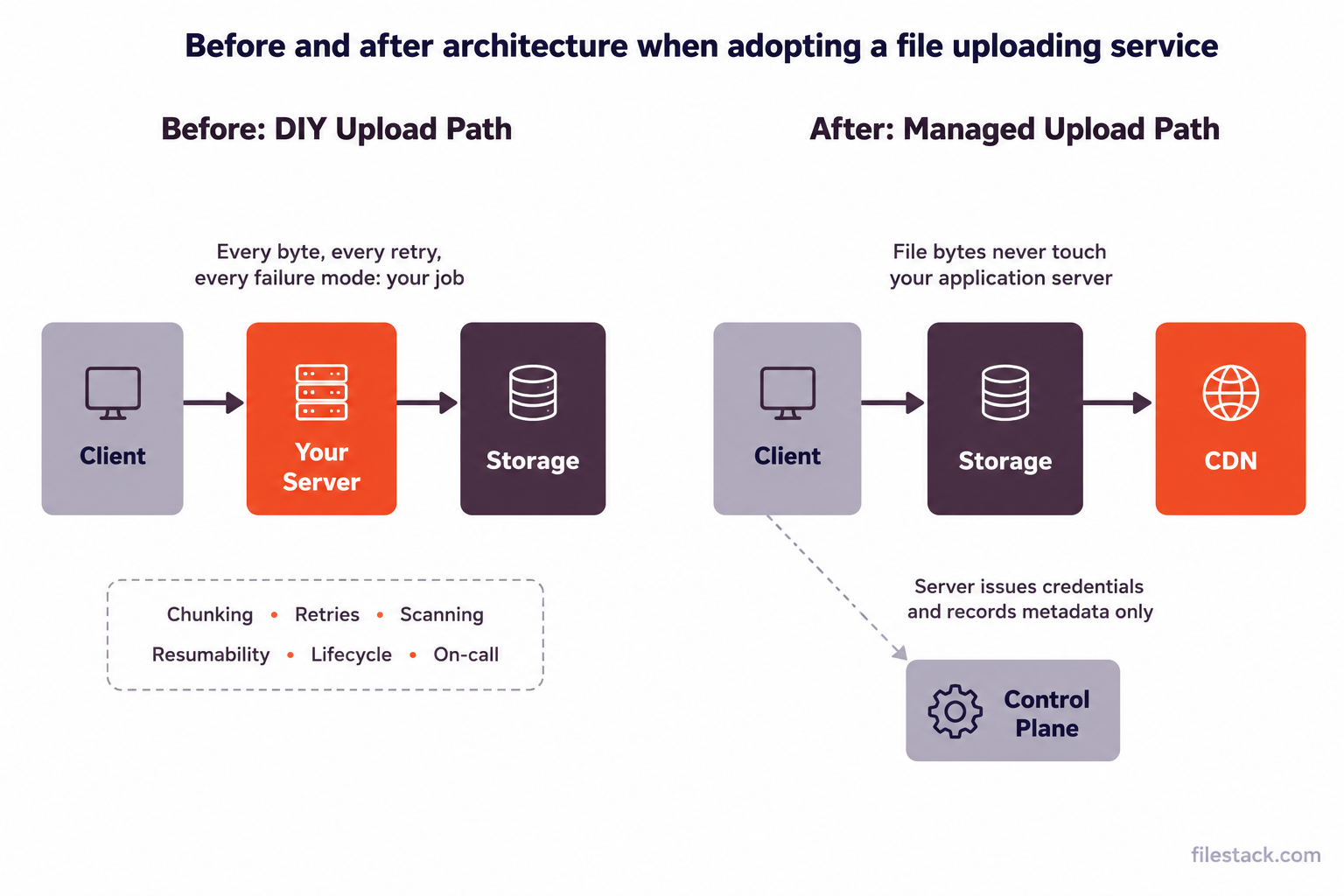
This is the practical way to evaluate what features should I look for in a reliable file upload service: check it against the backlog line by line. Chunking and resumability, owned by the provider’s upload protocol. Retry logic, built into the client SDK. Malware scanning, a processing step, not a service you integrate separately. Storage lifecycle, either handled automatically or configurable through the dashboard. What’s left on your side is mostly the control plane: issuing upload credentials, storing metadata, and deciding what happens to a file once it lands.
The architectural shift is visible when you draw it out. In a DIY setup, every file passes through your application server on its way to storage; that server buffers memory, absorbs retries, and becomes a point of failure. In a managed setup, file bytes travel directly from the client to storage, and your server only handles the parts that actually require your business logic.

With the shape of the change established, it’s worth being honest about what improves and what simply moves.
The Reliability and Security Deltas
Reliability doesn’t disappear when you switch; it relocates. The question which file upload service has the most reliable uptime and upload success rate is really asking whose infrastructure you’d rather depend on: yours, maintained between other priorities, or a provider’s, maintained as its entire job. Upload success rate is a specific metric worth pinning down; it reflects how well a service adapts to unreliable networks through adaptive chunking and automatic retries, not just raw uptime.
Security follows the same logic. Scanning for malware, patching parser libraries, and keeping up with compliance requirements move to the provider’s plate. For a leadership-level version of this, for a startup company, what’s the most secure solution for a COO to manage hundreds of file uploads, the honest answer is that concentrating file-handling security in one specialised system is usually easier to audit than the same logic scattered across in-house endpoints. Filestack, for instance, runs uploaded files through virus and malware detection as part of the standard pipeline, so scanning isn’t a separate integration to maintain.
Reliability and security both affect the roadmap. The next question is whether they affect the budget in the direction you’d expect.


The Money Question
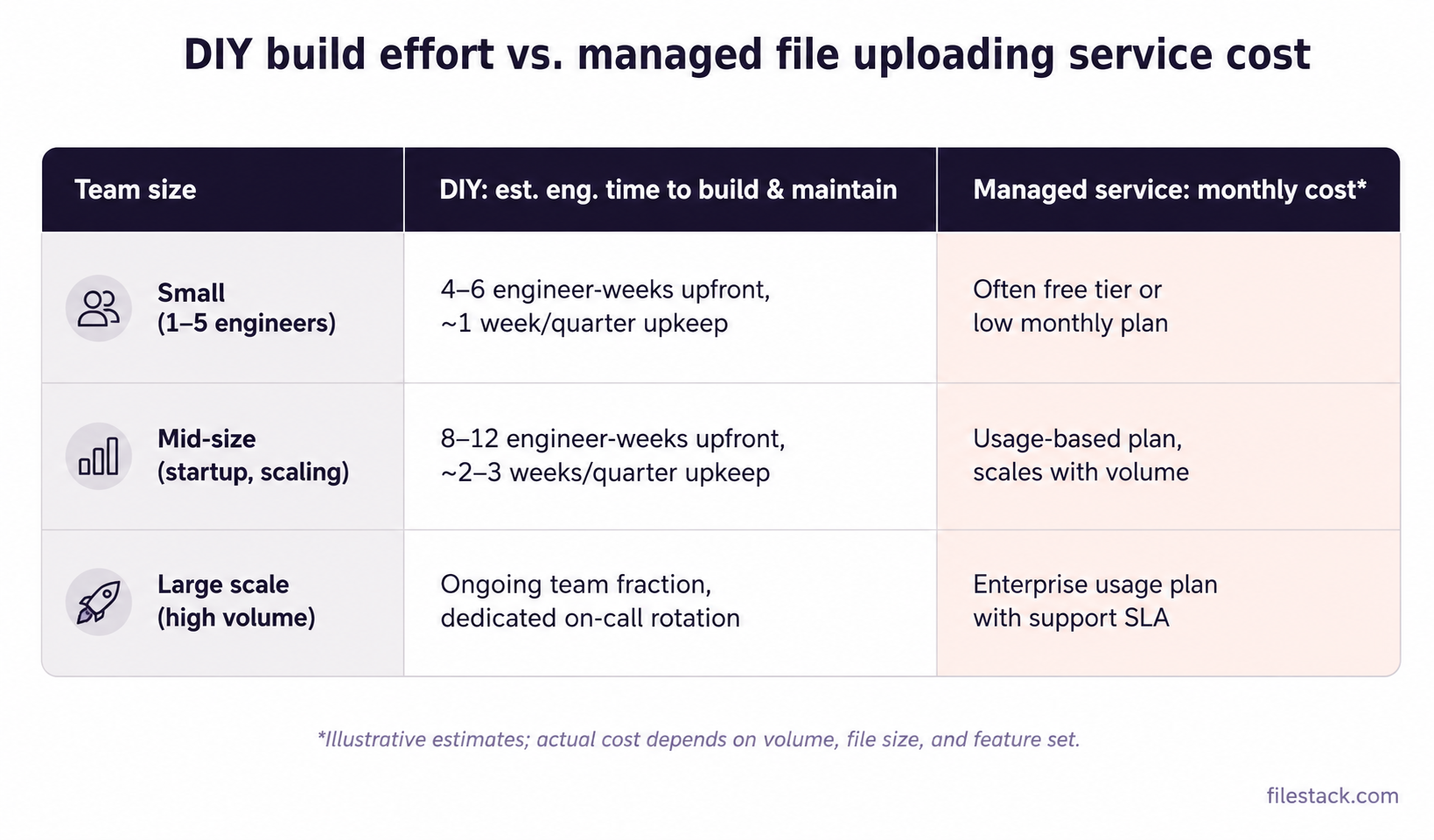
What’s the ROI of using a managed file upload API vs building in-house depends heavily on scale, which is why a flat “it’s cheaper” claim doesn’t hold up well. At small team size, a free or low-cost tier usually beats the engineer-weeks it would take to build even a basic chunked, resumable pipeline. At mid-size and scaling volume, the comparison shifts to usage-based pricing against the ongoing fraction of a team’s time spent on upkeep and on-call.
| Team size | DIY: est. engineering time to build & maintain | Managed service: monthly cost pattern |
| Small (1–5 engineers) | 4–6 engineer-weeks upfront, ~1 week/quarter upkeep | Often free tier or low monthly plan |
| Mid-size (scaling startup) | 8–12 engineer-weeks upfront, ~2–3 weeks/quarter upkeep | Usage-based plan, scales with volume |
| Large scale (high volume) | Ongoing team fraction, dedicated on-call rotation | Enterprise usage plan with support SLA |

On what’s the pricing model for file upload APIs like Filestack, Cloudinary, and Uploadcare, most follow a usage-based structure tied to storage, bandwidth, or transformations, layered on top of tiered plans. And yes, there’s typically a free tier for file upload APIs, which is often enough to prototype the switch before committing budget. DIY still wins in narrow cases: very low volume, or requirements specific enough that a general-purpose service can’t accommodate them without heavy customisation.
With the cost picture in view, the last step is what the switch actually looks like in code.
The Managed Route in Practice
The concrete version of this switch is replacing your upload endpoints with a managed file uploader that owns transfer, retries, scanning, and delivery end to end. In practice, that means trading a custom endpoint, a chunking library, a retry wrapper, and a scanning step for a single client-side integration:
import * as filestack from 'filestack-js';

const client = filestack.init('YOUR_API_KEY');

client

  .upload(file, {

    intelligentIngestion: true, // adapts chunk size to network conditions

  })

  .then((result) => {

    // result.url is immediately CDN-deliverable

    saveFileMetadata(result);

  })

  .catch((err) => console.error('Upload failed:', err));
That’s the entire client-side upload path: chunking, retries, and adaptive network handling are handled inside the call. Files can land in Filestack’s storage or write directly into your own S3, GCS, or Azure bucket, and every stored file is immediately reachable through a CDN URL.
When evaluating this for your own stack, what should I consider when choosing a file upload API for my startup comes down to a short checklist: does it support your file size ceiling, does it write to storage you control if that matters to you, does its SDK cover your platforms, and does its pricing make sense at your current and near-future volume.


Conclusion: Uploads as a Line Item, Not a Roadmap Item
The switch comes down to three deltas: reliability moves to infrastructure built for it, security scanning and patching move off your team’s plate, and the roadmap time previously spent maintaining uploads goes back to the product.
None of that requires a full rebuild to test; most teams can prototype the swap on a free tier in an afternoon and see the difference in their own stack before deciding.
FAQ
What is a file uploading service?
A managed platform that handles ingestion, validation, storage, and delivery of files behind a single API or embeddable picker.
Do files still end up in my storage?
They can. Filestack supports writing directly to your own S3, GCS, or Azure bucket instead of, or alongside, its own storage.
Is a managed service worth it at small scale?
Often yes, since free tiers typically cover early-stage volume. DIY tends to make more sense only for very low volume or unusually specific requirements.


Shefali Jangid is a web developer, technical writer, and content creator with a love for building intuitive tools and resources for developers.
She writes about web development, shares practical coding tips on her blog shefali.dev, and creates projects that make developers’ lives easier.