
Every application that accepts images from users faces the same underlying problem: getting those images in, keeping them safe, processing them into the right format, and delivering them quickly to every device that asks. Most teams underestimate the scope until they’re managing tens of thousands of images and realising that the initial solution, a simple upload endpoint and an S3 bucket, isn’t cutting it anymore.
An image upload service addresses this problem as a whole rather than in pieces. Instead of stitching together separate tools for upload handling, cloud storage, image processing, and CDN delivery, you work with a single platform that manages the complete journey from the moment a user selects a file to the moment an optimised image appears on their screen.
This guide covers what that journey looks like, where the common failure points are, and what to look for in a service designed to handle it at scale.
Key Takeaways
- An image upload service handles the full image lifecycle: ingestion, storage, transformation, optimisation, and delivery, through a single API-driven platform.
- Storing only the original image and generating variants on demand is more efficient than maintaining multiple pre-sized copies.
- Dynamic transformations (crop, resize, compress, convert) applied at request time eliminate manual export workflows and reduce storage overhead.
- CDN-based delivery dramatically reduces latency for global audiences by serving images from edge nodes close to each user.
- A production-ready image upload service needs security controls, developer-friendly SDKs, auto-optimisation, and the scalability to grow alongside your image library.
What Is an Image Upload Service?
An image upload service is the infrastructure layer that sits between your users and their images, handling everything that needs to happen between “file selected” and “image delivered.”
What is an image upload service?
An image upload service is a cloud-based platform that allows applications to upload, store, process, optimise, and deliver images through APIs and automated workflows, removing the need to build and maintain custom image infrastructure.
Core Functions of an Image Upload Service
The platform covers five distinct functions that would otherwise require separate systems:
- Image ingestion: Accepting files from users via web, mobile, desktop, or third-party integrations, with validation at the point of entry.
- Cloud storage: Preserving original image assets durably and retrievably, with metadata attached for later querying and management.
- Image transformations: Applying modifications such as cropping, resizing, watermarking, compression, and format conversion on demand or automatically.
- Optimisation: Reducing file size and selecting the most efficient format for each browser and device, without visible quality loss.
- Content delivery: Distributing optimised images through a globally distributed infrastructure so load times stay low regardless of where users are.
Why Businesses Use Image Upload Services
The practical argument is straightforward. Building each of these functions in-house requires expertise, infrastructure, and ongoing maintenance across multiple systems. A dedicated image upload service compresses that work into an integration. You connect the service, implement the SDK, and the pipeline is operational. Teams move faster, infrastructure costs are more predictable, and the service scales without engineering effort on your side.
The Complete Image Lifecycle
Understanding the full journey an image takes through a well-designed system helps clarify what each component is responsible for and where gaps in basic implementations tend to appear.
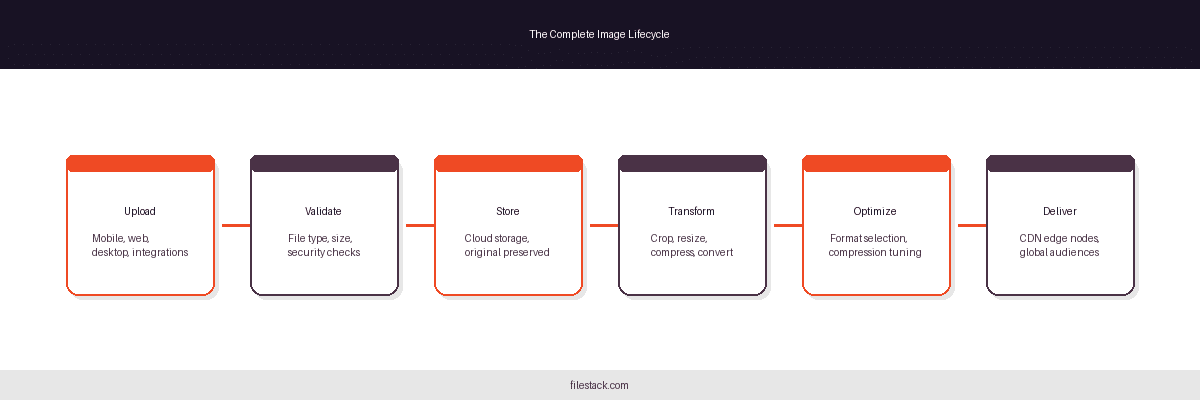
Upload
The upload phase begins when a user selects a file. That file might come from a smartphone camera roll, a web browser’s file picker, a desktop drag-and-drop zone, or a third-party integration with a cloud storage provider. A robust image upload service accepts all of these without requiring different code paths for each source.
At upload time, the service validates the incoming file, checking type, size, and basic structure, before accepting it. This is the right moment to catch malformed files, disallowed formats, and oversized payloads, before they consume storage or processing resources.
Storage
Once validated, the original image is stored intact. This matters more than it might seem. Transformations applied later are best derived from the original full-resolution source. If you store only a processed version, any future change to your transformation logic, a new target format, different compression settings, or a rebranded watermark requires reprocessing from scratch. Preserving originals keeps those options open.
Storage should come with metadata: dimensions, file type, upload timestamp, and any application-specific information that makes the image queryable and manageable as the library grows.
Transformation
Transformation is where the original image becomes the version each context requires. A single uploaded product photo might need a square thumbnail for a grid view, a wider crop for a banner, and a compressed WebP for a mobile feed. Dynamic transformation generates each of these at request time from the stored original, rather than requiring all three to be exported and stored separately.
Delivery
The final step is getting the right image to the right user quickly. Delivery performance is determined largely by network distance, how far the file has to travel from where it’s stored to where it’s displayed. CDN delivery addresses this by caching images at edge locations distributed globally, so every user receives the image from a node close to them.
Challenges of Managing User Images at Scale
The problems that emerge as image libraries grow are predictable, but they arrive faster than most teams expect.
Rapid Storage Growth
A platform with active users generates images continuously. Without deliberate storage management: deduplication, archiving of unused assets, cleanup of temporary uploads, storage costs compound quickly. The problem is compounded if the application generates and stores multiple variants per image; a library of 100,000 original images with ten variants each is a million files to manage.
Performance Bottlenecks
Large images served without optimisation slow pages down. Slow pages reduce engagement. The relationship between image load time and conversion rate is well-documented; it’s not a theoretical concern. As the image library scales, the performance overhead of unoptimised delivery scales with it.
Device and Browser Compatibility
Serving images correctly across smartphones, tablets, desktops, and multiple browser versions isn’t a single-format problem. The optimal image for a retina display is different from the optimal image for a budget Android phone. Different browsers support different modern formats. Handling this without a system that adapts automatically requires maintaining multiple image variants manually.
Infrastructure Complexity
Building the equivalent of a managed image upload service in-house means owning upload handling, storage configuration, a processing pipeline, CDN integration, and the security layer across all of them. The initial build is one cost; the ongoing maintenance as each component evolves is another. For most teams, this is infrastructure that doesn’t differentiate their product, and therefore infrastructure that’s expensive to own relative to its strategic value.
Image Upload Workflows Explained
Not all upload architectures are the same. The right approach depends on your application’s security requirements, performance targets, and backend complexity.
Direct-to-Cloud Uploads
In a direct-to-cloud workflow, files travel from the user’s device straight to cloud storage without passing through your application server. Your server is involved in generating a short-lived upload credential, but not in the data transfer itself. The result is faster uploads, no server bandwidth consumed by file data, and a simpler path to scale. This is the right default for most consumer-facing applications.
Server-Side Upload Processing
Some use cases require files to touch your backend before being stored, content moderation pipelines, compliance workflows, or applications where server-side validation logic is too complex to enforce at the edge. In these cases, the file routes through your application server, which validates and processes it before forwarding it to storage. The trade-off is increased server load and higher latency; the benefit is full control over what enters your system.
Multi-Source Upload Support
Modern users don’t keep all their files in one place. A user might want to upload a photo from their phone, a document from Google Drive, or a video from Dropbox. Supporting multiple source types: local device, cloud storage providers, social media, enterprise systems, through a unified upload interface improves the user experience significantly and is worth factoring into infrastructure selection.
Benefits of Automated Upload Workflows
Regardless of which architecture you choose, automation reduces friction at every stage. Validation runs without manual review. Storage happens without developer intervention. Transformations apply according to rules defined once. The result is a pipeline that handles volume without proportional overhead.
Storing Images Efficiently
Storage strategy has downstream consequences for cost, performance, and operational flexibility.
Why Original Files Matter
The original file is the source of truth. All derived versions: resized, cropped, converted, are computed from it. As long as you have the original, you can regenerate any variant. If you delete originals to save space and later need a different output format or different dimensions, you’re asking users to re-upload files they already submitted. That’s a poor outcome worth avoiding with a clear retention policy.
Centralised Cloud Storage
Centralised cloud storage offers durability, availability, and scalability that on-premise or ad hoc storage can’t match at reasonable cost. Files are replicated across multiple locations by default, accessible via API from any part of your infrastructure, and billed based on actual usage rather than provisioned capacity.
Metadata Management
Metadata makes large image libraries manageable. Storing dimensions, file type, upload date, uploader, and application-specific tags against each image means you can query, filter, and audit your library without opening individual files. At scale, this operational visibility is not optional; it’s the difference between a manageable library and an opaque storage bucket.
Storage Optimisation Strategies
Deduplication- detecting that two uploads are identical files and storing only one copy- reduces storage footprint at scale. Archiving assets that haven’t been accessed in a defined period moves them to cheaper storage tiers. Automatic cleanup of temporary and failed upload artifacts prevents gradual accumulation. These strategies are most effective when built into the service rather than applied retroactively.
Transforming Images on Demand
Dynamic transformation is one of the primary arguments for a managed image upload service over a simpler storage-only approach.
Why Dynamic Image Transformations Matter
Storing a pre-generated variant for every possible display context is impractical. Display contexts multiply: new device sizes, new layout components, new output formats, new thumbnail dimensions. An image upload service that applies transformations at request time lets you serve any variant from the original, on demand, without pre-generating or storing each one.
What image transformations can an image upload service perform?
Most image upload services support cropping, resizing, compression, format conversion, optimisation, and watermarking to improve image quality, reduce file size, and ensure each image is appropriate for its delivery context.
Common Image Transformations
Cropping maintains consistent layouts across image galleries, product grids, and social feeds where visual rhythm depends on uniform aspect ratios. Smart cropping that detects faces or focal points preserves subject matter across different dimensions.
Resizing ensures each device receives an image sized appropriately for its display rather than downloading a resolution it can’t render. This is the single highest-impact transformation for mobile performance.
Compression reduces file size by adjusting quality settings and applying encoding optimisations, typically with minimal perceptible quality difference at moderate compression levels.
Format conversion moves images from older formats like JPEG and PNG into modern alternatives like WebP and AVIF, which offer significantly better compression at comparable visual quality. The right service handles this automatically based on what each browser supports.
Watermarking protects branded or proprietary content by overlaying text or logo assets programmatically, at any scale, without manual editing.

Optimising Images for Performance
Transformation and optimisation are related but distinct. Transformation changes the image’s dimensions or format; optimisation reduces its size within those constraints.
The Relationship Between Image Size and Speed
Oversized images are one of the most common causes of slow page loads. An image that’s 4× larger than its display size transfers 4× the data for no visual benefit. At scale, this translates directly into higher bounce rates, lower engagement, and measurable impact on conversion, particularly on mobile, where connections are slower and users are less tolerant of delays.
Automatic Image Optimisation
Effective optimisation combines multiple techniques: compression algorithms tuned to the content type, quality settings calibrated to the acceptable threshold for the use case, and format selection based on browser capabilities. When this happens automatically, when the service makes these decisions per request without developer involvement, optimisation becomes a property of the infrastructure rather than a task on the to-do list.
Responsive Image Delivery
A desktop user on a retina display and a mobile user on LTE need different images of the same content. Responsive delivery serves each device an image sized and compressed for its actual display context. The source image is the same; the delivered version adapts.
SEO Benefits of Image Optimisation
Page speed is a confirmed ranking factor. Images are typically the largest assets on a page, and oversized images are a leading contributor to poor Core Web Vitals scores, particularly Largest Contentful Paint (LCP). An image upload service that optimises automatically contributes to better search visibility without requiring manual intervention per image.
Delivering Images Globally
Getting images to users quickly is the last mile of the lifecycle, and it’s where distance becomes the constraint.
Why Image Delivery Matters
A server located in a single region adds meaningful latency for users far from that region. The physics of network distance doesn’t compress; a request from Sydney to a server in Virginia travels tens of thousands of kilometres of network infrastructure. For images, which can be cached, this problem is solvable with CDN infrastructure.
Content Delivery Networks (CDNs)
CDNs store copies of images at edge nodes distributed globally. When a user requests an image, the CDN serves it from the nearest edge node rather than the origin server. First-request latency is higher because the edge node hasn’t cached the image yet; subsequent requests are dramatically faster. For images that are accessed repeatedly- product photos, profile pictures, editorial images, CDN caching reduces origin load and cuts delivery time substantially.
Adaptive Image Delivery
Serving the right image for each context isn’t just about dimensions. Browser support for modern formats like WebP and AVIF isn’t universal across all deployed versions. Network conditions vary. Adaptive delivery reads the request context: device type, browser capabilities, network speed where detectable, and serves the most efficient variant available for that specific user.
Scaling for Global Audiences
As your user base grows internationally, delivery infrastructure that works well for a domestic audience starts to show its limits. A managed image delivery platform with globally distributed infrastructure handles international scale as part of the service, rather than requiring you to provision regional infrastructure yourself.
Security and Compliance Considerations
Security applied to the upload layer protects the entire downstream pipeline.
Secure Upload Workflows
Authenticated upload workflows ensure that only authorised users can submit files to your system. Short-lived upload tokens, credentials generated server-side and valid for a single upload session, prevent unauthorised submissions without requiring permanent credentials to be distributed to clients.
File Validation
Validation at upload time should cover file type verification (not just extension matching, but actual format inspection), size limits appropriate to your use case, and, for sensitive applications, content scanning. Catching invalid or malicious files at the point of entry is significantly cheaper than discovering them after they’re stored.
Access Management
Not all images should be equally accessible. Profile photos might be public; medical records require strict access controls. Role-based permissions and image access policies let you enforce appropriate visibility at the asset level rather than the bucket level.
Protecting User-Generated Content
User-generated content requires particular care because you’re handling assets that belong to users, not your organisation. Secure storage with clear retention policies, HTTPS for all transfer traffic, and access controls that prevent content from being served to unauthorised parties are baseline requirements for any application that accepts user images.
Key Features to Look for in an Image Upload Service
Evaluating a service against a consistent set of criteria helps avoid discovering gaps after integration.
A complete image upload service should provide: easy upload integration through drop-in SDKs and documented APIs; cloud storage that preserves originals with metadata; real-time transformation support for crop, resize, compress, and format conversion; automatic optimization based on device and browser context; global CDN delivery with edge caching; security controls including signed upload tokens, file validation, and access policies; developer-friendly documentation across multiple languages; and infrastructure that scales with your image library without requiring capacity planning on your end.
Any platform missing multiple items from this list will require supplementary tools, which reintroduces the integration complexity the service is supposed to eliminate.

How Filestack Simplifies Image Upload, Transformation, and Delivery
Filestack’s deliver images platform covers the complete lifecycle described in this guide: ingestion, storage, transformation, optimisation, and global delivery, through a unified API.
Unified Image Management Workflow
Rather than coordinating separate upload handling, storage, processing, and CDN vendors, Filestack provides a single integration point. Files enter the platform, transformations are applied via URL parameters or SDK calls, and optimised images are delivered from globally distributed infrastructure. The workflow is consistent whether you’re handling ten images or ten million.
Real-Time Processing Capabilities
Cropping, resizing, compression, format conversion, and optimisation are all available at request time. Transformations are specified once as rules; the platform applies them dynamically to every request without requiring pre-generated variants or manual export workflows.
Fast Global Image Delivery
Filestack delivers images through a globally distributed infrastructure, reducing latency for users regardless of geography. CDN caching means frequently accessed images are served from edge nodes close to users rather than from the origin on every request.
Developer Benefits
SDKs are available across major platforms and languages. The API is consistent, the documentation is thorough, and implementation time is significantly lower than building equivalent functionality independently. The operational burden: infrastructure maintenance, capacity planning, CDN configuration, stays with Filestack rather than your team.
That said, Filestack is one option among several in this category. The right choice depends on your specific workflow requirements, file volumes, and existing infrastructure. The criteria above provide a framework for comparing alternatives on equal terms.

Conclusion
Image management at scale involves more moving parts than it appears to at the start. Upload handling, validation, storage, transformation, optimisation, and delivery each have their own complexity, and that complexity compounds when they’re built and maintained separately.
An image upload service that covers the full lifecycle simplifies this significantly. The integration work happens once; from that point on, the platform handles the pipeline. Teams ship faster, infrastructure costs are more predictable, and users receive optimised images regardless of their device or location.
If you’re evaluating options for managing user images at scale, Filestack’s deliver images platform is a practical starting point for teams that want upload, storage, transformation, and global delivery handled through a single integration.
Frequently Asked Questions
What is an image upload service?
An image upload service is a cloud platform that handles the full image lifecycle: upload, storage, transformation, optimisation, and delivery, through APIs and SDKs, removing the need for custom image infrastructure.
How does an image upload service work?
Users submit images via a client SDK or API. The service validates the file, stores the original, applies transformations at request time, and delivers optimised versions through CDN infrastructure to end users.
Why should businesses use an image upload service instead of building their own system?
Building equivalent functionality in-house requires expertise and ongoing maintenance across upload handling, storage, processing, and CDN layers. A managed service compresses this to a single integration with predictable costs and built-in scalability.
Can an image upload service optimise images automatically?
Yes. Most services apply compression, format selection, and quality adjustments automatically based on the requesting device and browser, without developer intervention per image.
What image transformations are typically supported?
Standard transformations include cropping (including smart and face-aware), resizing, compression, format conversion (JPEG, PNG, WebP, AVIF), watermarking, and rotation. These can typically be chained in a single request.
How does CDN-based image delivery improve performance?
CDNs cache images at edge nodes located close to users globally. Instead of every request travelling to the origin server, most requests are served from a nearby edge node, dramatically reducing latency.
Is direct-to-cloud image uploading better than server-based uploads?
For most applications, yes, direct uploads reduce server load and improve upload speed. Server-side processing is appropriate when backend validation logic or compliance requirements make it necessary.
How can image upload services reduce storage costs?
By storing only original images and generating variants dynamically, services eliminate the need to maintain multiple stored copies per image. Deduplication and archiving policies reduce the footprint further.
What security features should an image upload service include?
Signed upload tokens with short expiry, server- and client-side file validation, HTTPS for all transfers, role-based access controls, and secure storage with appropriate retention policies.
How do image upload services support responsive image delivery?
By serving different image sizes and formats based on the requesting device’s display characteristics and browser capabilities, without requiring developers to maintain separate image sets for each breakpoint.

Shefali Jangid is a web developer, technical writer, and content creator with a love for building intuitive tools and resources for developers.
She writes about web development, shares practical coding tips on her blog shefali.dev, and creates projects that make developers’ lives easier.
Read More →