



It’s 2 a.m. A user uploads a 2GB video. Node’s heap spikes in seconds, the container gets OOM-killed, and every other request in flight dies with it. One file just took down the whole API.
If uploading large files keeps taking your API down, the culprit is almost always the same: your server is buffering whole files in memory before it does anything else with them.
Uploading large files without exhausting server memory means streaming or chunking file data instead of buffering entire files in RAM. The proven approach combines client-side chunking, multipart/resumable uploads, and direct-to-storage transfer, patterns that services like Filestack provide out of the box, with reliable uploads for files up to 5GB even on unstable networks.
This article walks through why large uploads eat RAM in the first place, then works through three escalating fixes: streaming to disk, DIY chunked/multipart uploads, and going direct-to-storage. By the end, you’ll have a clear framework for deciding how much of this to build yourself and how much to hand off.
Key Takeaways
- Buffering entire files in server memory is the root cause behind most upload-related crashes and OOM kills.
- Streaming request bodies to disk keeps memory flat, but doesn’t fix flaky networks or dropped connections.
- Chunked, multipart, and resumable uploads solve reliability, at the cost of a fair amount of bookkeeping code.
- The healthiest amount of file traffic through your app server is zero; direct-to-storage uploads take your server out of the data path entirely.
- Managed upload infrastructure like Filestack’s Intelligent Ingestion applies these patterns automatically, so you don’t maintain the retry and chunking logic yourself.
Before fixing anything, it helps to see exactly where the memory goes, and it’s rarely where people expect.
Why Large File Uploads Eat Your RAM (The Failure Modes)
The default trap is subtle: a lot of popular upload middleware reads the entire request body into memory before your code ever touches it. Express’s multer, for example, defaults to memoryStorage, which holds the full file as a buffer in RAM. That’s fine for a 200KB avatar. It’s a problem the moment users start uploading video, RAW images, or ZIP archives.
The math turns ugly fast. Twenty concurrent 500MB uploads means roughly 10GB of RAM committed to files that haven’t even finished arriving, before your application has done a single byte of real work with them.
Buffering isn’t the only failure mode, either:
- Request timeouts on slow or mobile connections, where a multi-minute upload outlives the server’s patience.
- Reverse-proxy body-size limits, like nginx’s
client_max_body_size, silently rejecting large payloads. - Serverless payload caps, which cut off uploads well below what users expect to send.
- No resume capability, a connection drop at 99% means starting a multi-gigabyte upload completely over.
One quick question worth asking yourself here: what are the best practices for handling file uploads with JavaScript? The short answer is the rest of this article: stop buffering, then build in resilience.
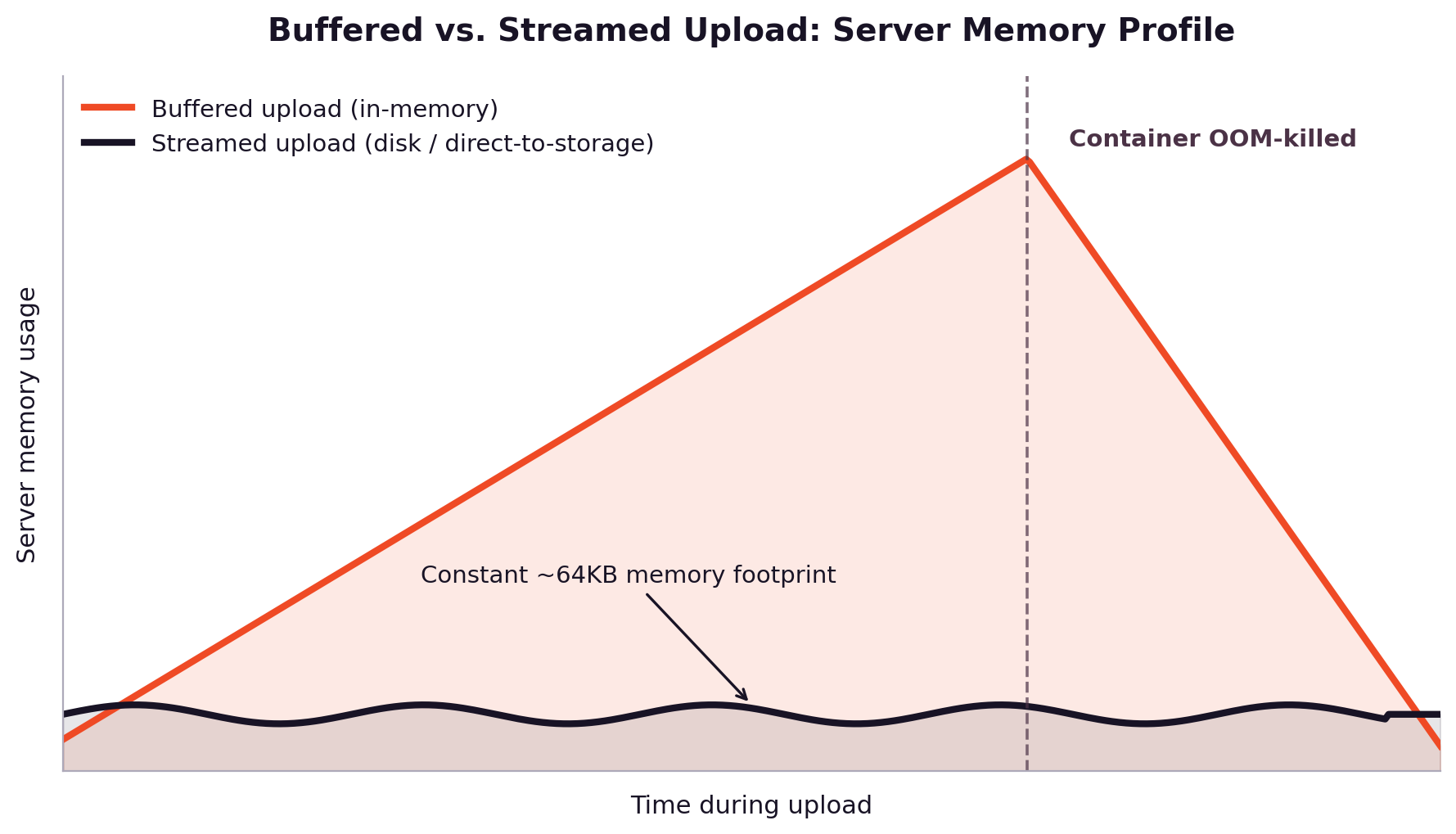

The first fix costs almost nothing to implement and immediately flattens your memory graph.
Fix #1: Stream, Don’t Buffer
Instead of reading the whole file into RAM, stream the incoming request body straight to disk or object storage as it arrives. Node’s streams, paired with a library like busboy, let you process a file in small chunks, keeping memory usage roughly constant regardless of file size.
const express = require("express");

const Busboy = require("busboy");

const fs = require("fs");

const path = require("path");

const app = express();

app.post("/upload", (req, res) => {

const busboy = Busboy({ headers: req.headers });

busboy.on("file", (fieldname, file, info) => {

const savePath = path.join("/tmp/uploads", info.filename);

const writeStream = fs.createWriteStream(savePath);

file.pipe(writeStream); // constant ~64KB memory footprint

writeStream.on("close", () => {

console.log(`${info.filename} saved successfully`);

});

});

busboy.on("finish", () => res.status(200).send("Upload complete"));

req.pipe(busboy);

});
That single change, piping instead of buffering, is why the streamed line in the chart above stays nearly flat no matter how big the file gets. It’s worth pausing on backpressure here too: file.pipe(writeStream) automatically slows the incoming stream if the disk write falls behind, so memory doesn’t build up even under load.
Streaming solves the memory problem, but it’s honest to say what it doesn’t solve: flaky networks. One dropped packet at 99% still means restarting a 4GB upload from zero. That’s a reliability problem, not a memory problem, and it needs a different tool.
If you’re wiring this into a broader REST API or asking how do I implement a file upload feature using REST API or how do I integrate a file upload API with Node.js, streaming is the foundation every answer to those questions builds on.


Fix #2: Chunked, Multipart & Resumable Uploads
Streaming fixed memory. This section fixes what happens when the network itself misbehaves.
Three related terms get used loosely, so it’s worth defining them precisely:
- Chunking: Splitting a file into smaller pieces (say, 5–10MB each) on the client before sending it.
- Multipart: Uploading those pieces in parallel and reassembling them on the server or storage layer.
- Resumable: Tracking which chunks have successfully landed, so a retry only needs to resend what’s missing.
Together, they turn one fragile multi-gigabyte transfer into many small, independently retryable ones. This is exactly how Amazon S3’s multipart upload API works, and it’s the same idea behind the open tus resumable upload protocol: split, send in parallel, verify, and only retry the pieces that failed.
A simplified client-side chunking loop looks like this:
async function uploadInChunks(file, chunkSize = 5 * 1024 * 1024) {

const totalChunks = Math.ceil(file.size / chunkSize);

for (let i = 0; i < totalChunks; i++) {

const start = i * chunkSize;

const end = Math.min(start + chunkSize, file.size);

const chunk = file.slice(start, end);

await fetch(`/upload/chunk?index=${i}&total=${totalChunks}`, {

method: "POST",

body: chunk,

});

// production code adds retry-with-backoff around this call

}

}
The workflow in production usually runs: initiate an upload session → send chunks in parallel with exponential-backoff retries → verify completeness with checksums or ETags → mark the upload complete.
This answers how does multipart upload work in web applications and what’s the best way to handle multi-part or resumable uploads for large files, but it also reveals a hidden cost ledger that’s easy to underestimate: tracking chunk state, cleaning up orphaned chunks from abandoned uploads, verifying integrity, tuning concurrency, and adjusting chunk size for different network conditions. None of that is hard individually. All of it together is a small subsystem you now own and maintain.
Once chunking and retries are handled, there’s one more question worth asking: does the file need to touch your server at all?
Fix #3: Go Direct-to-Storage (Bypass Your Server Entirely)
The healthiest amount of file traffic flowing through your API server is zero. Presigned URLs make this possible; your server’s job shrinks to issuing short-lived upload credentials and recording metadata, while the actual file bytes travel directly from the client to storage.
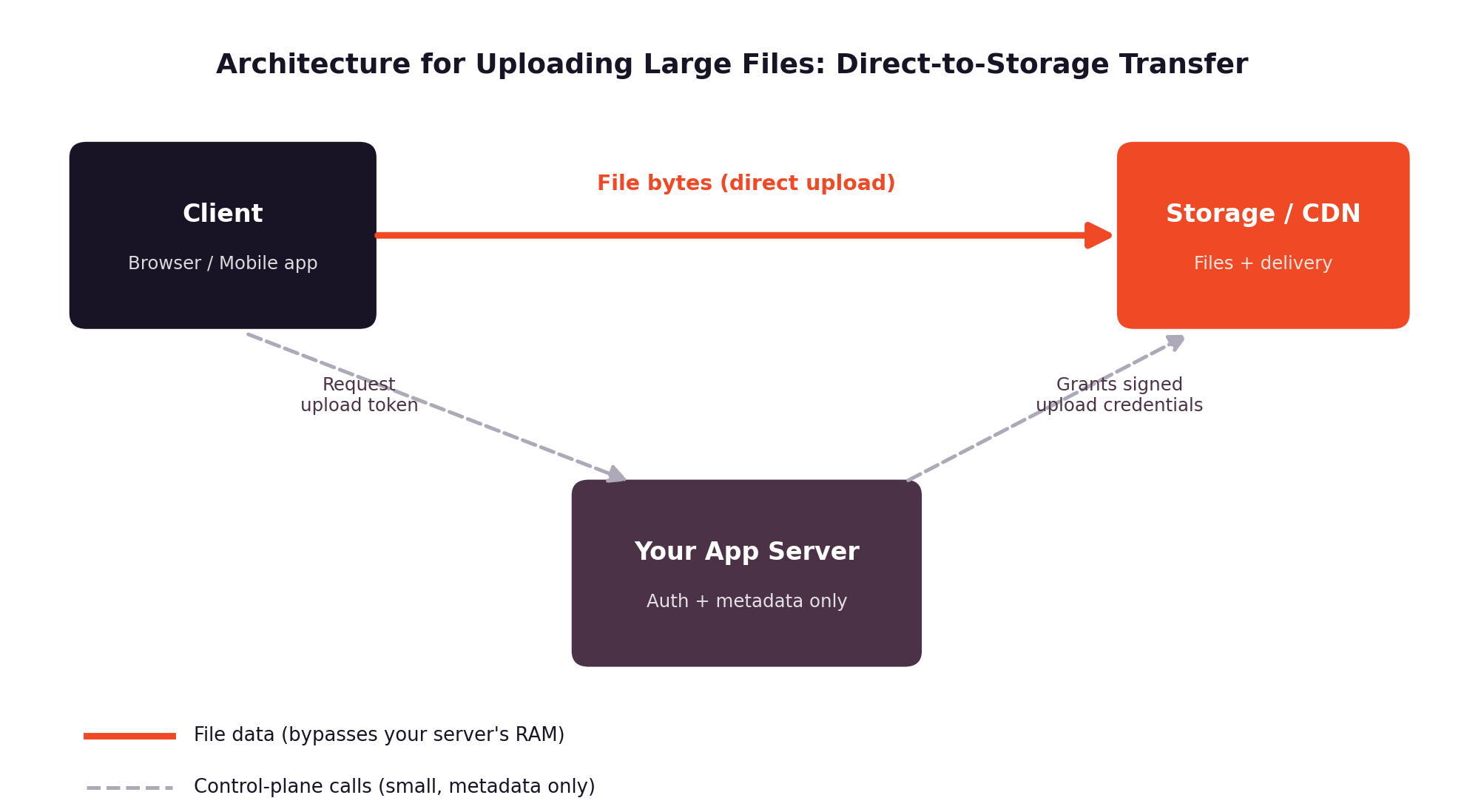

This directly answers how do I set up a file upload API that works with my own S3 bucket: your app server issues a signed credential, the client uploads straight to the bucket, and your server never buffers a single byte of the file itself. Filestack supports this pattern too; it can write uploads directly into your own S3 bucket while still handling chunking, retries, and CDN delivery on top.
The architectural shift matters more than any single line of code in the earlier sections: once file bytes bypass your server, memory pressure from uploads stops being your server’s problem at all.
The Managed Route: Production-Grade Uploads in an Afternoon
At this point, most teams find themselves asking the same question.
What’s the best way to handle file uploads without building your own infrastructure? By now you’ve seen what a genuinely robust upload pipeline requires: streaming instead of buffering, chunk bookkeeping, parallel retries with backoff, integrity checks, orphaned-chunk cleanup, and ideally a direct-to-storage path. That’s a real subsystem, and someone has to maintain it as traffic grows and networks misbehave in new ways.
This is where a production-grade file uploader like Filestack fits in, not as a replacement for understanding the problem, but as a maintained implementation of the exact pattern just described. Instead of writing and operating your own chunking, retry, and storage-lifecycle code, you can drop in a file uploader that handles multipart splitting, adaptive chunk sizing, and automatic retries for you.
The client-side integration is intentionally small:
import * as filestack from "filestack-js";

const client = filestack.init("YOUR_API_KEY");

client

.upload(file, { intelligentChunkSize: true })

.then((result) => console.log("Uploaded:", result.url))

.catch((error) => console.error("Upload failed:", error));
A few specifics worth knowing if you’re evaluating options: Filestack supports files up to 5GB through its API and SDKs, and its Intelligent Ingestion feature adjusts chunk size dynamically to real-time network conditions, retrying failed chunks automatically, which is particularly useful on unstable mobile connections. Multipart chunk uploads in parallel for better throughput on large files, and SDKs cover JavaScript, React, Angular, Node.js, Python, iOS, and Android, so the same upload behaviour carries across web and mobile. Once a file lands, it’s addressable via a CDN URL and can be transformed, resized, converted, OCR’d, and virus-scanned without a re-upload.
That directly answers what API supports uploading files up to 5GB reliably on unstable networks, and for teams asking I’m a developer in the startup space; what’s the easiest way to manage hundreds of file uploads, the same multi-file and cloud-source picker support scales from one upload to a few hundred without additional plumbing.
Choosing Your Approach (Decision Framework)
Not every project needs the full pipeline; here’s a quick way to figure out where you sit:
| File size | Network reliability | Team bandwidth | Recommended approach |
| Small (under ~50MB) | Reliable | Any | Streaming to disk/storage is usually enough |
| Medium–large | Mixed or mobile-heavy | Has time to build/maintain | DIY chunked + resumable uploads |
| Large (100MB–5GB+) | Unreliable networks | Limited bandwidth to maintain infra | Managed uploader (e.g., Filestack) |
Reliability deserves its own callout, since it’s often the deciding factor: which file upload service has the most reliable uptime and upload success rate? “Upload success rate” really measures how well a service recovers from partial failures, dropped connections, timeouts, and network switches, rather than how fast it moves bytes when everything is going well. Retry logic and adaptive chunking are what move that number, not raw throughput alone.
A couple of edge cases are worth a sentence each. For video pipelines, the question is usually less about the upload and more about what happens after; transcoding and delivery matter as much as getting the bytes in the door. For bulk ingestion, the platforms worth comparing are the ones optimised for parallel, high-volume transfer rather than single-file speed.


Conclusion: Stop Renting Out Your RAM to Uploads
The pattern holds regardless of stack or scale: never buffer a full file in memory, chunk what’s big, and take your server out of the data path wherever you can. Whether you build that pipeline yourself or reach for a managed file uploader like Filestack depends on your file sizes, your users’ network conditions, and how much of that maintenance your team wants to own long-term.
If you want to see the direct-to-storage, adaptive-chunking approach in practice, Filestack’s free tier is a reasonable place to try it against your own upload flow.
FAQ
How large a file can I upload with Filestack?
Up to 5GB per file via Filestack’s API and SDKs.
How does multipart upload work?
A file is split into smaller chunks on the client; those chunks upload in parallel, and the server or storage layer reassembles them once all pieces arrive and pass integrity checks.
Do uploaded files pass through my server?
No, with a direct-to-storage setup, file bytes travel from the client straight to storage, and your server only handles metadata and short-lived upload credentials.
Can I keep files in my own S3 bucket?
Yes. Filestack can write directly into your own S3 bucket while still providing chunking, retries, and CDN delivery on top.


Shefali Jangid is a web developer, technical writer, and content creator with a love for building intuitive tools and resources for developers.
She writes about web development, shares practical coding tips on her blog shefali.dev, and creates projects that make developers’ lives easier.